
AI automation services that take the busywork off your team
Our AI automation services take repetitive reading, data entry, follow-up and reporting off your team’s desk. We build around your existing systems and measure against a baseline agreed upfront, so you see the hours returned.
We reply within 4 business hours.
What are AI automation services?
AI automation services use language models, classifiers and workflow orchestration to complete tasks that previously required a person. Typical examples include reading documents, extracting data, answering routine inquiries, routing work and generating reports. Unlike traditional rule-based automation, AI handles unstructured input, email, PDFs, free text, that rigid scripts cannot process.
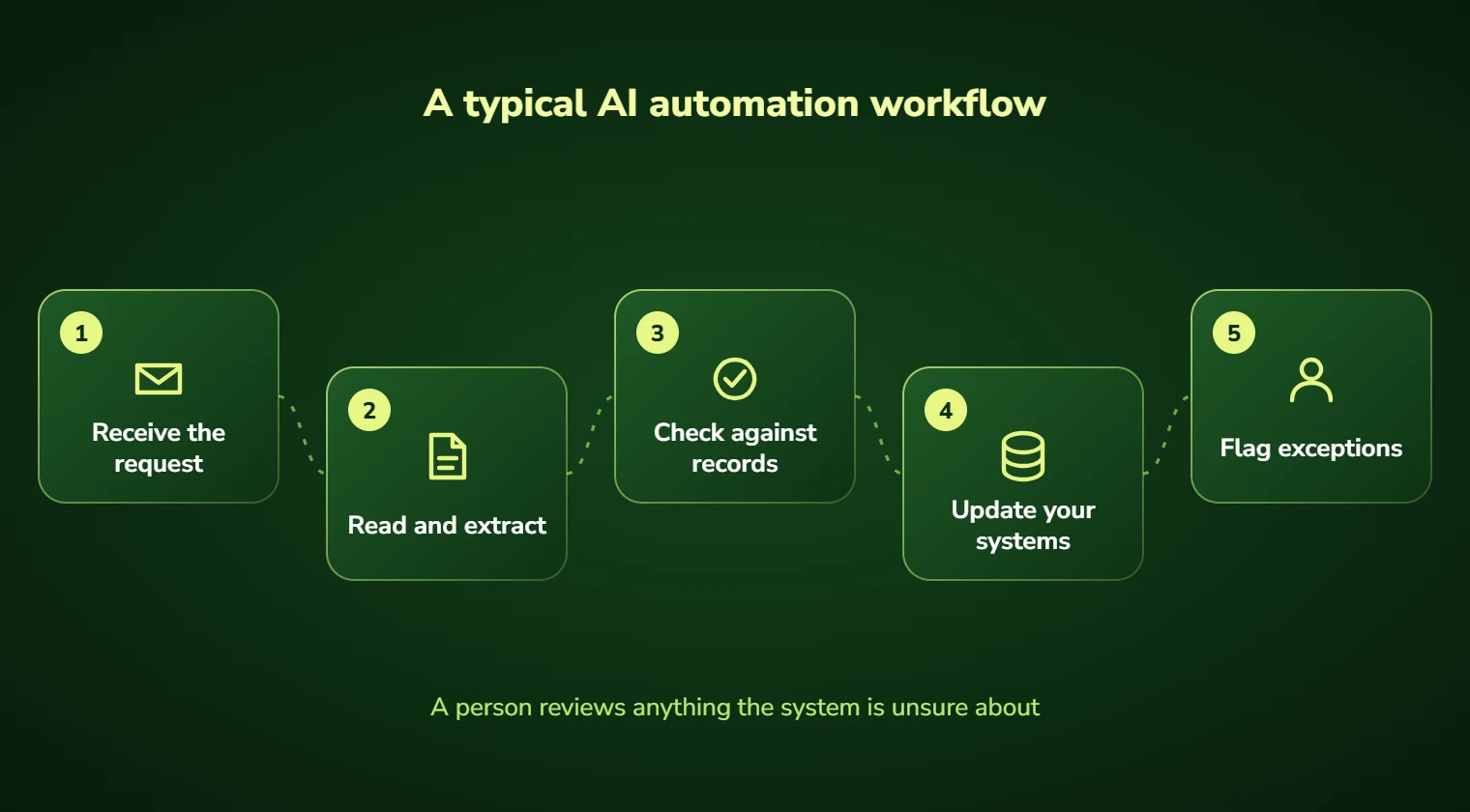
Your team is expensive and half their week is data entry
The costly part of most businesses is not the skilled work. It is the hours wrapped around it: reading emails to find one number and copying it into two systems. Then come chasing the person who did not reply and formatting the same report every Friday.
Traditional automation could never touch this, because the input is messy. Rules break on an invoice with a different layout. Macros fail when someone writes the date differently. So the work stayed manual by default.
Automation that copes with messy, real-world input
Language models changed what is automatable. A system can now read an invoice it has never seen and understand a customer email written badly at midnight. It can also pull the right fields out of a contract without a template.
We build those systems around your actual process, with confidence thresholds so uncertain cases go to a person rather than being guessed at. The automation handles the ninety percent that is routine; your team handles the ten percent that genuinely needs them.
What our AI automation services include
We look for workflows with three properties: they run often, they follow a describable pattern, and a mistake is either recoverable or catchable by review. Processes with all three are excellent candidates. Processes missing one are usually where automation projects go wrong.
The measurement comes first. Before building anything, we count how often a workflow runs and how long each instance takes. We also work out the loaded hourly cost of the person doing it. That produces an annual figure, and the build only proceeds if the figure justifies it.
Everything we build is designed to fail visibly rather than silently. Low-confidence outputs are flagged, not guessed. Every automated action is logged. If the system is wrong, you find out from the dashboard rather than from a customer.
As an AI automation company, we deliver custom AI automation solutions for back-office work. That means AI business automation and AI-powered process automation for documents, emails and data entry that still follow your own rules.
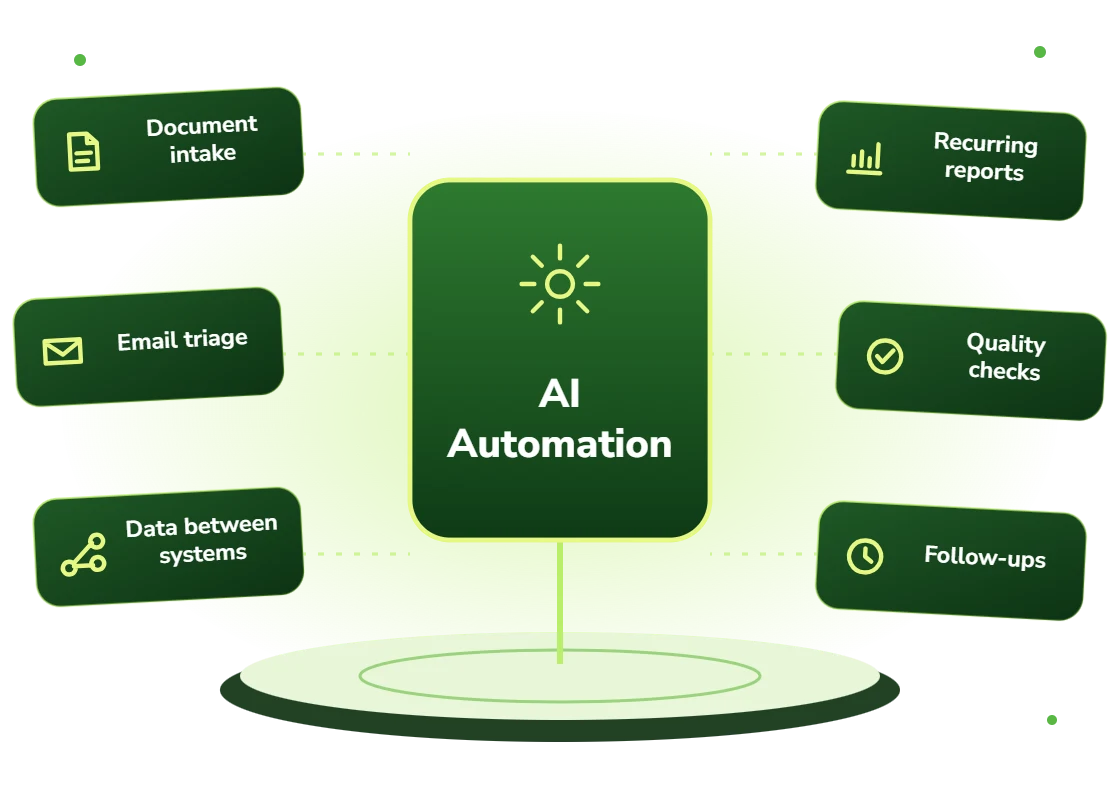
- Document intake: invoices, forms, contracts, statements, claims, applications
- Email and inquiry triage: classification, routing, drafting and escalation
- Data movement between systems that have no working integration
- Recurring report generation and distribution
- Quality checks: comparing documents against records to catch mismatches
- Follow-up and chasing sequences that currently rely on someone remembering
Which workflows are worth automating with AI?
The clearest wins are in businesses where administrative headcount has grown in step with revenue. If serving twice as many customers requires twice as many back-office staff, there is almost certainly a process worth automating.
It also suits organizations that cannot hire. Consider tight local labor markets, roles that turn over constantly, and seasonal surges that do not justify permanent staff. In each case, automation is the practical option rather than the ambitious one.
Business automation with AI suits teams that need to automate repetitive business tasks without breaking on messy input. Intelligent workflow automation handles the variation that rigid rules cannot, and sends the genuine exceptions to a person.
- Teams processing more than 100 documents or forms a week by hand
- Companies where skilled staff spend a third of their time on administration
- Businesses with seasonal peaks that currently require temporary staff
- Organizations running two systems that require manual double entry
- Support teams whose queue resets into a backlog every morning
- Firms in tight labor markets where administrative roles stay unfilled
What AI automation can do for your team
Hours back, counted
Clients average 31 staff hours returned per week within three months. We report the number monthly rather than asking you to assume it.
Capacity without headcount
Handle more volume without adding administrative staff, which is usually the constraint on growing profitably rather than demand.
Consistent output
The system applies the same rules at 4pm Friday as at 9am Monday. Error rates stop correlating with how busy the week was.
Round-the-clock processing
Work arriving overnight is processed overnight, so the queue your team opens in the morning is already triaged.
Better staff retention
Nobody joined to do data entry. Removing it is one of the few efficiency projects staff actively support.
A full audit trail
Every automated decision is logged with its inputs, confidence and outcome, which matters when someone asks why later.
Back-office problems AI automation solves
Backlogs that never clear
Volume arriving faster than a fixed team can process it. Automation absorbs the routine share so the backlog stops compounding.
Double and triple entry
The same information typed into three systems. We connect them, including systems with no real API, and remove the re-keying.
Slow customer response
Inquiries sitting for hours because someone must read and route them. Automated triage cuts first response to minutes.
Errors found downstream
Mistakes surfacing weeks later in reconciliation. Automated validation catches mismatches at the point of entry.
Knowledge locked in one person
A process only one employee understands. Building it into a system documents it as a side effect.
Seasonal staffing that never works
Temporary staff who need retraining every peak. Automation carries the surge without the onboarding cost.
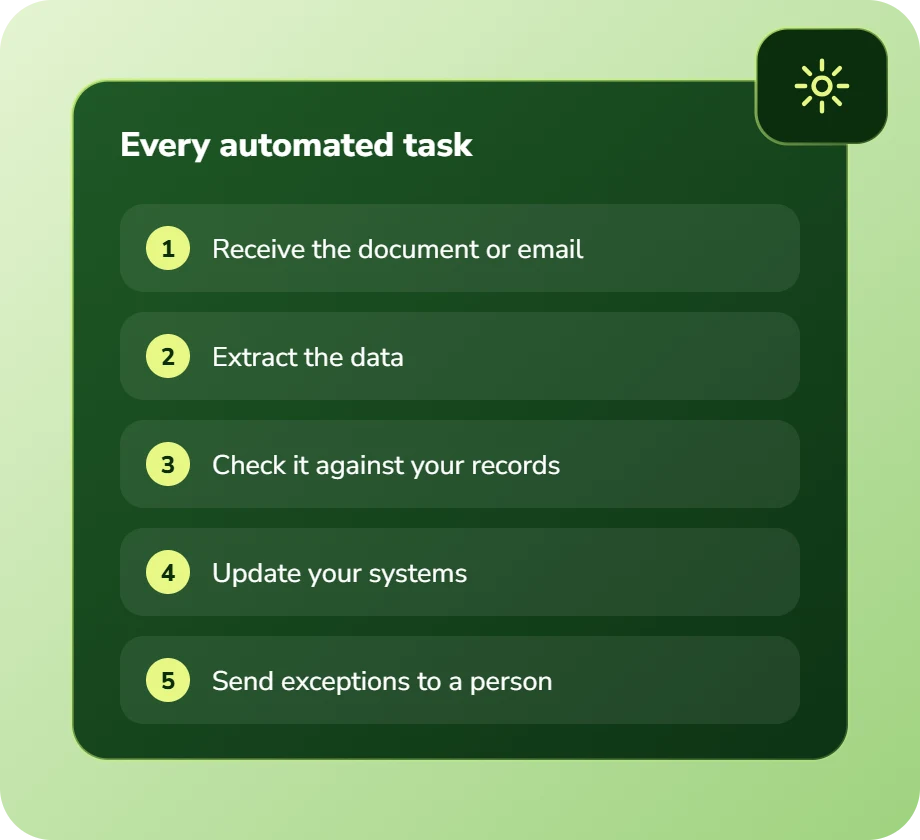
What every automation build includes
Everything below is standard on every engagement. Nothing here is an upsell that surfaces halfway through the build.
Process discovery and time study
We observe the workflow as performed, not as documented, and measure volume and duration to size the opportunity in dollars.
Document extraction pipelines
Reading structured and unstructured documents, pulling the fields that matter, and validating them against your existing records.
Classification and routing
Incoming work sorted by type, urgency and owner, with the reasoning attached so a person can check it quickly.
System integration
Connection to your CRM, ERP, accounting or practice management system, including legacy systems where we work through the UI if no API exists.
Human-in-the-loop review
Confidence thresholds you set. Below the line, work is queued for a person with the source document and the model reasoning attached.
Exception handling
Explicit design for the cases that do not fit. Unhandled exceptions are the reason most automation projects quietly get abandoned.
Monitoring and alerting
Dashboards showing throughput, accuracy and exception rates, with alerts when any of them drift outside normal range.
Training and written handover
Documentation, recorded walkthroughs and live sessions so your team can operate, monitor and adjust the system without us.
Which AI models and automation tools do we use?
We are vendor-neutral. Instead, we choose models and infrastructure on accuracy, cost per task, latency, and where your data is allowed to live.
How we deliver AI automation, step by step
Every AI automation build moves through the same five stages, from time study to monthly savings report. You always know what comes next.
Discovery
First, we observe the workflow as actually performed and measure how often it runs and how long it takes.
AI Strategy
Next, we turn volume, duration and loaded hourly cost into an annual figure and rank workflows by it.
Pilot Build
Then we build the top workflow as a fixed-scope pilot and demo it weekly against your real historical data.
Implementation
After a parallel run, we connect it to your live systems with confidence thresholds, exception routing and a rollback path.
Optimization
Finally, we track throughput, accuracy and exception rates, and report hours and dollars saved to you every month.
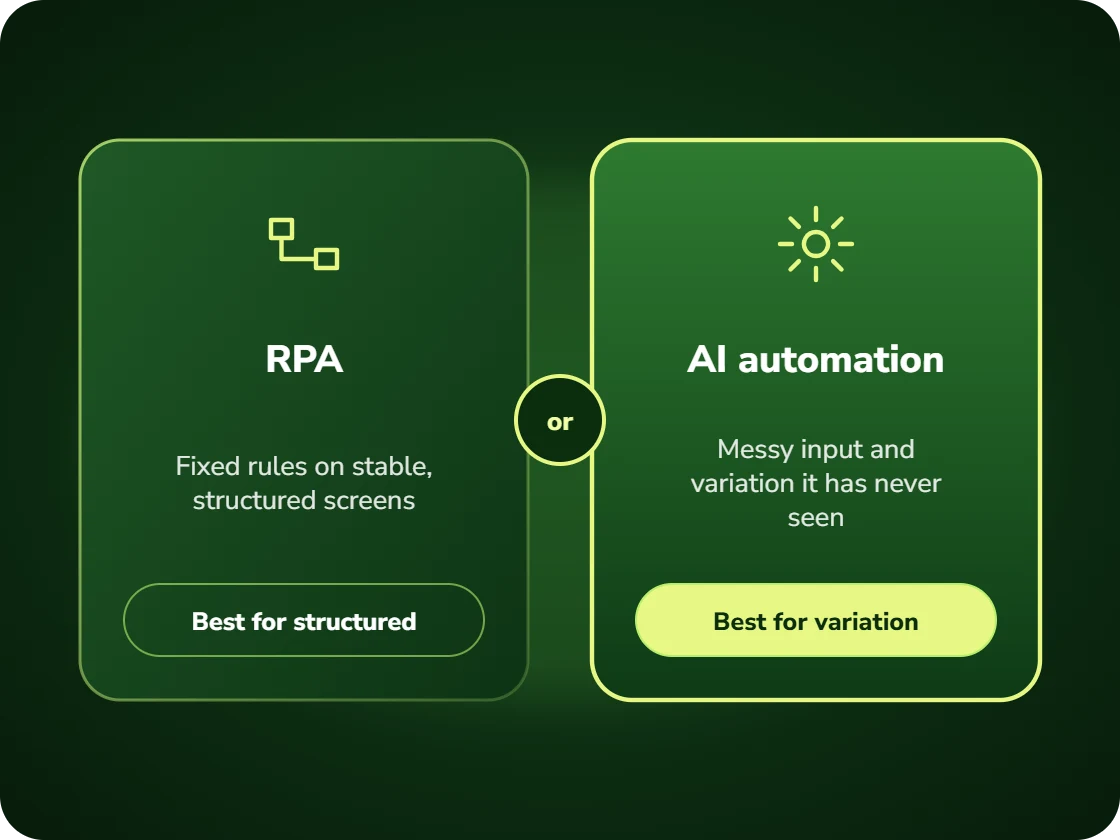
AI automation or RPA: which fits your workflow?
Both remove manual work, but they handle change very differently.
- RPA follows fixed rules and clicks through screens exactly as instructed. It works well for stable, structured tasks and breaks when a form layout changes.
- AI automation interprets messy input, such as a supplier invoice it has never seen or a badly written email, and copes with variation.
Many of our builds combine the two: AI reads and decides, while deterministic steps move the data.
How much does an AI automation project cost?
The cost of AI automation depends on how many systems your workflow touches and how much exception handling it needs. Rather than a rate card, you get a fixed written price for your own process before work starts, together with an estimate of the hours it gives back to your team.
Book a free 30-minute call and bring the task your team dreads most. We will tell you what it costs you each year, what automating it would take, and whether it is worth doing at all.
- A written savings estimate before any paid work
- Fixed scope and fixed price, agreed up front
- Full ownership of everything we build for you
- An honest recommendation when the numbers do not work
Figures are internal measurements across recent engagements, reported to every client monthly in writing.
AI automation FAQs
How much does AI automation cost?
It depends on how many systems the workflow connects and how complex the exceptions are. A short discovery comes first, and it tells you the expected annual saving so you can judge the return. Then you get a fixed written price before any build work begins. Book a free 30-minute consultation and we will tell you whether your workflow is worth automating.
What is the difference between AI automation and RPA?
RPA follows fixed rules and clicks through screens exactly as instructed, which works well for stable, structured tasks and breaks the moment a form layout changes. AI automation interprets messy input, a supplier invoice it has never seen, a customer email written badly, and can handle variation. They are complementary: we frequently use RPA for the deterministic steps and AI for the interpretation.
What happens when the AI is unsure?
It stops and asks. Every automation we build has a confidence threshold you set. Below that line, the item goes to a person with the source document, the extracted values and the reason for the flag attached. As a result, review takes seconds rather than starting from scratch. Silent guessing is the failure mode that destroys trust in these systems, and we design specifically against it.
Will this replace our staff?
In our engagements it usually does not, because the constraint is rarely too many people. It is a backlog that never clears. What typically happens is that the staff doing data entry move to exception handling, supplier or customer relationships, and the work that was being neglected. If your intent is headcount reduction we will tell you honestly whether the numbers support it.
How long until it is live?
Six to ten weeks from kickoff for a first automation. That includes a parallel run where the system operates alongside the manual process, so you can compare accuracy before relying on it. Complex integrations with legacy systems extend this, and we flag that during discovery rather than after.
What if our documents are handwritten or poor quality?
Modern vision models handle handwriting and low-quality scans far better than traditional OCR, but accuracy varies with how bad the source is. We test on your actual documents during discovery and give you a measured accuracy figure before you commit, rather than a vendor claim. If the accuracy is not good enough to be useful, we say so.
Ready to scope your AI automation services project?
Book a free 30-minute consultation. Bring one workflow. You will leave with a realistic estimate of what it would cost to automate and what it would save.