Document AI

Document AI services for the paperwork your team reads by hand

Our document AI services extract and classify information from invoices, contracts and forms. Validation rules and human review help manage uncertain results before structured data reaches your business systems.

Free 30-minute consultation
Fixed-scope pilots
U.S.-based team
Custom, not off-the-shelf
SOC 2-aligned practices
ROI tracked in writing
What is document AI?

Document AI, also called intelligent document processing, uses vision and language models to read documents, classify them by type, extract structured data, and validate it against existing records. Unlike template-based OCR, it handles documents it has never seen before, including varied layouts, scans and handwriting, without a template per format.

7+
Years building AI systems
240+
Projects delivered
4.8
Avg. months to payback
38
U.S. states served
The Problem

Template OCR breaks on the second supplier

Traditional document capture needs a template per layout. That is workable with five suppliers and impossible with four hundred, so most organizations built templates for their top few and left the long tail manual.

The long tail is usually where the cost is. It is also where the errors are, because the documents that get read by a tired person at 4pm are the unusual ones.

Our Approach

Read the document, do not match a template

Vision-language models read a document the way a person does: they find the invoice number because they understand what an invoice number is, not because it sits at fixed coordinates.

That removes the template problem entirely. A supplier you have never received a document from is handled on the first one, and a supplier who redesigns their invoice does not break anything.

Diagram showing information extracted from a document into structured fields
Service Overview

Document AI services: scope and deliverables

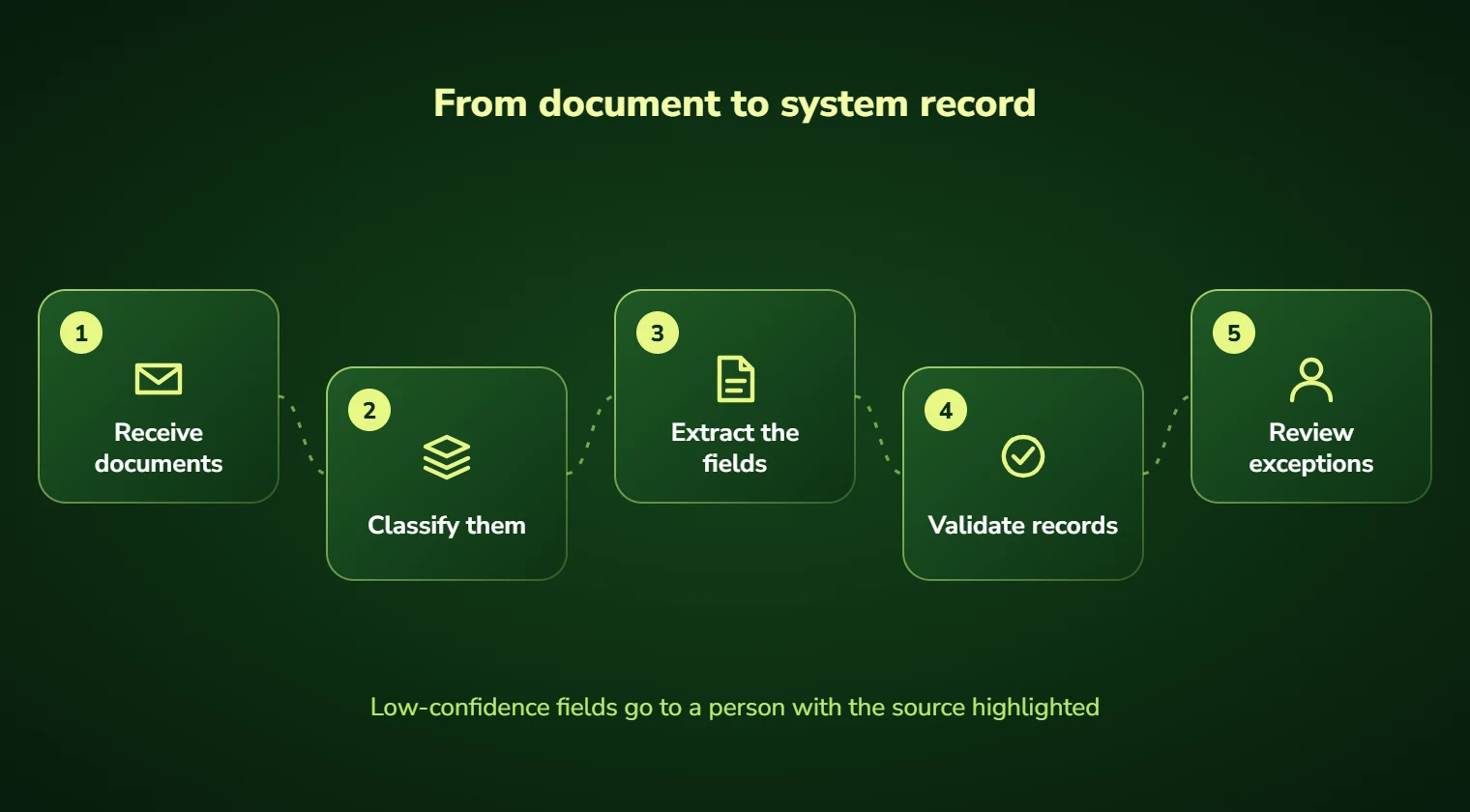
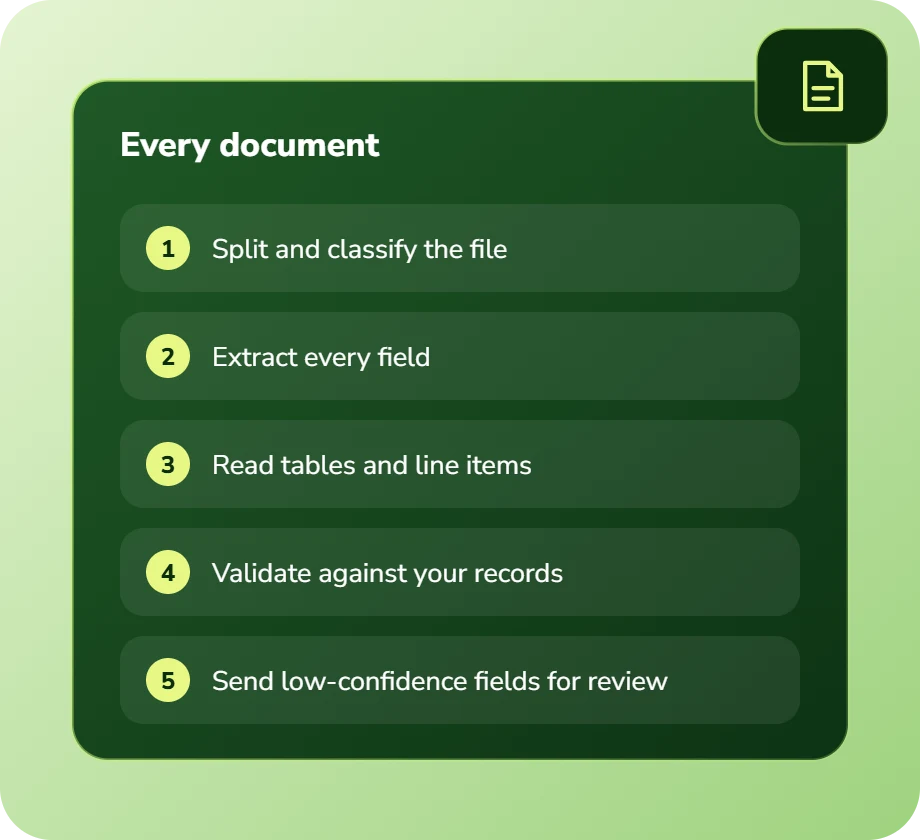
Classification comes first: what kind of document is this? Then extraction: pull the fields that matter for that type. Then validation: do these values agree with what we already know?

Validation is the step that separates a useful system from a liability. An extracted invoice total that does not match the purchase order should not post silently; it should be flagged with both numbers shown to a human.

Every field carries a confidence score, and thresholds are set per field. An invoice date might post automatically at 90% confidence while a bank account number requires 99% and a second check, because the cost of being wrong differs enormously.

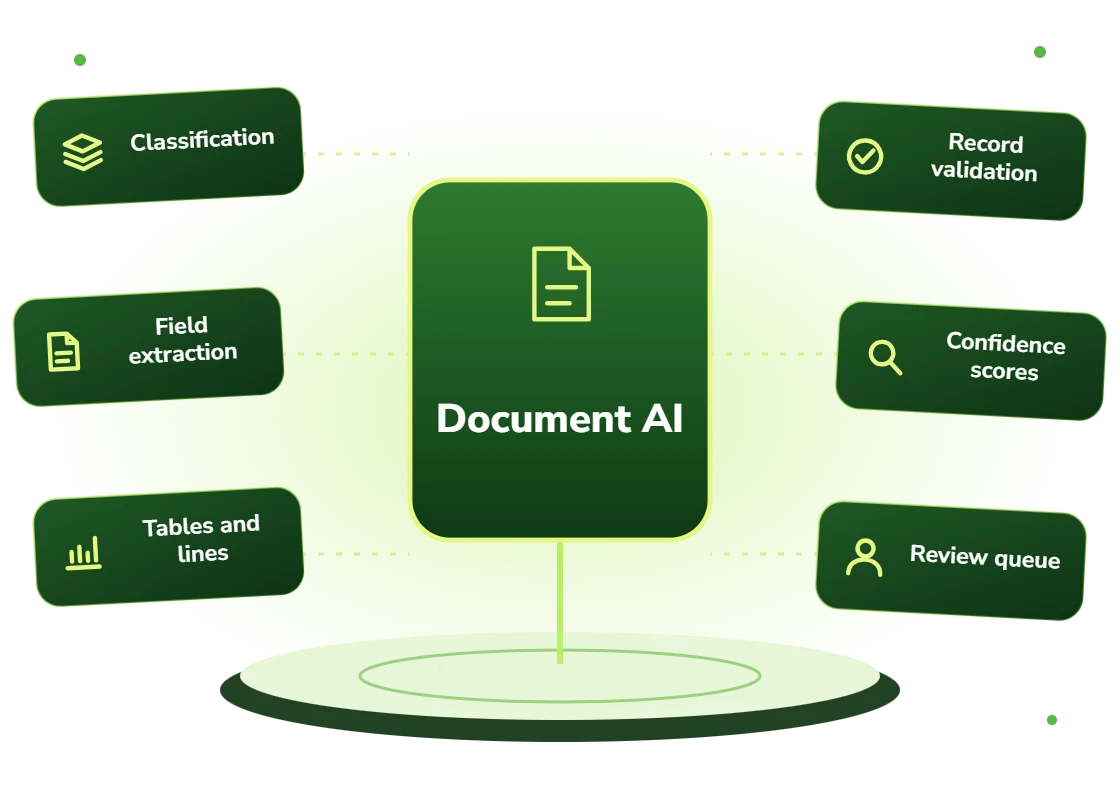
  • Classification by document type, including multi-document PDFs split automatically
  • Field extraction without templates, across layouts never seen before
  • Table and line-item extraction, including tables spanning pages
  • Validation against your existing records: POs, contracts, master data
  • Per-field confidence scoring with configurable thresholds
  • Human review queue with the source document and flagged fields highlighted
Right Fit

Where document AI pays back fastest

Volume and variety together. High volume with a single format is often solvable more cheaply with traditional capture; high variety is where AI earns its cost.

The second strong signal is downstream error cost. If a mis-keyed figure surfaces weeks later in reconciliation or in a customer dispute, the validation layer is often worth more than the extraction itself.

  • Teams processing over 100 documents a week across varied layouts
  • Accounts payable functions with hundreds of suppliers and no template coverage
  • Claims operations handling forms, reports and correspondence together
  • Legal and contract teams reviewing agreements for specific clauses
  • Logistics operations reconciling bills of lading against carrier invoices
  • Any process where keying errors surface expensively downstream
Benefits

Benefits of document AI

No templates to maintain

New formats work on the first document, and a redesigned supplier invoice does not break the pipeline.

Handles the long tail

The low-volume, high-variety documents that were never worth templating are exactly what this handles well.

Errors caught at entry

Validation against existing records surfaces mismatches immediately rather than in month-end reconciliation.

Confidence you can tune

Per-field thresholds so low-risk fields flow automatically while high-consequence fields always get checked.

Handwriting and poor scans

Vision models handle handwritten forms and low-quality scans substantially better than traditional OCR.

Review that takes seconds

Flagged items arrive with the source document, the extracted value and the reason for the flag already highlighted.

Problems We Solve

Business challenges this solves

01

Hundreds of formats, five templates

Template coverage stalled at the top suppliers. Template-free extraction covers the whole long tail.

02

Keying errors found at month end

Mistakes surfacing weeks later. Validation at entry catches them when correction is cheap.

03

Handwritten forms still manual

Paper forms nobody could automate. Vision models make them viable for the first time.

04

Line items ignored

Only headers captured because tables were too hard. Line-item extraction enables real matching.

05

Documents arriving by every route

Email, portal, post and fax. One pipeline handles all intake channels consistently.

06

No audit trail on data entry

No record of what the original said. Every extraction links back to the source document and page.

What's Included

Features and deliverables

Everything below is in scope on a standard engagement. Nothing here is an upsell discovered halfway through the build.

01

Multi-channel intake

Email attachments, shared folders, SFTP, scanner output, portal uploads and API submission, normalized into one pipeline.

02

Document classification

Type identification and automatic splitting of multi-document PDFs, so a 60-page bundle becomes correctly separated records.

03

Template-free extraction

Field extraction driven by understanding rather than coordinates, working on layouts never seen before.

04

Table and line-item capture

Structured extraction of line items including tables that span pages and inconsistent column layouts.

05

Validation rules engine

Cross-checking extracted values against purchase orders, contracts, master data and arithmetic consistency.

06

Confidence scoring and routing

Per-field confidence with configurable thresholds determining automatic posting versus human review.

07

Review interface

A queue showing the source document alongside extracted fields, with flagged values highlighted for fast correction.

08

System integration

Validated data written directly to your ERP, accounting, claims or practice management system.

Technology Stack

Technologies we use for document AI

We are not tied to one vendor. Model and infrastructure choices are made on accuracy, cost per task, latency, and where your data is allowed to live.

Language Models
C
Claude (Anthropic)
G
GPT (OpenAI)
G
Gemini (Google)
L
Llama
M
Mistral
A
Azure OpenAI Service
Vector & Retrieval
P
Pinecone
W
Weaviate
Q
Qdrant
p
pgvector
E
Elasticsearch
A
Amazon OpenSearch
Data & Backend
P
Python
T
TypeScript / Node.js
P
PostgreSQL
S
Snowflake
d
dbt
A
Apache Airflow
Business Systems
S
Salesforce
H
HubSpot
N
NetSuite
M
Microsoft 365
S
Slack
Z
Zapier / Make
How We Work

Our AI development process

The same five stages on every engagement, so you always know what happens next and what you get at the end of it.

01

Discovery

We interview the people doing the work, map the workflow end to end, and audit the systems and data behind it.

02

AI Strategy

Every opportunity gets scored on cost to build, time to value, and annual savings, then ranked.

03

Pilot Build

We ship the top-ranked automation as a fixed-scope pilot so you see real output before committing further budget.

04

Implementation

Integration with your live systems, staff training, human-in-the-loop review gates, and a documented rollback path.

05

Optimization

Monthly accuracy reviews, prompt and retrieval tuning, and a written report on hours and dollars saved.

Timeline

How long it takes

A typical first engagement, week by week. Complex integrations and regulated environments extend this, and we say so during discovery rather than after.

Weeks 1 to 2

Discovery and scoping

Process observation, systems audit, data review, and a written estimate of cost and expected saving before anything is built.

Week 3

Design sign-off

Architecture, data handling rules, review thresholds and success measures agreed in writing.

Weeks 4 to 7

Build and integration

Development against your real data, connected to your live systems, with weekly demos rather than a single reveal.

Week 8

Parallel run and testing

The system runs alongside the existing process so accuracy can be compared directly before anyone depends on it.

Weeks 9 to 10

Launch and handover

Cutover with a rollback path, staff training, full documentation, then 30 days of included tuning.

Who We Work With

Industries we deliver document AI for

Financial Services

Document extraction, reconciliation, KYC support, and audit-ready reporting with full traceability.

Insurance

First-notice-of-loss intake, claims triage, policy Q&A, and fraud signal detection.

Healthcare

Intake, prior authorization, clinical documentation, and revenue-cycle workflows built to respect HIPAA boundaries.

Legal

Contract review, discovery triage, and matter intake with citation-checked outputs and attorney sign-off gates.

Logistics & Supply Chain

Document processing, carrier communication, exception handling, and inventory rebalancing.

Construction

Bid takeoffs, submittal review, RFI drafting, and field-report summarization.

Manufacturing

Quality inspection, maintenance prediction, supplier communication, and production scheduling.

Professional Services

Proposal drafting, timesheet capture, research synthesis, and client reporting at scale.

Use Cases

Real-world use cases

01

Accounts payable automation

Invoice extraction, three-way matching against purchase orders and receipts, and posting of clean invoices.

02

Insurance claims intake

Claim forms, medical reports, estimates and correspondence classified, extracted and routed by severity.

03

Contract clause extraction

Identifying renewal dates, liability caps, termination terms and non-standard clauses across a contract portfolio.

04

Freight document reconciliation

Bills of lading, delivery receipts and carrier invoices matched automatically with discrepancies surfaced before payment.

05

Patient intake processing

Registration forms, insurance cards and referral letters extracted and validated against existing patient records.

06

Construction submittal review

Submittals and shop drawings checked against specification requirements with deviations flagged for review.

Why DevSolutionsAI

Why choose DevSolutionsAI for document AI

Business case before build

Every recommendation carries an estimated cost, timeline, and annual savings figure. If the math does not work, we say so before you spend.

Vendor-neutral by design

We resell nothing and take no platform commissions. Model and infrastructure choices are made on fit, cost, and your data-residency rules.

Fixed-scope pilots

The first engagement is a defined deliverable at a defined price, not an open-ended retainer that quietly grows each quarter.

Built for handover

You own the code, the prompts, the infrastructure, and the documentation. No lock-in to a proprietary wrapper you cannot leave.

Human-in-the-loop where it counts

Anything customer-facing, clinical, financial, or legal gets a review gate, a confidence threshold, and a logged audit trail.

Security reviewed early

Data flow diagrams, retention rules, and access boundaries are agreed in week one, not retrofitted after your security team objects.

Get Started

Find out what document AI would cost you, before you commit to anything

Every engagement is quoted after a short discovery, so you get a fixed written price built around your actual volumes rather than a rate card that assumes someone else’s business.

The first call is thirty minutes and free. Bring one workflow. We will tell you what it is likely costing you each year, roughly what automating it would take, and whether we think it is worth doing at all.

  • A written savings estimate before any paid work
  • Fixed scope and fixed price, agreed up front
  • Full ownership of everything we build for you
  • An honest recommendation when the numbers do not work
What clients typically see
Across recent projects
Staff hours saved each week
31
Months to payback
4.8
Client retention
94%
Response to enquiries
4 hrs

Figures are internal measurements across recent engagements, reported to every client monthly in writing.

Illustrative project scenario

Illustrative project scenario

Third-party logistics · 2,100 shipments/week

Catching $340,000 of carrier overbilling in the first year

Challenge. A 3PL reconciled carrier invoices against bills of lading and delivery receipts by hand. Volume meant only a sample was ever checked properly, and the team suspected they were paying accessorial charges that did not match the documented service.

What we built. A document AI pipeline ingesting carrier invoices, BOLs and delivery receipts from email and EDI, classifying and extracting line items from each, then matching them automatically. Discrepancies in weight, accessorial charges, delivery windows and fuel surcharges are flagged with the source documents shown side by side.

Outcome. Full reconciliation coverage replaced sampling. In the first year the system identified roughly $340,000 in billing discrepancies, of which the client recovered the large majority. Reconciliation staff time fell by about 60% despite checking every shipment rather than a sample.

$340k
Discrepancies identified
100%
Coverage vs. sampling
−60%
Reconciliation staff time
2.1k
Shipments reconciled weekly

Illustrative project scenario. The figures demonstrate how a project could be scoped and evaluated; they are not verified client results or an audited average.

Client Feedback

What clients say about working with us

31
Avg. staff hours saved weekly
4.8
Avg. months to payback
94%
Client retention
4
Hour response to enquiries
Common Questions

Document AI FAQs

On clean, typed documents we typically see 97 to 99% field-level accuracy. Handwritten and poor-quality scans are lower and vary considerably with source quality. Rather than quoting a general figure we test on a sample of your actual documents during discovery and give you a measured per-field accuracy report before you commit. Fields where accuracy is insufficient get a mandatory review gate rather than being automated.

No, and that is the main advantage over traditional capture. The system reads documents by understanding their content rather than matching coordinates, so a supplier you have never received a document from is handled correctly on the first one, and a supplier redesigning their invoice does not break anything.

They route to a human review queue with the source document displayed alongside the extracted values, and the low-confidence fields highlighted. Review typically takes seconds because the person is verifying rather than keying. Confidence thresholds are configurable per field, so a bank account number can require near-certainty while a description field posts more freely.

Yes, considerably better than traditional OCR, though accuracy depends heavily on legibility. We test against your real handwritten samples in discovery. For forms where handwriting quality is poor, the practical design is usually extraction with mandatory review rather than full automation, which still removes most of the keying effort.

Validated data is written directly to your system through its API, or through file-based import where no API exists. We support the common ERP, accounting, claims and practice management platforms, and have built connectors for legacy systems by automating their interfaces where necessary.

A pipeline for one document type typically runs $22,000 to $48,000 depending on validation complexity and integration requirements. Running cost is usually one to five cents per document. For a team processing 500 documents a week manually, payback is generally three to six months, and we produce that estimate from your own volume data during discovery.

Service Areas

Document AI across the United States

We deliver document ai remotely to clients nationwide, with on-site workshops available in major metros.

Ready to scope your document AI project?

Book a free 30-minute consultation. Bring one workflow and leave with a realistic estimate of what it would cost to automate and what it would save.

Free 30-minute consultation
Fixed-scope pilots
U.S.-based team
Custom, not off-the-shelf
SOC 2-aligned practices
ROI tracked in writing
Free 30-minute AI consultation