AI copilot development for assistance that knows what the user is looking at
Our AI copilot development work brings assistance into your product or internal tools. The copilot uses relevant screen, record and permission context to help users draft, find information or prepare actions for review.
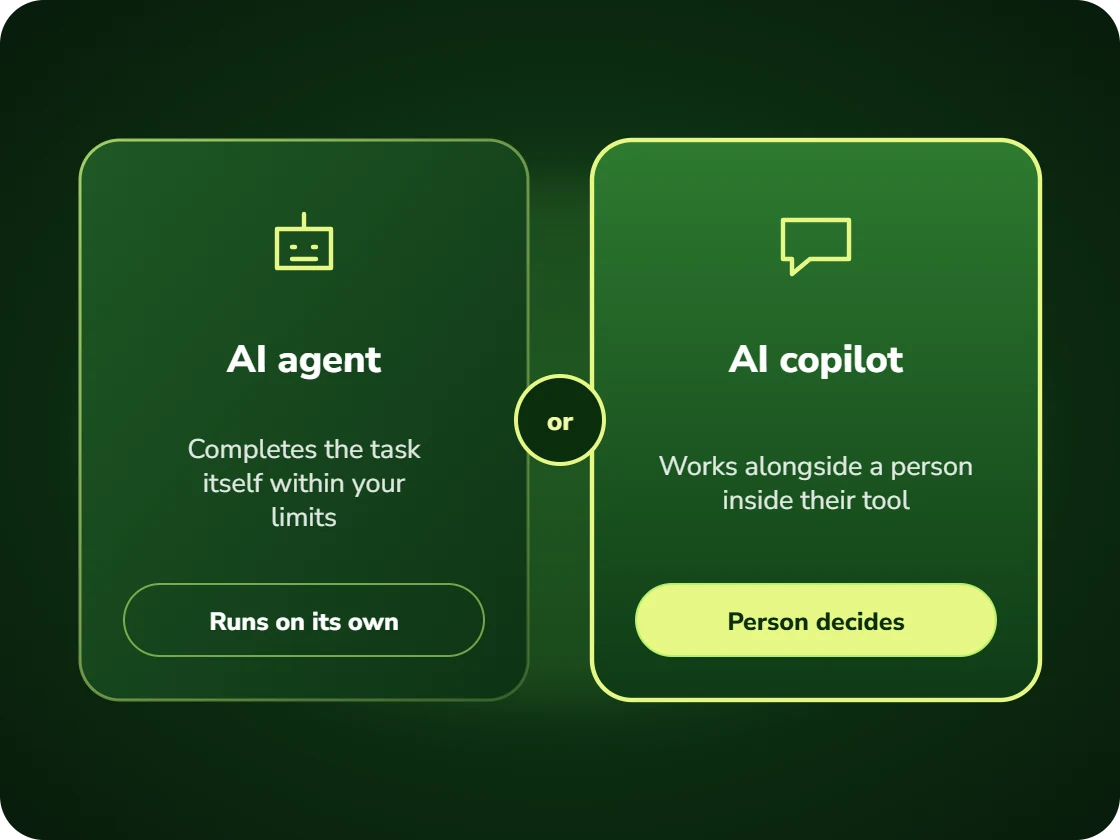
An AI copilot is an assistant embedded inside an application that has awareness of the user’s current context, the screen, the record, the task in progress, and can both answer questions and take actions within the application. It differs from a chatbot in that context is supplied automatically rather than described by the user.
The assistant that makes users explain their own screen
Most in-app AI is a chat window that knows nothing about what the user is doing. To get a useful answer, the user has to describe the record they are already looking at.
That is more work than doing the task manually, so people stop using it. The feature ships, adoption collapses quietly, and it appears in the product tour forever.
Context supplied automatically, actions available inline
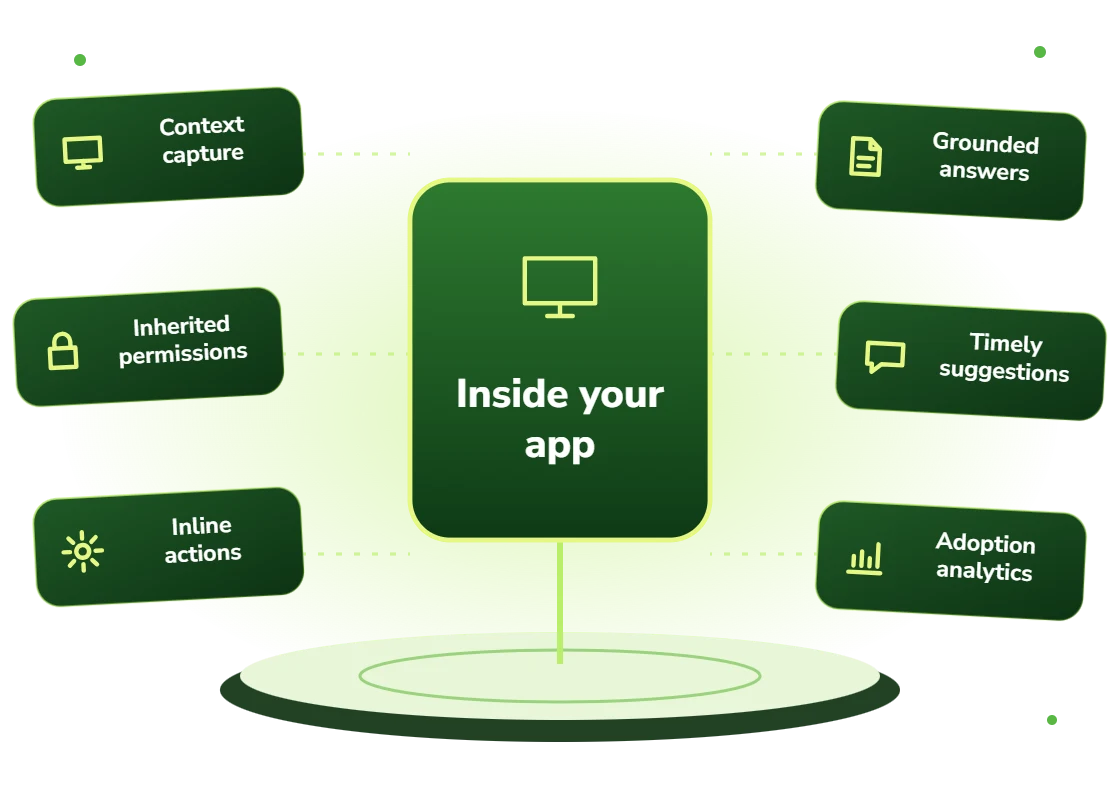
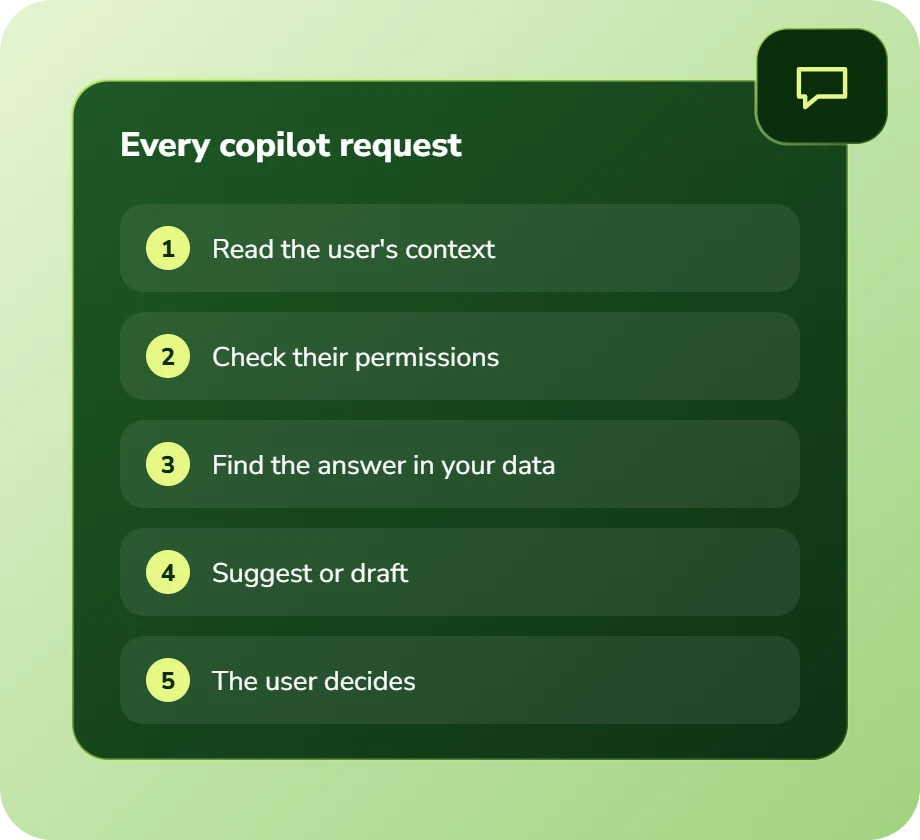
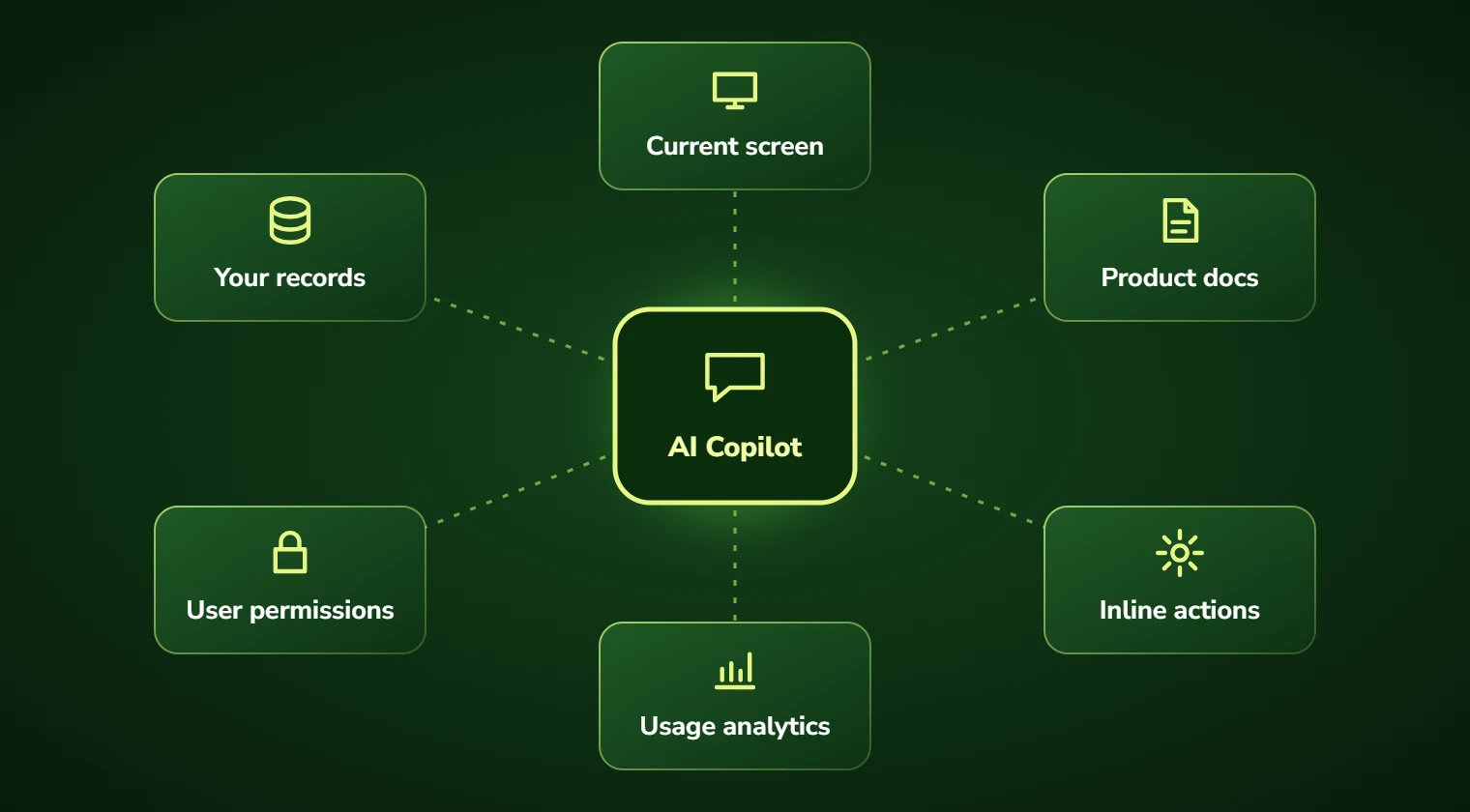
A copilot receives the current context automatically: which record, which screen, which stage of the workflow, and what this user is permitted to see and do.
It can then answer specifically, suggest the next action, and execute it within the application, subject to the same permissions the user has, with confirmation on anything consequential.
AI copilot development: scope and deliverables
Context engineering is most of it. Deciding what to include for each screen and action, the record, related entities, recent history, relevant policy, without flooding the model or leaking data the user should not see.
Permission inheritance is the non-negotiable part. A copilot must operate strictly within the calling user’s permissions, or it becomes a privilege escalation route. This has to be enforced at the data layer, not by instructing the model.
And restraint. A copilot that interrupts constantly gets dismissed permanently. Proactive suggestions need to be rare and genuinely useful, which usually means fewer than product teams initially want.
- Automatic context capture from the current screen, record and workflow state
- Permission inheritance enforced at the data layer, not by prompt instruction
- Inline actions executed within the application with confirmation where needed
- Grounding in product documentation and the user’s own data
- Restrained proactive suggestions, triggered on genuine signal only
- Usage analytics distinguishing real adoption from curiosity clicks
Who should build a copilot
Software companies whose product has genuine depth, where users regularly do not know the feature exists that would solve their problem. A copilot surfaces capability people already paid for.
And internal tool owners, particularly for systems with poor usability that cannot be replaced. A copilot is often a cheaper path to usability than a rebuild.
- SaaS products deep enough that users miss relevant capability
- Applications with long onboarding or steep learning curves
- Internal systems with poor usability that cannot be replaced
- Products where support tickets are mostly “how do I” questions
- Complex workflows where users regularly need reference material
- Software where power users are dramatically more effective than average ones
Benefits of AI copilot development
No context to explain
The copilot already knows the record and screen, so getting help is faster than doing the task manually.
Features get discovered
Capability users never found gets surfaced at the moment it would help, which is the cheapest way to increase product value.
Shorter onboarding
New users become productive without completing training, because help arrives in context rather than in a documentation site.
Fewer "how do I" tickets
The largest support category in most software products, answered inside the product where the question occurs.
Actions, not just answers
The copilot performs the task within the user’s permissions rather than describing how to do it.
Safe by construction
Permission inheritance at the data layer means a copilot cannot become a privilege escalation route.
Business challenges AI copilot development solves
In-app AI nobody uses
A chat box that requires describing your own screen. Automatic context makes it faster than doing it manually.
Features users never find
Capability paid for and undiscovered. Contextual surfacing at the point of need.
Onboarding taking weeks
Steep learning curves delaying value. In-context help compresses ramp substantially.
"How do I" ticket volume
Support answering product usage questions. A copilot handles them where they arise.
Unusable internal systems
Legacy tools nobody can navigate. A copilot is cheaper than a rebuild and often sufficient.
Assistants that interrupt constantly
Proactive suggestions users learn to dismiss. Restraint and genuine trigger signals matter more than capability.
Features and deliverables
Everything below is in scope on a standard engagement. Nothing here is an upsell discovered halfway through the build.
Context engineering
Per-screen definition of what context the copilot receives, balancing usefulness against token cost and data exposure.
Permission inheritance
Strict enforcement at the data layer so the copilot can never see or do more than the calling user.
Inline action execution
Actions performed within the application, with confirmation on anything consequential or irreversible.
Product knowledge grounding
Retrieval over documentation, help content and release notes so answers reflect the current product version.
Proactive suggestion engine
Rare, high-signal suggestions triggered on genuine patterns rather than constant interruption.
Multi-tenant safety
For SaaS products, guaranteed isolation so no tenant’s data can appear in another’s copilot context.
Adoption analytics
Measurement distinguishing genuine repeat usage from first-week curiosity, plus which queries fail.
Cost controls
Context budgets, caching and model routing so a copilot does not become the most expensive feature in the product.
Technologies we use for AI copilot development
We are not tied to one vendor. Model and infrastructure choices are made on accuracy, cost per task, latency, and where your data is allowed to live.
Our AI development process
The same five stages on every engagement, so you always know what happens next and what you get at the end of it.
Discovery
We interview the people doing the work, map the workflow end to end, and audit the systems and data behind it.
AI Strategy
Every opportunity gets scored on cost to build, time to value, and annual savings, then ranked.
Pilot Build
We ship the top-ranked automation as a fixed-scope pilot so you see real output before committing further budget.
Implementation
Integration with your live systems, staff training, human-in-the-loop review gates, and a documented rollback path.
Optimization
Monthly accuracy reviews, prompt and retrieval tuning, and a written report on hours and dollars saved.
How long it takes
A typical first engagement, week by week. Complex integrations and regulated environments extend this, and we say so during discovery rather than after.
Discovery and scoping
Process observation, systems audit, data review, and a written estimate of cost and expected saving before anything is built.
Design sign-off
Architecture, data handling rules, review thresholds and success measures agreed in writing.
Build and integration
Development against your real data, connected to your live systems, with weekly demos rather than a single reveal.
Parallel run and testing
The system runs alongside the existing process so accuracy can be compared directly before anyone depends on it.
Launch and handover
Cutover with a rollback path, staff training, full documentation, then 30 days of included tuning.
Industries we deliver AI copilot development for
SaaS & Technology
AI features inside your product, support deflection, onboarding assistants, and usage analytics.
Financial Services
Document extraction, reconciliation, KYC support, and audit-ready reporting with full traceability.
Healthcare
Intake, prior authorization, clinical documentation, and revenue-cycle workflows built to respect HIPAA boundaries.
Professional Services
Proposal drafting, timesheet capture, research synthesis, and client reporting at scale.
Insurance
First-notice-of-loss intake, claims triage, policy Q&A, and fraud signal detection.
Manufacturing
Quality inspection, maintenance prediction, supplier communication, and production scheduling.
Logistics & Supply Chain
Document processing, carrier communication, exception handling, and inventory rebalancing.
Legal
Contract review, discovery triage, and matter intake with citation-checked outputs and attorney sign-off gates.
Real-world AI copilot development use cases
SaaS product copilot
In-app assistance answering questions and performing actions on the record the user is viewing.
CRM sales copilot
Account context, next-best-action suggestions and record updates without leaving the opportunity view.
Analytics copilot
Natural-language querying with generated queries shown, so users can verify rather than trust blindly.
Clinical documentation copilot
Documentation support inside the record with strict boundaries against clinical recommendation.
Legacy system copilot
A usability layer over an unreplaceable internal system, guiding users through workflows nobody can remember.
Developer tooling copilot
Assistance inside internal engineering tools grounded in your own codebase conventions and documentation.
Why choose DevSolutionsAI for AI copilot development
Business case before build
Every recommendation carries an estimated cost, timeline, and annual savings figure. If the math does not work, we say so before you spend.
Vendor-neutral by design
We resell nothing and take no platform commissions. Model and infrastructure choices are made on fit, cost, and your data-residency rules.
Fixed-scope pilots
The first engagement is a defined deliverable at a defined price, not an open-ended retainer that quietly grows each quarter.
Built for handover
You own the code, the prompts, the infrastructure, and the documentation. No lock-in to a proprietary wrapper you cannot leave.
Human-in-the-loop where it counts
Anything customer-facing, clinical, financial, or legal gets a review gate, a confidence threshold, and a logged audit trail.
Security reviewed early
Data flow diagrams, retention rules, and access boundaries are agreed in week one, not retrofitted after your security team objects.
Find out what AI copilot development would cost you, before you commit to anything
Every engagement is quoted after a short discovery, so you get a fixed written price built around your actual volumes rather than a rate card that assumes someone else’s business.
The first call is thirty minutes and free. Bring one workflow. We will tell you what it is likely costing you each year, roughly what automating it would take, and whether we think it is worth doing at all.
- A written savings estimate before any paid work
- Fixed scope and fixed price, agreed up front
- Full ownership of everything we build for you
- An honest recommendation when the numbers do not work
Figures are internal measurements across recent engagements, reported to every client monthly in writing.
Illustrative project scenario
Cutting "how do I" tickets by more than half
Challenge. A field service platform had accumulated substantial functionality over a decade. Support analysis showed 63% of tickets were product usage questions rather than faults. Most asked about features that existed and users could not find. A previous in-app chatbot had 4% weekly active usage.
What we built. A context-aware copilot receiving the current screen, record and workflow stage automatically, grounded in product documentation and release notes, inheriting user permissions strictly. It answers, navigates the user to the relevant feature, and can perform common actions inline with confirmation.
Outcome. “How do I” tickets fell 58%. Weekly active copilot usage reached 41%, against 4% for the previous chatbot, which the team attributes primarily to removing the need to describe context. Time-to-first-value for new customers improved measurably.
Illustrative project scenario. The figures demonstrate how a project could be scoped and evaluated; they are not verified client results or an audited average.
What clients say about working with us
AI Copilot Development FAQs
What makes a copilot different from a chatbot in our app?
Context and capability. A chatbot requires the user to describe the record they are already looking at, which is frequently more effort than doing the task manually, this is why in-app chatbots so often reach single-digit adoption. A copilot receives the current screen, record, workflow stage and user permissions automatically, and can perform actions inline rather than explaining how.
How do you stop it exposing data users should not see?
Permission inheritance enforced at the data layer, not by instructing the model. The copilot queries your systems as the calling user, so it is structurally incapable of retrieving anything that user could not retrieve themselves. Enforcing this in the prompt rather than the data layer is the most serious mistake we see in copilot implementations, because it turns the copilot into a privilege escalation route.
Will users actually adopt it?
It depends almost entirely on whether it is faster than doing the task manually. The most common adoption failure is requiring users to explain context the application already knows. On a recent engagement, moving from a generic chatbot to a context-aware copilot took weekly active usage from 4% to 41% with no change in the underlying model. We measure genuine repeat usage rather than first-week curiosity.
Should the copilot suggest things proactively?
Sparingly. Proactive suggestions are valuable when they are rare and genuinely relevant, and actively harmful when frequent, users learn to dismiss the panel reflexively and then never see the useful suggestion either. We set high trigger thresholds initially and lower them only where measurement shows suggestions are being acted on.
How much does a copilot cost to build?
A prototype covering one workflow runs $22,000 to $35,000 over four to five weeks and produces real adoption data. A full product copilot with context engineering across screens, permission inheritance, inline actions and analytics typically runs $78,000 to $150,000. For multi-tenant SaaS products, tenant isolation adds to that.
Can you build a copilot for an internal legacy system?
Yes, and it is often the highest-return version of this work. A copilot over an unusable internal system is frequently far cheaper than replacing the system and delivers much of the usability benefit. Where the legacy system has no API we work through its interface or database layer, which we assess during discovery.
Services that pair well with this one
Most clients combine two or three of these. We will tell you the right sequence during discovery.
Ready to scope your AI copilot development project?
Book a free 30-minute consultation. Bring one workflow and leave with a realistic estimate of what it would cost to automate and what it would save.