AI virtual assistant development for business tasks
Our AI virtual assistant development work connects scheduling, email, research and administrative tasks to relevant business systems. Access is scoped to the task, with review before actions that need human approval.
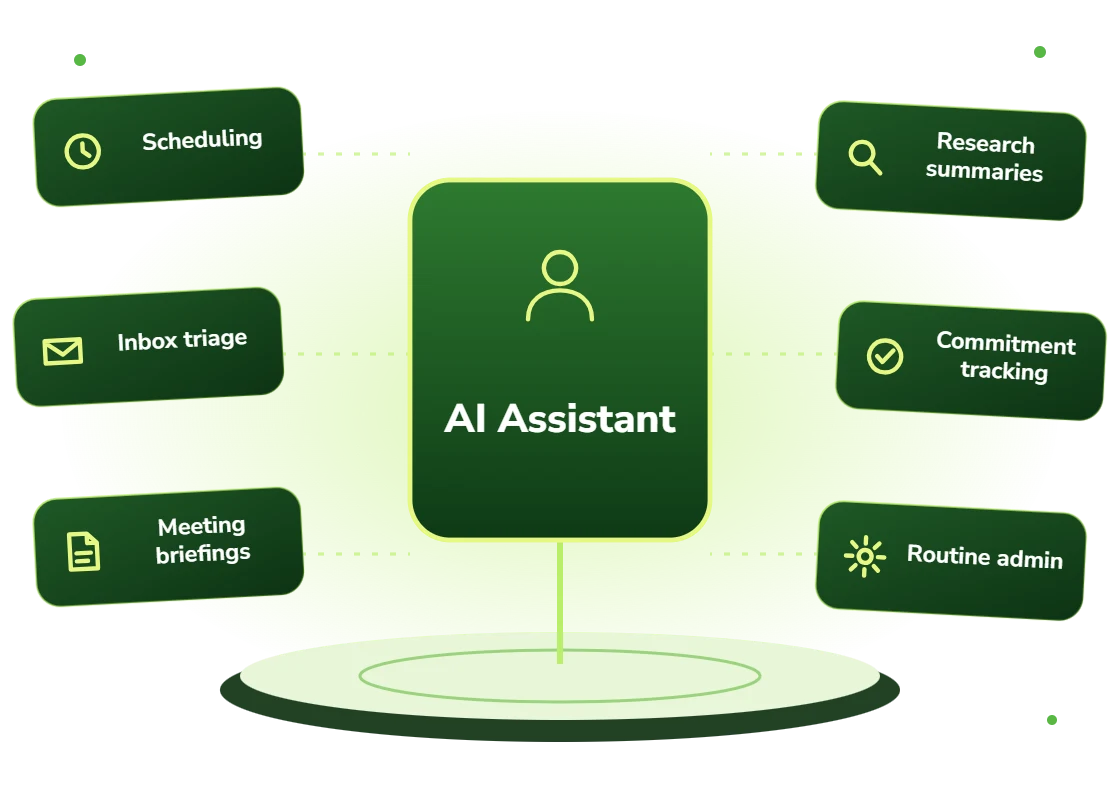
An AI virtual assistant is a software assistant that handles administrative work on a person or team’s behalf: managing calendars, triaging email, preparing briefings, drafting correspondence and retrieving information. Unlike a general chat assistant, a business virtual assistant is connected to the organization’s actual systems with scoped permissions, so it can complete tasks rather than only describe them.
General assistants are impressive and useless at work
A consumer AI assistant can draft a great email. It cannot see who you are meeting, what was agreed last time, or whether that client is behind on payment. So it produces plausible text that someone still has to correct.
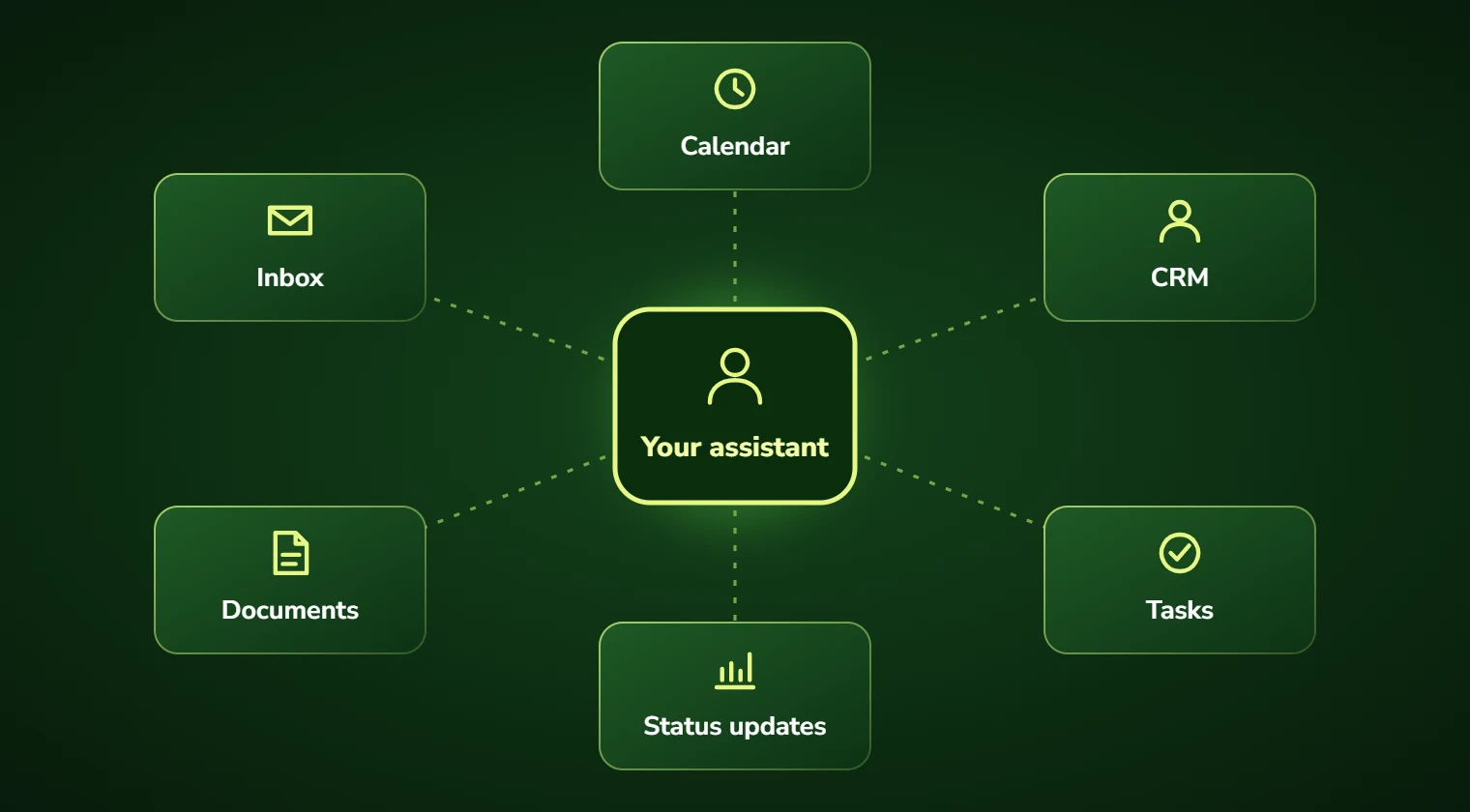
The gap is access, not intelligence. Without connection to the calendar, inbox, CRM and document store, an assistant is a very articulate stranger guessing at your business.
An assistant that can see and do, within limits you set
We build assistants with scoped, authenticated access to the systems that hold your working context, so the draft reply already knows the account history and the meeting request already checks real availability.
Permissions are explicit and narrow. The assistant reads what you allow, writes only where you have approved, and anything with external consequence, sending to a client, committing to a date, can require confirmation.
AI virtual assistant development: scope and deliverables
The work we target is the administrative layer around professional work: the scheduling, the summarizing, the chasing, the preparing. It is high-volume, low-judgement, and it consumes a surprising share of senior people’s weeks.
Assistants can be personal or shared. A partner in a law firm might have one tuned to their matters and preferences; an operations team might share one that handles the same tasks for everyone. Both are common and they are built differently.
The design constraint that matters most is trust calibration. An assistant that oversteps once loses the user permanently, so we start narrow with confirmation on everything and widen autonomy only as the user asks for it.
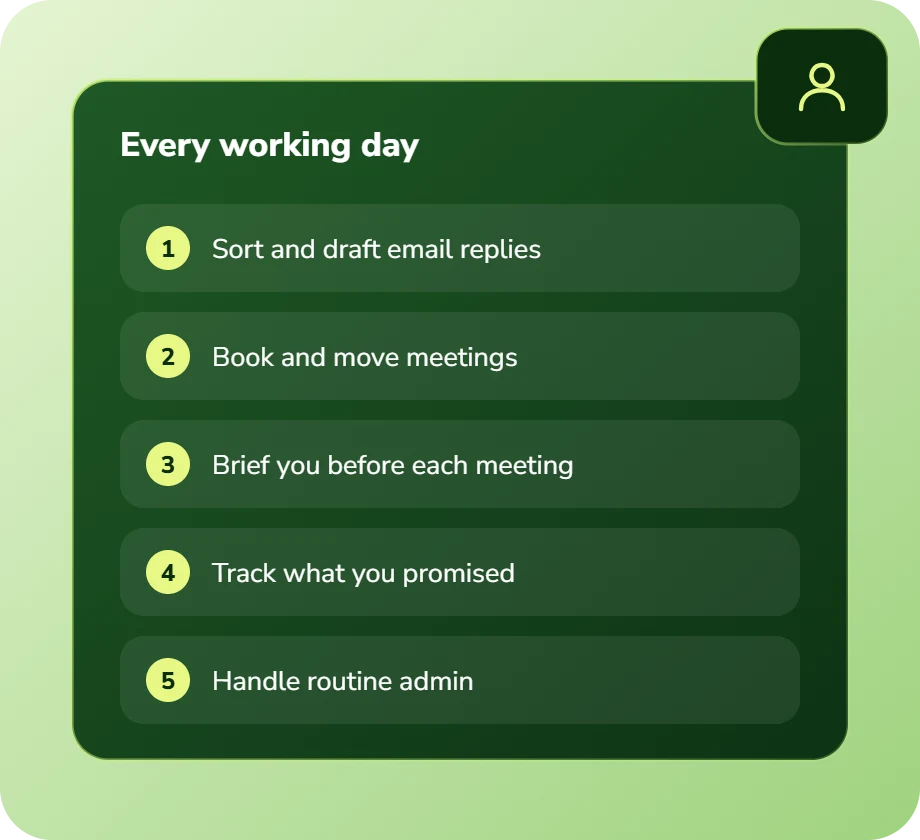
- Calendar management: scheduling, rescheduling, conflict resolution, preparation time
- Inbox triage: classification, prioritization, drafted replies, follow-up tracking
- Meeting preparation: briefings assembled from CRM, prior notes and documents
- Research and summarization across your own document store
- Task and commitment tracking extracted from conversations
- Recurring admin: expense coding, timesheet prompts, status updates
Who gets real value from a virtual assistant
Fee-earning professionals see the fastest return, because every administrative hour recovered is a billable hour available. A lawyer or consultant losing eight hours a week to admin has an obvious business case.
The other strong fit is teams too small for a human assistant but large enough for the work to hurt, typically firms of ten to eighty people where nobody has support and everyone does their own scheduling.
- Fee-earning professionals losing billable hours to administration
- Executives without dedicated assistant support
- Client-facing teams preparing for many meetings each week
- Firms where scheduling coordination consumes hours across the team
- Teams tracking commitments across email, calls and meetings by memory
- Organizations where onboarding a human assistant is not economic
Benefits of AI virtual assistants
Billable hours recovered
For fee earners, every administrative hour returned has a direct and calculable revenue value.
Prepared for every meeting
Briefings assembled automatically from CRM, prior notes and relevant documents before you walk in.
Scheduling without the ping-pong
Real availability checked and proposed, with rescheduling and conflict handling done without your involvement.
Nothing dropped
Commitments made in email and meetings are extracted and tracked, rather than depending on someone remembering.
Context, not generic drafts
Replies drafted with account history and prior correspondence in view, so they need editing rather than rewriting.
Bounded and confirmable
Narrow permissions, confirmation on anything external, and a full log of every action taken.
Business challenges this solves
Scheduling ping-pong
Five emails to book one meeting. The assistant checks real availability and proposes directly.
Inbox as a to-do list
Important messages buried under noise. Triage surfaces what matters and tracks what needs a reply.
Walking into meetings cold
No time to prepare. Briefings assembled automatically from the systems that already hold the context.
Commitments forgotten
Promises made in meetings that nobody recorded. Extracted and tracked as tasks automatically.
Senior people doing admin
Expensive time on low-value work. The assistant handles the layer that never needed their expertise.
No assistant coverage
Teams too small to justify hiring support. An AI assistant is economic at a scale a human hire is not.
Features and deliverables
Everything below is in scope on a standard engagement. Nothing here is an upsell discovered halfway through the build.
Scoped system access
Authenticated, permission-limited connections to calendar, email, CRM, document store and task systems.
Calendar intelligence
Availability-aware scheduling, travel and preparation buffers, conflict resolution and automatic rescheduling.
Inbox triage and drafting
Classification by urgency and type, drafted replies with real context, and follow-up tracking on unanswered threads.
Meeting briefing generation
Pre-meeting briefs pulling relationship history, open items, recent correspondence and relevant documents.
Commitment extraction
Action items and promises identified from email and meeting transcripts, then tracked to completion.
Document retrieval
Natural-language search across your own files with answers cited back to the source document.
Confirmation workflow
Anything external or irreversible presented for one-click approval before it happens.
Per-user personalization
Individual preferences, tone, working hours and priorities learned and applied per person rather than globally.
Technologies we use for AI virtual assistants
We are not tied to one vendor. Model and infrastructure choices are made on accuracy, cost per task, latency, and where your data is allowed to live.
Our AI development process
The same five stages on every engagement, so you always know what happens next and what you get at the end of it.
Discovery
We interview the people doing the work, map the workflow end to end, and audit the systems and data behind it.
AI Strategy
Every opportunity gets scored on cost to build, time to value, and annual savings, then ranked.
Pilot Build
We ship the top-ranked automation as a fixed-scope pilot so you see real output before committing further budget.
Implementation
Integration with your live systems, staff training, human-in-the-loop review gates, and a documented rollback path.
Optimization
Monthly accuracy reviews, prompt and retrieval tuning, and a written report on hours and dollars saved.
How long it takes
A typical first engagement, week by week. Complex integrations and regulated environments extend this, and we say so during discovery rather than after.
Discovery and scoping
Process observation, systems audit, data review, and a written estimate of cost and expected saving before anything is built.
Design sign-off
Architecture, data handling rules, review thresholds and success measures agreed in writing.
Build and integration
Development against your real data, connected to your live systems, with weekly demos rather than a single reveal.
Parallel run and testing
The system runs alongside the existing process so accuracy can be compared directly before anyone depends on it.
Launch and handover
Cutover with a rollback path, staff training, full documentation, then 30 days of included tuning.
Industries we deliver AI virtual assistants for
Professional Services
Proposal drafting, timesheet capture, research synthesis, and client reporting at scale.
Legal
Contract review, discovery triage, and matter intake with citation-checked outputs and attorney sign-off gates.
Financial Services
Document extraction, reconciliation, KYC support, and audit-ready reporting with full traceability.
Real Estate
Lead qualification, listing content, transaction coordination, and 24/7 inquiry response.
Healthcare
Intake, prior authorization, clinical documentation, and revenue-cycle workflows built to respect HIPAA boundaries.
SaaS & Technology
AI features inside your product, support deflection, onboarding assistants, and usage analytics.
Construction
Bid takeoffs, submittal review, RFI drafting, and field-report summarization.
Education
Enrollment support, content generation, tutoring assistants, and administrative automation.
Real-world use cases
Legal practice support
Matter-aware scheduling, client correspondence drafting, and deadline tracking with conflict checking built in.
Consulting engagement admin
Meeting preparation, status updates, timesheet prompting and follow-up tracking across concurrent engagements.
Real estate agent assistant
Viewing scheduling, enquiry follow-up, listing information retrieval and pipeline chasing.
Executive support
Calendar defence, inbox triage, briefing preparation and commitment tracking for leaders without a human assistant.
Financial advisory prep
Client review preparation assembling portfolio position, prior discussion notes and open action items.
Clinical administration
Scheduling, referral chasing and documentation support, bounded strictly away from clinical decision-making.
Why choose DevSolutionsAI for AI virtual assistants
Business case before build
Every recommendation carries an estimated cost, timeline, and annual savings figure. If the math does not work, we say so before you spend.
Vendor-neutral by design
We resell nothing and take no platform commissions. Model and infrastructure choices are made on fit, cost, and your data-residency rules.
Fixed-scope pilots
The first engagement is a defined deliverable at a defined price, not an open-ended retainer that quietly grows each quarter.
Built for handover
You own the code, the prompts, the infrastructure, and the documentation. No lock-in to a proprietary wrapper you cannot leave.
Human-in-the-loop where it counts
Anything customer-facing, clinical, financial, or legal gets a review gate, a confidence threshold, and a logged audit trail.
Security reviewed early
Data flow diagrams, retention rules, and access boundaries are agreed in week one, not retrofitted after your security team objects.
Find out what AI virtual assistants would cost you, before you commit to anything
Every engagement is quoted after a short discovery, so you get a fixed written price built around your actual volumes rather than a rate card that assumes someone else’s business.
The first call is thirty minutes and free. Bring one workflow. We will tell you what it is likely costing you each year, roughly what automating it would take, and whether we think it is worth doing at all.
- A written savings estimate before any paid work
- Fixed scope and fixed price, agreed up front
- Full ownership of everything we build for you
- An honest recommendation when the numbers do not work
Figures are internal measurements across recent engagements, reported to every client monthly in writing.
Illustrative project scenario
Returning 6.2 billable hours per fee earner each week
Challenge. A litigation firm had no paralegal support for junior associates. Time-tracking analysis showed associates losing an average of nine hours a week to scheduling, correspondence drafting, and searching for documents across a poorly organized file store.
What we built. A matter-aware assistant with scoped access to the practice management system, document store, calendar and email. It schedules with conflict checking, drafts routine correspondence with matter context, retrieves documents by natural-language query, and tracks deadlines. All external correspondence requires explicit confirmation.
Outcome. Fee earners recovered an average of 6.2 hours per week, of which the firm estimates roughly 70% converted to billable work. Document retrieval time fell from an average of 6 minutes to under 30 seconds.
Illustrative project scenario. The figures demonstrate how a project could be scoped and evaluated; they are not verified client results or an audited average.
What clients say about working with us
AI Virtual Assistants FAQs
How is this different from ChatGPT or Copilot?
Access and scope. A general assistant has no connection to your calendar, CRM, matter files or client history, so it can draft plausible text but cannot check availability, apply your account context, or complete a task. We build assistants with authenticated, permission-scoped access to the systems that hold your working context. Many clients use both: a general tool for thinking and drafting, a connected assistant for doing.
Is it safe to give an AI access to our email and calendar?
It depends entirely on how the access is scoped, which is why we design that first. Assistants get read access only to what they need, write access only where explicitly approved, and confirmation gates on anything leaving the organization. Every action is logged. Deployment can sit entirely inside your own cloud tenancy so nothing leaves your control, and we walk your IT or compliance team through the data flow before anything is connected.
Will it send emails to clients without me seeing them?
Not unless you explicitly enable that, and we default to off. Standard configuration drafts the reply and presents it for approval. Some clients later enable autonomous sending for narrow, low-risk categories such as meeting confirmations, but that is an opt-in decision made per category after the drafting quality has been observed.
Can each person have their own assistant preferences?
Yes. Working hours, meeting buffers, tone of correspondence, priority rules and delegation preferences are per-user. Shared team assistants are also common for functions like operations or reception, and they are built differently, more standardized, less personalized.
What does an AI virtual assistant cost?
A single-function assistant starts around $12,000. A full assistant with calendar, email, CRM and document access typically runs $25,000 to $55,000 depending on how many systems are connected and the security review requirements. Running cost is usually $20 to $60 per user per month in model and infrastructure charges.
How long before people actually use it?
Adoption is the real risk, not the technology. We deploy narrow and confirmation-heavy at first, because an assistant that oversteps once tends to lose that user permanently. Autonomy widens as individual users ask for it. Typical build is six to eight weeks, with adoption reaching steady state around a month after launch.
Services that pair well with this one
Most clients combine two or three of these. We will tell you the right sequence during discovery.
Ready to scope your AI virtual assistants project?
Book a free 30-minute consultation. Bring one workflow and leave with a realistic estimate of what it would cost to automate and what it would save.