AI Email Automation

AI email automation for the shared mailbox that never gets to zero

AI email automation helps teams read, sort and draft replies in shared mailboxes. We connect relevant business context and keep human review before sending messages that need judgment or approval.

Free 30-minute consultation
Fixed-scope pilots
U.S.-based team
Custom, not off-the-shelf
SOC 2-aligned practices
ROI tracked in writing
What is AI email automation?

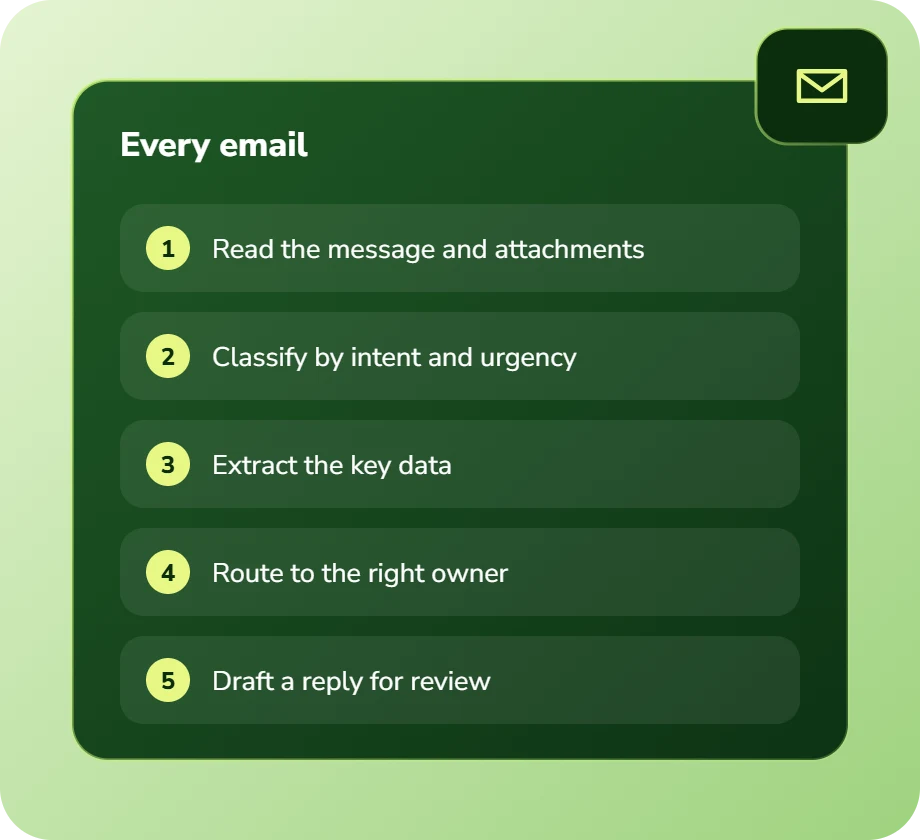
AI email automation uses language models to read incoming email, classify it by type and urgency, extract relevant data, route it to the correct owner or system, and draft contextual replies for human review. It differs from rule-based filtering in handling free-text email that does not match fixed patterns.

7+
Years building AI systems
240+
Projects delivered
4.8
Avg. months to payback
38
U.S. states served
The Problem

The mailbox that is really a queue nobody manages

Shared mailboxes accumulate everything: orders, complaints, invoices, questions, supplier notices and spam. Rules catch some of it, then break when a sender changes their subject line format.

So the actual triage is a person reading each message and deciding what it is. On a few hundred messages a day that is most of someone’s job, and it is the first thing to slip when they are away.

Our Approach

Read, classify, route, draft

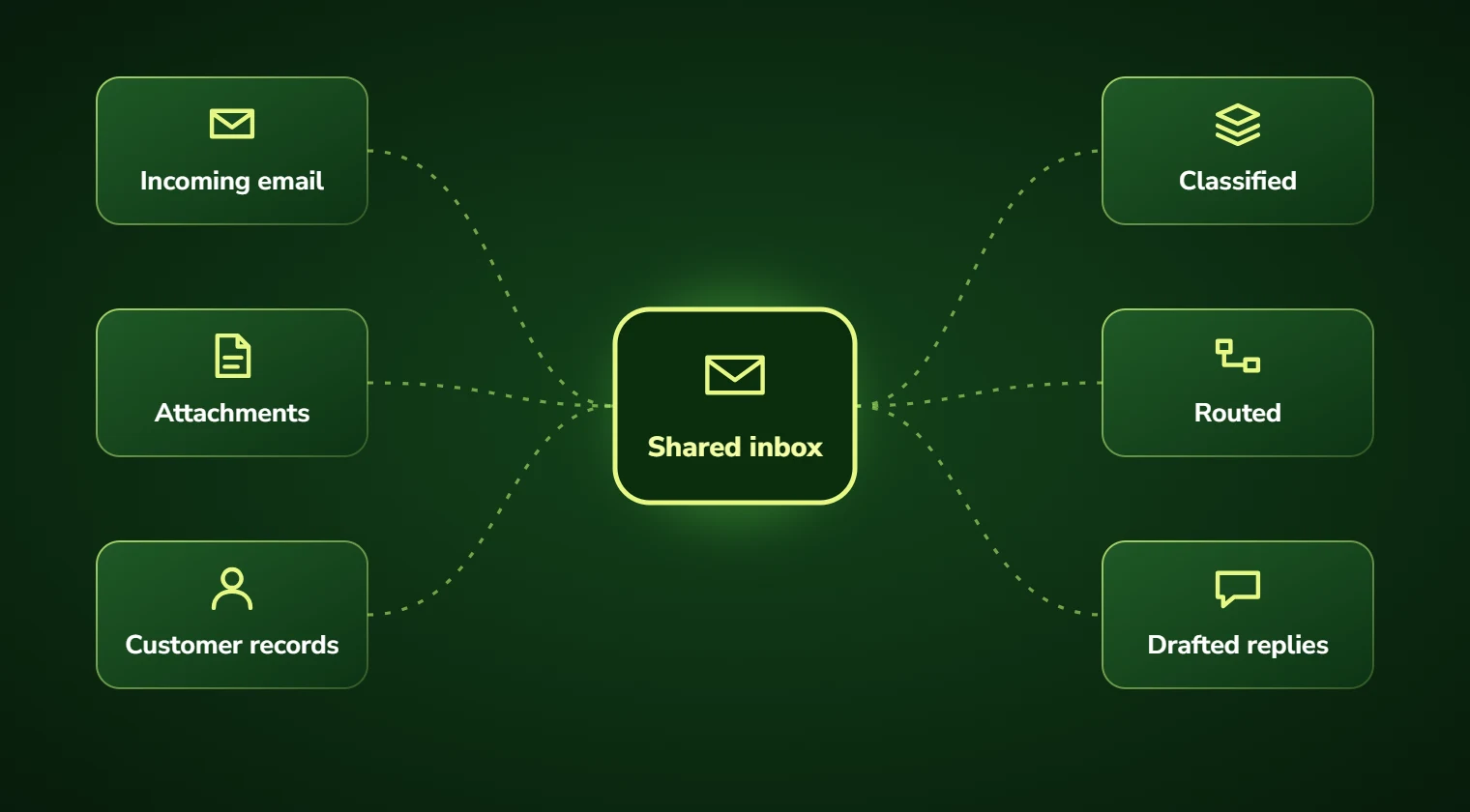
A language model reads each message the way a person would, understanding intent regardless of phrasing, classifies it, extracts the data that matters, and routes it to the right owner or straight into the relevant system.

Routine replies are drafted with real context attached. A person reviews and sends, which keeps judgement in the loop while removing the reading and typing.

Illustration of alternating messages in a chat conversation
Service Overview

AI email automation: scope and deliverables

Classification and routing is the foundation, and usually the largest single saving. Getting a message to the right person immediately eliminates the reassignment loops that dominate resolution time.

Extraction is the second layer: pulling order numbers, dates, quantities and reference numbers out of free-text email and into your systems without re-keying.

Drafting is the third. Replies generated with account context and policy grounding, presented for review. We recommend keeping a human on send for anything customer-facing, at least initially.

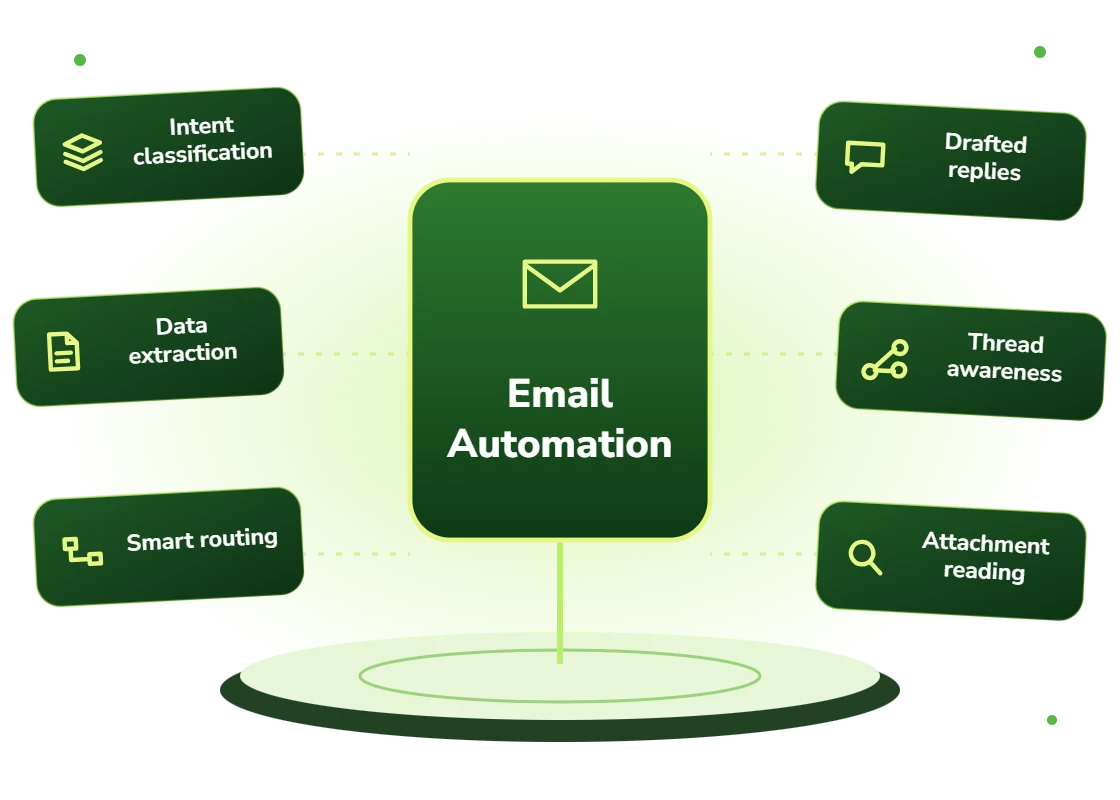
  • Classification by intent, urgency and type regardless of phrasing
  • Data extraction from free-text email into structured system records
  • Routing to the right owner, team or system with duplicate detection
  • Drafted replies grounded in account context and policy
  • Thread awareness so replies within a conversation are handled correctly
  • Attachment processing: documents read and extracted alongside the message
Right Fit

Who needs this

Any team with a shared mailbox receiving more than a hundred messages a day where triage is manual. The saving scales directly with volume.

It is particularly valuable where email is the primary intake channel for operational work, orders, claims, service requests, because delays in triage delay the whole downstream process.

  • Teams managing shared mailboxes above roughly 100 messages daily
  • Operations where email is the primary intake for orders or requests
  • Businesses whose email rules break constantly on format changes
  • Companies where email volume spikes seasonally beyond staffing
  • Teams re-keying information from email into operational systems
  • Organizations where slow email triage delays downstream processes
Benefits

Benefits of email automation

Triaged before anyone opens it

The mailbox your team opens at 9am is already sorted, prioritized and enriched.

Routing that survives format changes

Understanding intent rather than matching patterns, so a new subject line format does not break everything.

No re-keying from email

Order numbers, dates and quantities extracted into systems directly rather than typed by hand.

Faster first response

Routine replies drafted immediately, so response time stops depending on queue position.

Volume spikes absorbed

Seasonal surges handled without temporary staff who need retraining every year.

Human judgement retained

Drafts reviewed before sending, so speed improves without removing the check that matters.

Problems We Solve

Business challenges this solves

01

Mailbox triage as a full-time job

Someone reading every message to decide what it is. Classification removes the reading.

02

Rules breaking on format changes

Filters failing when a sender changes their template. Intent understanding is robust to that.

03

Data re-keyed from email

Order details typed from message into system. Extraction writes them directly.

04

Urgent messages buried

Time-critical email lost in volume. Priority classification surfaces it immediately.

05

Seasonal volume spikes

Peaks requiring temporary staff. Automation absorbs the surge without onboarding cost.

06

Triage collapsing when someone is away

A process dependent on one person. Automation removes the single point of failure.

What's Included

Features and deliverables

Everything below is in scope on a standard engagement. Nothing here is an upsell discovered halfway through the build.

01

Intent classification

Messages categorized by type, urgency and required action based on meaning rather than keyword rules.

02

Structured extraction

Reference numbers, dates, quantities and entities pulled from free text into system fields with validation.

03

Attachment processing

PDFs, images and spreadsheets attached to messages read and extracted alongside the email body.

04

Routing and assignment

Messages assigned to the right owner, team or system, with duplicate and thread detection.

05

Reply drafting

Contextual drafts grounded in account data and policy, presented for review with sources shown.

06

Priority and SLA handling

Urgency detection with escalation timers so time-critical messages are not buried in volume.

07

System integration

Extracted data written directly into your ERP, CRM, ticketing or operational system.

08

Monitoring and analytics

Volume, classification accuracy, response time and category trends reported continuously.

Technology Stack

Technologies we use for email automation

We are not tied to one vendor. Model and infrastructure choices are made on accuracy, cost per task, latency, and where your data is allowed to live.

Language Models
C
Claude (Anthropic)
G
GPT (OpenAI)
G
Gemini (Google)
L
Llama
M
Mistral
A
Azure OpenAI Service
Agent & Orchestration
M
Model Context Protocol
L
LangGraph
L
LangChain
L
LlamaIndex
T
Temporal
C
Celery
Data & Backend
P
Python
T
TypeScript / Node.js
P
PostgreSQL
S
Snowflake
d
dbt
A
Apache Airflow
Business Systems
S
Salesforce
H
HubSpot
N
NetSuite
M
Microsoft 365
S
Slack
Z
Zapier / Make
How We Work

Our AI development process

The same five stages on every engagement, so you always know what happens next and what you get at the end of it.

01

Discovery

We interview the people doing the work, map the workflow end to end, and audit the systems and data behind it.

02

AI Strategy

Every opportunity gets scored on cost to build, time to value, and annual savings, then ranked.

03

Pilot Build

We ship the top-ranked automation as a fixed-scope pilot so you see real output before committing further budget.

04

Implementation

Integration with your live systems, staff training, human-in-the-loop review gates, and a documented rollback path.

05

Optimization

Monthly accuracy reviews, prompt and retrieval tuning, and a written report on hours and dollars saved.

Timeline

How long it takes

A typical first engagement, week by week. Complex integrations and regulated environments extend this, and we say so during discovery rather than after.

Weeks 1 to 2

Discovery and scoping

Process observation, systems audit, data review, and a written estimate of cost and expected saving before anything is built.

Week 3

Design sign-off

Architecture, data handling rules, review thresholds and success measures agreed in writing.

Weeks 4 to 7

Build and integration

Development against your real data, connected to your live systems, with weekly demos rather than a single reveal.

Week 8

Parallel run and testing

The system runs alongside the existing process so accuracy can be compared directly before anyone depends on it.

Weeks 9 to 10

Launch and handover

Cutover with a rollback path, staff training, full documentation, then 30 days of included tuning.

Who We Work With

Industries we deliver email automation for

Logistics & Supply Chain

Document processing, carrier communication, exception handling, and inventory rebalancing.

Insurance

First-notice-of-loss intake, claims triage, policy Q&A, and fraud signal detection.

Professional Services

Proposal drafting, timesheet capture, research synthesis, and client reporting at scale.

Retail & E-commerce

Product data enrichment, demand forecasting, support deflection, and personalized merchandising.

Construction

Bid takeoffs, submittal review, RFI drafting, and field-report summarization.

Real Estate

Lead qualification, listing content, transaction coordination, and 24/7 inquiry response.

Healthcare

Intake, prior authorization, clinical documentation, and revenue-cycle workflows built to respect HIPAA boundaries.

Financial Services

Document extraction, reconciliation, KYC support, and audit-ready reporting with full traceability.

Use Cases

Real-world use cases

01

Order intake by email

Purchase orders arriving as email and attachments, extracted and entered into the ERP automatically.

02

Claims first notice

Claim notifications classified by severity, extracted and routed to the right adjuster within minutes.

03

Service request triage

Inbound requests classified by trade and urgency, routed to the right team with details extracted.

04

Supplier communication

Delivery notices, invoices and exceptions processed and reconciled against expected records.

05

Enquiry routing

General enquiries classified and routed to the right department rather than forwarded manually.

06

Document collection chasing

Tracking which requested documents have arrived and automatically chasing what is outstanding.

Why DevSolutionsAI

Why choose DevSolutionsAI for email automation

Business case before build

Every recommendation carries an estimated cost, timeline, and annual savings figure. If the math does not work, we say so before you spend.

Vendor-neutral by design

We resell nothing and take no platform commissions. Model and infrastructure choices are made on fit, cost, and your data-residency rules.

Fixed-scope pilots

The first engagement is a defined deliverable at a defined price, not an open-ended retainer that quietly grows each quarter.

Built for handover

You own the code, the prompts, the infrastructure, and the documentation. No lock-in to a proprietary wrapper you cannot leave.

Human-in-the-loop where it counts

Anything customer-facing, clinical, financial, or legal gets a review gate, a confidence threshold, and a logged audit trail.

Security reviewed early

Data flow diagrams, retention rules, and access boundaries are agreed in week one, not retrofitted after your security team objects.

Get Started

Find out what email automation would cost you, before you commit to anything

Every engagement is quoted after a short discovery, so you get a fixed written price built around your actual volumes rather than a rate card that assumes someone else’s business.

The first call is thirty minutes and free. Bring one workflow. We will tell you what it is likely costing you each year, roughly what automating it would take, and whether we think it is worth doing at all.

  • A written savings estimate before any paid work
  • Fixed scope and fixed price, agreed up front
  • Full ownership of everything we build for you
  • An honest recommendation when the numbers do not work
What clients typically see
Across recent projects
Staff hours saved each week
31
Months to payback
4.8
Client retention
94%
Response to enquiries
4 hrs

Figures are internal measurements across recent engagements, reported to every client monthly in writing.

Illustrative project scenario

Illustrative project scenario

Freight forwarder · 1,400 emails/day

Triaging 1,400 daily emails before anyone arrives

Challenge. A freight forwarder’s operations mailbox received roughly 1,400 messages daily: booking requests, customs queries, delivery exceptions, invoices and supplier notices. Two staff spent most of their day triaging, and the queue built up whenever either was absent. Existing rules covered about 30% and broke regularly.

What we built. Classification by message type and urgency, extraction of shipment references, dates and quantities into the transport management system, routing to the correct desk, and drafted replies for the routine categories. Exceptions and anything customer-facing route to a person with the extracted data attached.

Outcome. Around 84% of messages are now classified and routed without human involvement. The two triage staff moved to exception handling and customer relationships. Median time from message arrival to correct desk fell from 3.5 hours to under 4 minutes.

84%
Auto-classified and routed
3.5h → 4m
Time to correct desk
1,400
Emails handled daily
2
Staff moved to higher-value work

Illustrative project scenario. The figures demonstrate how a project could be scoped and evaluated; they are not verified client results or an audited average.

Client Feedback

What clients say about working with us

31
Avg. staff hours saved weekly
4.8
Avg. months to payback
94%
Client retention
4
Hour response to enquiries
Common Questions

Email Automation FAQs

Not unless you explicitly choose to enable that, and we default to off. Standard design drafts the reply and routes it for a person to review and send. Some clients later enable autonomous sending for narrow, low-risk categories such as acknowledgements or status confirmations, decided per category after observing draft quality over time.
Typically 90 to 96% on well-defined categories, but we measure it on your actual historical email during discovery rather than quoting a general figure. Categories where accuracy is insufficient get a mandatory review step rather than being automated. Accuracy is monitored continuously afterwards, so drift is visible.

Yes, through Microsoft Graph and the Gmail API respectively, and with most other mail systems through IMAP or their own APIs. We work with your existing email infrastructure rather than requiring migration.

Processed alongside the message. PDFs, images and spreadsheets attached to an email are read and extracted, which matters because in operational email the actual content is frequently in the attachment rather than the body, a purchase order or a delivery note, for example.

PII detection and redaction can run before any content reaches a model, processing can be deployed inside your own infrastructure, and retention rules are configured to your policy. For regulated clients we frequently deploy entirely within their environment so email content never leaves it.

A classification and routing implementation typically runs $22,000 to $45,000 depending on category complexity and how many systems receive extracted data. Adding reply drafting increases that. Running cost is usually well under a cent per message. For a mailbox above several hundred messages daily, payback is generally three to six months.

Service Areas

Email Automation across the United States

We deliver email automation remotely to clients nationwide, with on-site workshops available in major metros.

Ready to scope your email automation project?

Book a free 30-minute consultation. Bring one workflow and leave with a realistic estimate of what it would cost to automate and what it would save.

Free 30-minute consultation
Fixed-scope pilots
U.S.-based team
Custom, not off-the-shelf
SOC 2-aligned practices
ROI tracked in writing
Free 30-minute AI consultation