Knowledge Base AI

AI knowledge base development for your documentation

Our AI knowledge base development work helps staff and customers find answers in approved documentation. We connect retrieval to source references, access controls and a process for keeping content current.

Free 30-minute consultation
Fixed-scope pilots
U.S.-based team
Custom, not off-the-shelf
SOC 2-aligned practices
ROI tracked in writing
What is an AI knowledge base?

An AI knowledge base uses retrieval and language models to answer questions directly from an organization’s documentation, rather than returning a list of documents to read. It searches by meaning rather than keywords, synthesizes an answer from the relevant sources, cites where each part came from, and reports which questions it could not answer so gaps can be filled.

7+
Years building AI systems
240+
Projects delivered
4.8
Avg. months to payback
38
U.S. states served
The Problem

The knowledge exists and nobody can find it

Most organizations do not have a documentation problem so much as a retrieval problem. The policy was written. It lives in a wiki, a shared drive, an old intranet and a Slack thread, in four slightly different versions.

So people stop searching and ask the person who knows. That works until the person who knows is on leave, or leaves, at which point the knowledge leaves with them.

Our Approach

One place to ask, answers with sources

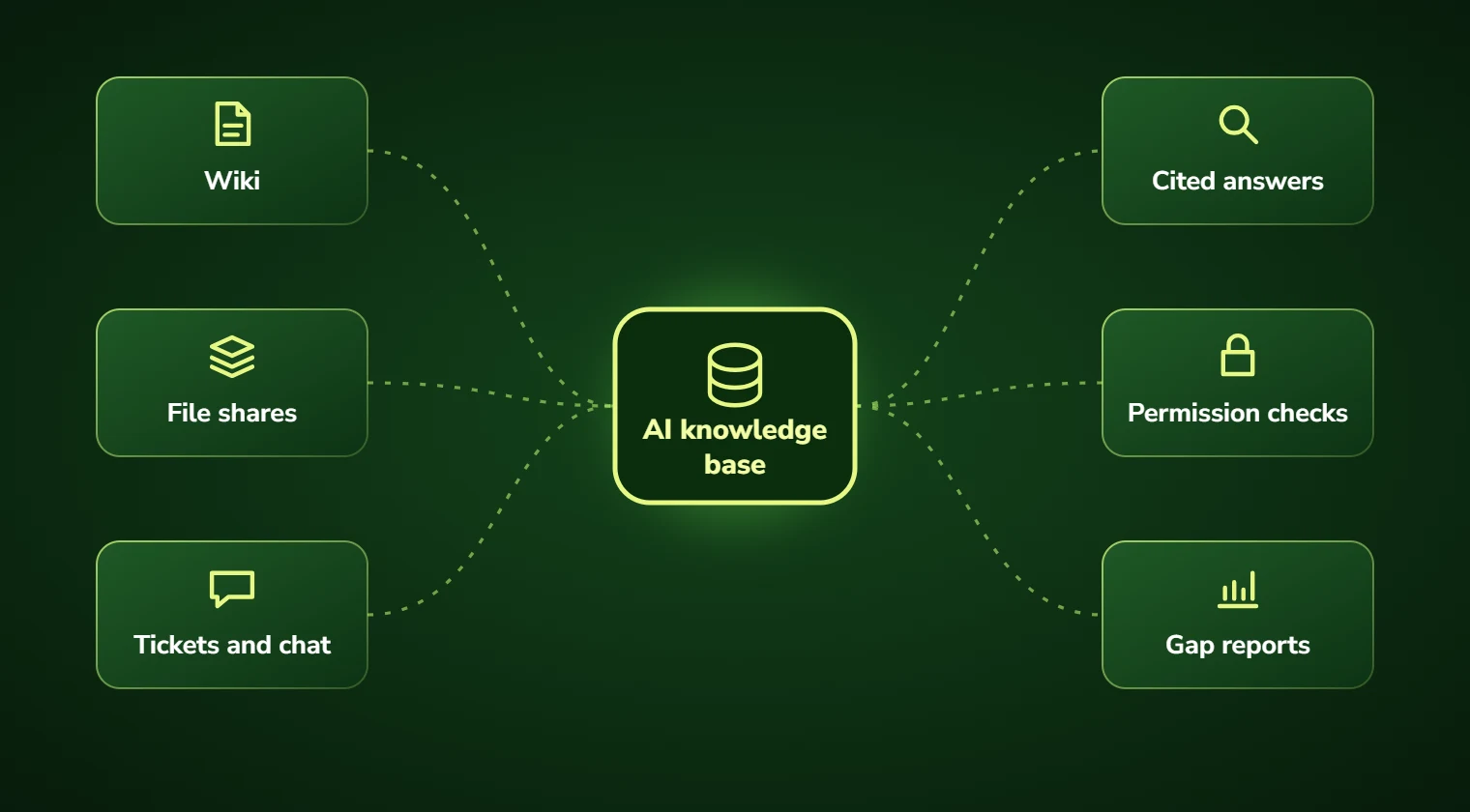
We index everything, wiki, drive, ticketing system, past resolved cases, and put a single question box over it. Ask in plain language, get a direct answer with citations back to the source documents.

Crucially, the system reports what it could not answer. Those unanswered questions are the most valuable output, because they tell you exactly where documentation is missing rather than leaving you to guess.

Search illustration
Conceptual search illustration
Service Overview

AI knowledge base development: scope and deliverables

Internal knowledge bases target the questions staff ask each other: how do we handle this exception, what is the approval threshold, who signs this off, has this come up before.

Customer-facing knowledge bases target the questions that otherwise become support tickets. The architecture is largely the same; the differences are in permission handling, tone and how conservatively the system refuses to answer.

Both benefit from the same underappreciated feature: gap reporting. Knowing that forty people asked about parental leave and the system had nothing to cite is more actionable than any usage dashboard.

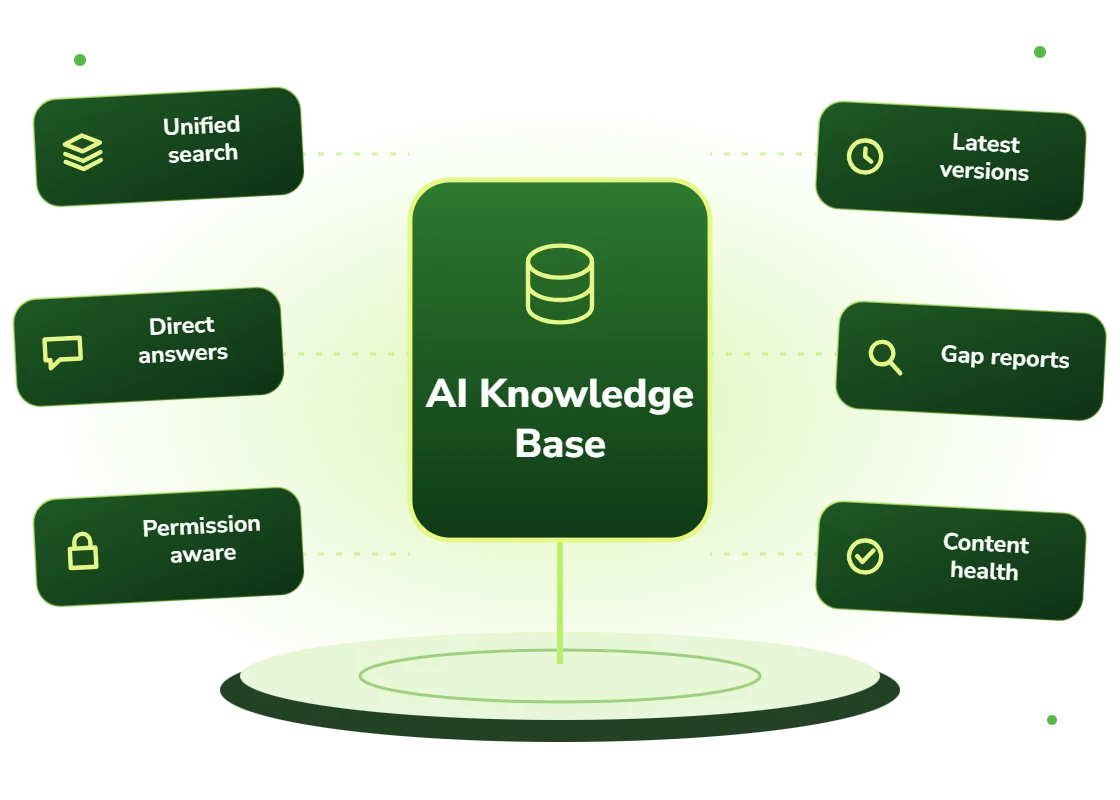
  • Unified indexing across wiki, file shares, ticketing, email and chat archives
  • Natural-language questions answered directly with citations
  • Permission-aware retrieval respecting existing access controls
  • Version and recency awareness so superseded content is not cited as current
  • Gap reporting: the questions people asked that could not be answered
  • Content health: duplicates, contradictions and stale documents identified
Right Fit

Signs you need this

The clearest one is a person who gets interrupted constantly because they are the only one who knows something. That is a single point of failure disguised as a helpful colleague.

The second is onboarding time. If a new hire takes months to become productive largely because they do not know where anything is, the cost of that is recurring and usually uncounted.

  • Staff interrupting colleagues for answers that exist in documentation
  • Long onboarding times driven by not knowing where information lives
  • Documentation spread across four systems in slightly different versions
  • Knowledge concentrated in individuals approaching retirement or departure
  • Support agents asking senior colleagues the same questions repeatedly
  • Customers raising tickets for questions the help centre already answers
Benefits

Benefits of knowledge base AI

Answers, not search results

A direct answer with citations rather than a list of documents someone still has to read and reconcile.

Fewer interruptions

The colleague who knows everything stops being a help desk, which is usually worth more than the time saved asking.

Faster onboarding

New starters get answers without needing to know the organizational geography first.

Knowledge that stays

Documented and retrievable knowledge does not resign, retire, or take a two-week holiday.

Gaps made visible

Unanswered questions reported directly, telling you what to document instead of guessing.

Contradictions surfaced

Content health analysis finds the four versions of a policy that disagree with each other.

Problems We Solve

Business challenges this solves

01

One person is the knowledge base

Constant interruptions to a single expert. Documented knowledge made retrievable removes the dependency.

02

Search that returns nothing useful

Keyword search failing because nobody uses the documented terminology. Semantic search matches intent.

03

Four versions, all slightly different

The same policy in a wiki, a PDF and two drives. Contradiction detection surfaces them for consolidation.

04

Onboarding measured in months

New hires slow because they cannot find things. Immediate answers compress the ramp materially.

05

Documentation nobody maintains

Content decaying because nobody knows what matters. Gap and usage reporting shows what to fix first.

06

Retiring expertise

Decades of knowledge about to walk out. Structured capture plus retrieval preserves what is documented.

What's Included

Features and deliverables

Everything below is in scope on a standard engagement. Nothing here is an upsell discovered halfway through the build.

01

Multi-source indexing

Confluence, SharePoint, Notion, Google Drive, Slack, Zendesk, file shares and email archives indexed into one searchable layer.

02

Direct answer generation

Synthesized answers drawn from multiple sources with citations to each, rather than a ranked document list.

03

Permission-aware retrieval

Existing access controls enforced at retrieval time, so users only get answers from content they may see.

04

Recency and version handling

Effective dates and supersession respected, so retired policies are not surfaced as current guidance.

05

Gap and usage reporting

Questions asked that could not be answered, ranked by frequency, delivered as a documentation backlog.

06

Content health analysis

Duplicate, contradictory and stale content identified across sources so consolidation is targeted rather than speculative.

07

Chat and search integration

Available where people already work: Slack, Teams, the intranet, or inside your helpdesk tooling.

08

Feedback and correction loop

Users flag bad answers; flags route to a content owner with the source document identified for correction.

Technology Stack

Technologies we use for knowledge base AI

We are not tied to one vendor. Model and infrastructure choices are made on accuracy, cost per task, latency, and where your data is allowed to live.

Language Models
C
Claude (Anthropic)
G
GPT (OpenAI)
G
Gemini (Google)
L
Llama
M
Mistral
A
Azure OpenAI Service
Vector & Retrieval
P
Pinecone
W
Weaviate
Q
Qdrant
p
pgvector
E
Elasticsearch
A
Amazon OpenSearch
Data & Backend
P
Python
T
TypeScript / Node.js
P
PostgreSQL
S
Snowflake
d
dbt
A
Apache Airflow
Business Systems
S
Salesforce
H
HubSpot
N
NetSuite
M
Microsoft 365
S
Slack
Z
Zapier / Make
How We Work

Our AI development process

The same five stages on every engagement, so you always know what happens next and what you get at the end of it.

01

Discovery

We interview the people doing the work, map the workflow end to end, and audit the systems and data behind it.

02

AI Strategy

Every opportunity gets scored on cost to build, time to value, and annual savings, then ranked.

03

Pilot Build

We ship the top-ranked automation as a fixed-scope pilot so you see real output before committing further budget.

04

Implementation

Integration with your live systems, staff training, human-in-the-loop review gates, and a documented rollback path.

05

Optimization

Monthly accuracy reviews, prompt and retrieval tuning, and a written report on hours and dollars saved.

Timeline

How long it takes

A typical first engagement, week by week. Complex integrations and regulated environments extend this, and we say so during discovery rather than after.

Weeks 1 to 2

Discovery and scoping

Process observation, systems audit, data review, and a written estimate of cost and expected saving before anything is built.

Week 3

Design sign-off

Architecture, data handling rules, review thresholds and success measures agreed in writing.

Weeks 4 to 7

Build and integration

Development against your real data, connected to your live systems, with weekly demos rather than a single reveal.

Week 8

Parallel run and testing

The system runs alongside the existing process so accuracy can be compared directly before anyone depends on it.

Weeks 9 to 10

Launch and handover

Cutover with a rollback path, staff training, full documentation, then 30 days of included tuning.

Who We Work With

Industries we deliver knowledge base AI for

Professional Services

Proposal drafting, timesheet capture, research synthesis, and client reporting at scale.

SaaS & Technology

AI features inside your product, support deflection, onboarding assistants, and usage analytics.

Healthcare

Intake, prior authorization, clinical documentation, and revenue-cycle workflows built to respect HIPAA boundaries.

Manufacturing

Quality inspection, maintenance prediction, supplier communication, and production scheduling.

Financial Services

Document extraction, reconciliation, KYC support, and audit-ready reporting with full traceability.

Legal

Contract review, discovery triage, and matter intake with citation-checked outputs and attorney sign-off gates.

Construction

Bid takeoffs, submittal review, RFI drafting, and field-report summarization.

Education

Enrollment support, content generation, tutoring assistants, and administrative automation.

Use Cases

Real-world use cases

01

Internal IT and HR helpdesk

Staff questions about policy, benefits, access and equipment answered directly, with tickets raised only where action is needed.

02

Support agent assist

Agents querying product documentation and prior resolved tickets without leaving the helpdesk interface.

03

Field technician reference

Technicians querying service manuals and prior repair records from a phone while on site.

04

Clinical protocol lookup

Staff querying current approved protocols with citations to the controlling document version.

05

Sales enablement

Reps querying product capability, pricing rules and competitive positioning during live calls.

06

Retirement knowledge capture

Structured capture of departing experts’ knowledge combined with existing documentation into a retrievable base.

Why DevSolutionsAI

Why choose DevSolutionsAI for knowledge base AI

Business case before build

Every recommendation carries an estimated cost, timeline, and annual savings figure. If the math does not work, we say so before you spend.

Vendor-neutral by design

We resell nothing and take no platform commissions. Model and infrastructure choices are made on fit, cost, and your data-residency rules.

Fixed-scope pilots

The first engagement is a defined deliverable at a defined price, not an open-ended retainer that quietly grows each quarter.

Built for handover

You own the code, the prompts, the infrastructure, and the documentation. No lock-in to a proprietary wrapper you cannot leave.

Human-in-the-loop where it counts

Anything customer-facing, clinical, financial, or legal gets a review gate, a confidence threshold, and a logged audit trail.

Security reviewed early

Data flow diagrams, retention rules, and access boundaries are agreed in week one, not retrofitted after your security team objects.

Get Started

Find out what knowledge base AI would cost you, before you commit to anything

Every engagement is quoted after a short discovery, so you get a fixed written price built around your actual volumes rather than a rate card that assumes someone else’s business.

The first call is thirty minutes and free. Bring one workflow. We will tell you what it is likely costing you each year, roughly what automating it would take, and whether we think it is worth doing at all.

  • A written savings estimate before any paid work
  • Fixed scope and fixed price, agreed up front
  • Full ownership of everything we build for you
  • An honest recommendation when the numbers do not work
What clients typically see
Across recent projects
Staff hours saved each week
31
Months to payback
4.8
Client retention
94%
Response to enquiries
4 hrs

Figures are internal measurements across recent engagements, reported to every client monthly in writing.

Illustrative project scenario

Illustrative project scenario

Industrial manufacturer · 900 staff, 60 years of records

Capturing what three retiring engineers knew

Challenge. A manufacturer faced the retirement of three engineers with a combined ninety years of tenure. Much of what they knew about legacy product lines, discontinued tooling and customer-specific modifications existed only in their heads or in unindexed personal files.

What we built. A structured capture programme interviewing the three engineers against a question set derived from actual support requests, combined with indexing of sixty years of drawings, service records, engineering change notices and correspondence. The resulting knowledge base answers natural-language questions with citations, and reports gaps weekly.

Outcome. Queries that previously required interrupting one of the three engineers are now answered directly in the majority of cases. Gap reporting in the first quarter identified 140 recurring questions with no documented answer, which became a prioritized capture backlog before the engineers departed.

60 yrs
Of records indexed
140
Knowledge gaps identified
3
Retiring experts captured
~75%
Queries answered directly

Illustrative project scenario. The figures demonstrate how a project could be scoped and evaluated; they are not verified client results or an audited average.

Client Feedback

What clients say about working with us

31
Avg. staff hours saved weekly
4.8
Avg. months to payback
94%
Client retention
4
Hour response to enquiries
Common Questions

Knowledge Base AI FAQs

Wiki search returns documents matching keywords; you still have to read them and reconcile any contradictions. An AI knowledge base returns an answer synthesized from the relevant sources with citations, and it matches on meaning rather than exact words, so someone asking about “time off” finds the policy filed under “annual leave entitlement”. It also reports what it could not answer, which no search box does.

Then the first output is a map of exactly how bad, which is genuinely useful. The gap report tells you which questions people are asking that nothing answers, ranked by frequency, so documentation effort goes where it matters instead of being spread evenly. If the knowledge is almost entirely undocumented, we will tell you that capture needs to come before search rather than indexing an empty shelf.
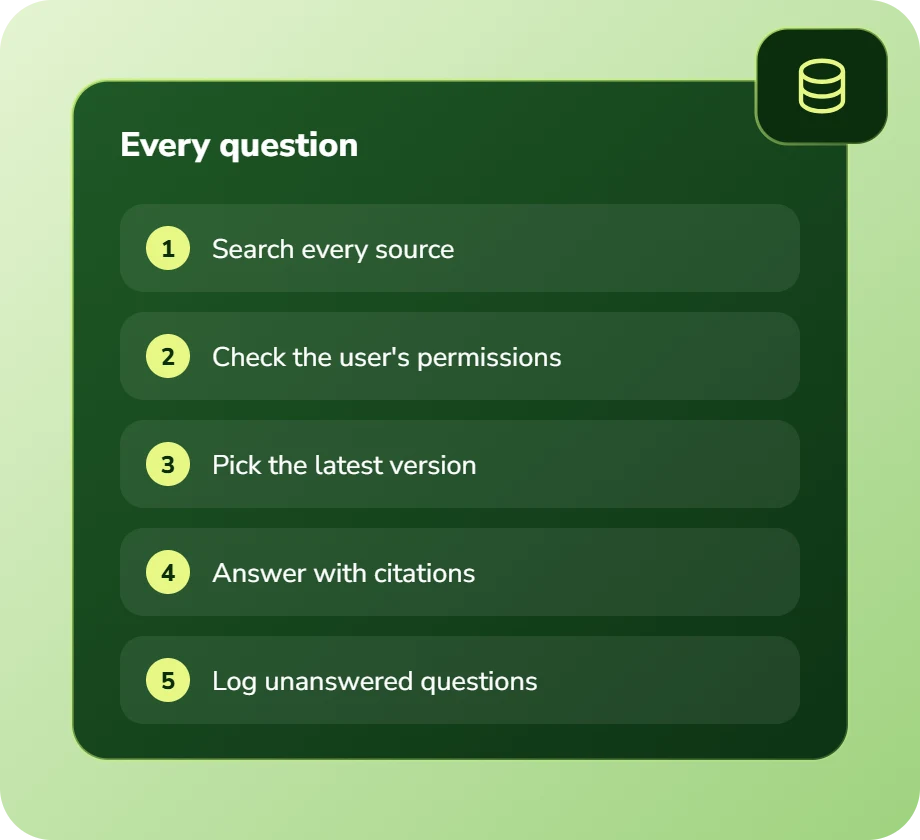
Yes, and filtering happens before retrieval rather than after. A user’s question only searches content they are entitled to see, so HR material does not surface for someone who should not have it. Filtering after retrieval is a common shortcut and a genuine data-leak risk because the model has already processed the content.

Wherever they already work, Slack, Microsoft Teams, your intranet, or embedded in your helpdesk. Adoption depends heavily on this. A knowledge base people have to remember to visit gets used far less than one that answers in the channel where the question would otherwise be asked.

Effective dates and supersession relationships are captured during indexing, and retrieval prefers current versions while marking historical ones explicitly. Where a document has no clear version signal we surface that uncertainty in the answer rather than presenting it confidently, which is usually enough for a reader to check.

An internal knowledge base over two or three content sources typically runs $24,000 to $45,000 and takes six to eight weeks. Adding more sources, permission integration and chat deployment increases that. Running cost is usually $500 to $2,500 monthly depending on query volume and corpus size.

Service Areas

Knowledge Base AI across the United States

We deliver knowledge base ai remotely to clients nationwide, with on-site workshops available in major metros.

Ready to scope your knowledge base AI project?

Book a free 30-minute consultation. Bring one workflow and leave with a realistic estimate of what it would cost to automate and what it would save.

Free 30-minute consultation
Fixed-scope pilots
U.S.-based team
Custom, not off-the-shelf
SOC 2-aligned practices
ROI tracked in writing
Free 30-minute AI consultation