AI Accounting Automation

Accounting automation services for firms doing the same work across fifty clients

Our accounting automation services help firms manage bookkeeping, document collection and workpaper preparation across client systems. We assess recurring tasks and exceptions before choosing AI or rules-based automation.

Free 30-minute consultation
Fixed-scope pilots
U.S.-based team
Custom, not off-the-shelf
SOC 2-aligned practices
ROI tracked in writing
What is AI accounting automation?

AI accounting automation applies language and vision models to accounting workflows: coding transactions to the correct accounts, extracting data from receipts and statements, chasing client documentation, preparing workpapers and drafting review notes. It suits multi-client firms particularly because it adapts to each client’s chart of accounts rather than requiring uniform rules.

7+
Years building AI systems
240+
Projects delivered
4.8
Avg. months to payback
38
U.S. states served
The Problem

The same work, fifty times, slightly differently

An accounting firm runs broadly the same processes across every client, but each has a different chart of accounts, a different bookkeeping system, and a different level of organization in what they send you.

Rules-based automation struggles with that because the rules would have to be rebuilt per client. So coding stays manual, document chasing stays manual, and capacity caps how many clients a firm can serve.

Our Approach

Learn each client, apply the pattern

AI coding learns each client’s chart of accounts and historical coding decisions, so it applies that client’s conventions rather than a generic rule set. New clients start producing useful suggestions within a period or two.

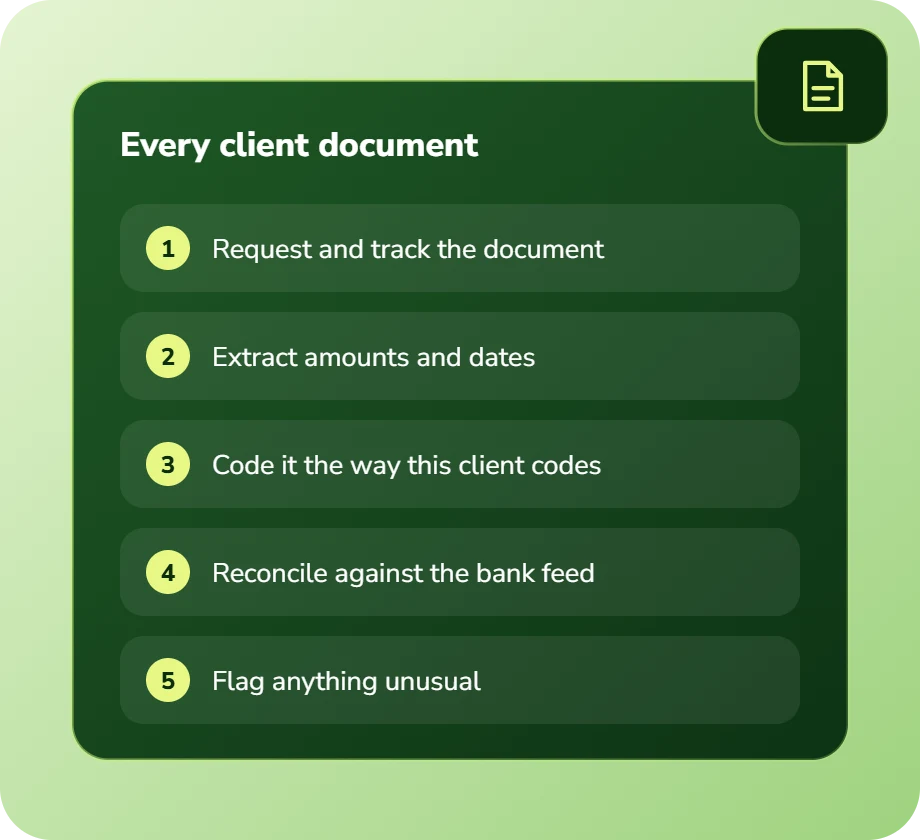
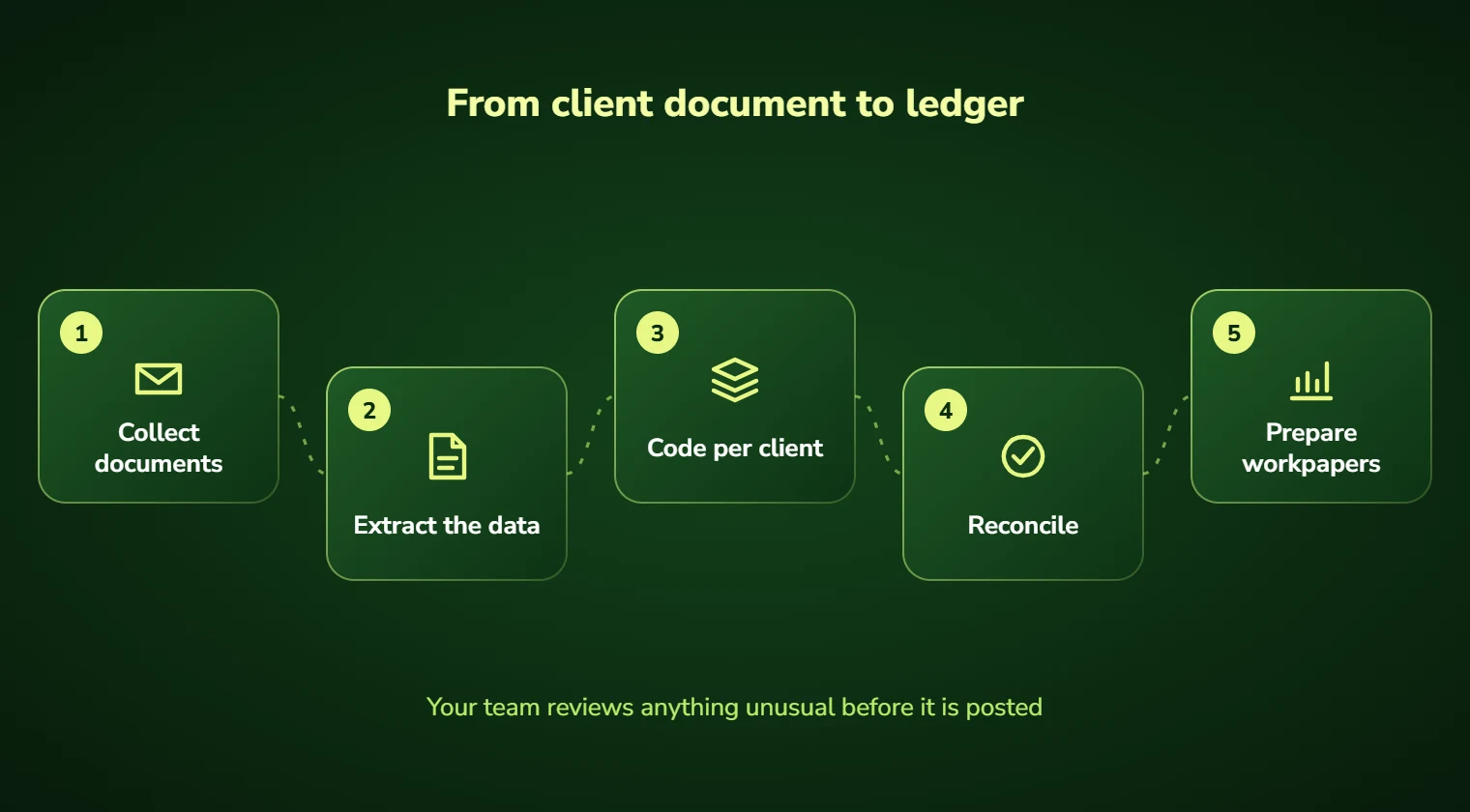
Document chasing, extraction and workpaper preparation follow the same logic: the process is common, the specifics are per client, and that combination is exactly what these models handle well.

Diagram showing information extracted from a document into structured fields
Service Overview

Accounting automation services: scope and deliverables

Transaction coding is the largest volume item. Learning from each client’s historical decisions produces materially better accuracy than generic rules, and confidence scoring means only uncertain items need review.

Client document collection is the largest time sink in most firms. Automated chasing of missing documents, with tracking of what has arrived and what is outstanding, removes work nobody enjoys and clients respond to better than to a partner’s email.

Workpaper preparation and review-note drafting complete the picture, turning preparation into review across a substantial share of engagements.

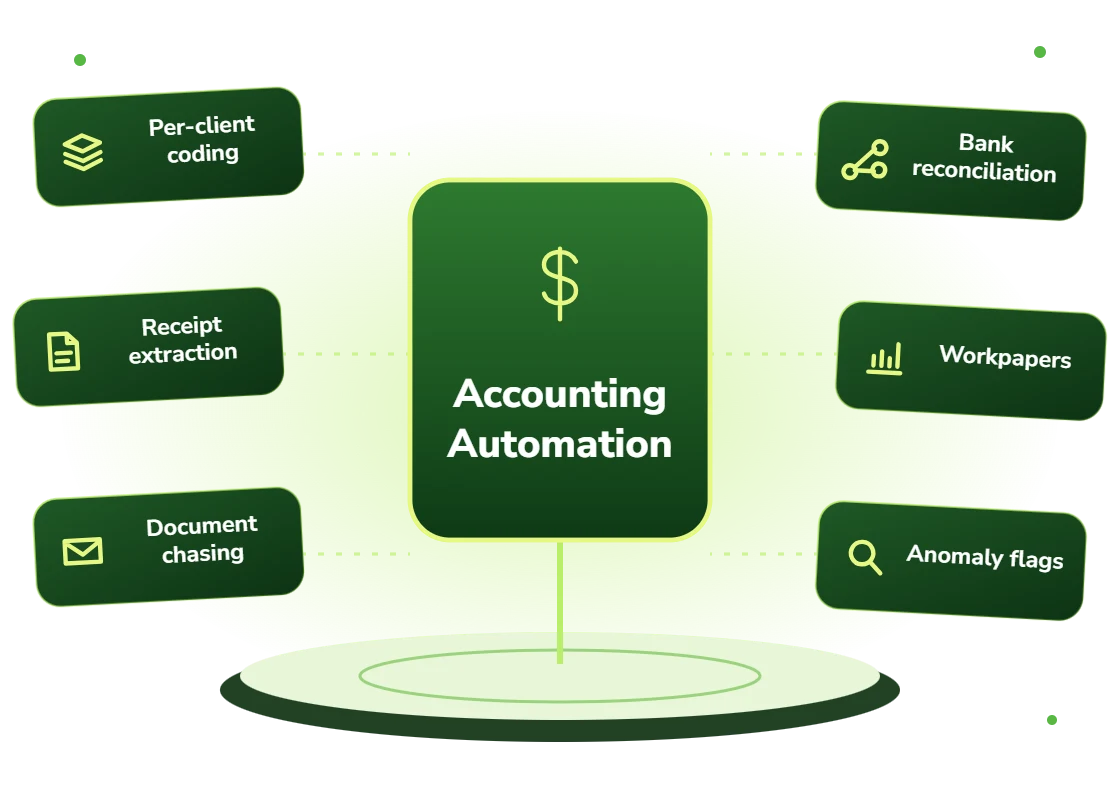
  • Transaction coding learned per client from historical decisions
  • Receipt and statement extraction across formats and quality levels
  • Automated client document chasing with arrival tracking
  • Bank feed categorization and reconciliation support
  • Workpaper preparation and supporting schedule assembly
  • Anomaly flagging: unusual transactions, coding inconsistencies, missing periods
Right Fit

Who this suits

Accounting and bookkeeping firms whose capacity is constrained by preparation work rather than by client demand. That is most firms during busy season.

And internal accounting teams in multi-entity businesses, where the same variation problem exists across subsidiaries rather than across clients.

  • Accounting and bookkeeping firms constrained by preparation capacity
  • Firms whose busy season requires temporary staff every year
  • Practices spending significant time chasing client documentation
  • Multi-entity businesses with varying charts of accounts
  • Firms wanting to serve more clients without proportional hiring
  • Teams where senior staff spend time on preparation rather than review
Benefits

Benefits of accounting automation

Coding that learns each client

Per-client conventions applied from historical decisions rather than generic rules that fit nobody well.

Document chasing handled

Automated, polite, persistent chasing of missing client documents, which clients respond to better than partner emails.

Capacity without hiring

More clients served per staff member, which for most firms is the binding constraint on growth.

Busy season without temps

Seasonal volume absorbed without recruiting and retraining temporary staff every year.

Preparation becomes review

Senior staff reviewing prepared work rather than preparing it, which is where their value actually is.

Anomalies surfaced early

Unusual transactions and coding inconsistencies flagged during the period rather than at year end.

Problems We Solve

Business challenges this solves

01

Coding rules that fit no client well

Generic automation failing on client-specific charts. Per-client learning handles the variation.

02

Chasing clients for documents

Weeks spent requesting the same items repeatedly. Automated chasing removes the task.

03

Busy season staffing

Temporary staff recruited and retrained annually. Automation absorbs the peak instead.

04

Seniors doing preparation

Expensive staff on low-value work. Automated preparation shifts them to review.

05

Capacity capping client growth

Unable to take clients without hiring. Higher throughput per person changes the equation.

06

Errors found at year end

Coding problems discovered too late. In-period anomaly flagging catches them earlier.

What's Included

Features and deliverables

Everything below is in scope on a standard engagement. Nothing here is an upsell discovered halfway through the build.

01

Per-client coding models

Transaction coding learned from each client’s chart of accounts and historical decisions, improving as more periods are processed.

02

Receipt and statement extraction

Data captured from receipts, bank statements and supplier documents across formats, including photographs and poor scans.

03

Document collection automation

Tracking what has been requested and received per client, with automated reminders and escalation.

04

Bank feed processing

Automatic categorization of bank feed transactions with confidence scoring and review routing.

05

Workpaper preparation

Supporting schedules and workpapers assembled from ledger data ready for review.

06

Anomaly detection

Unusual amounts, duplicate entries, coding inconsistencies and missing period data flagged during the period.

07

Multi-system support

Working across QuickBooks, Xero, Sage, NetSuite and other client systems from one workflow.

08

Review queue

Low-confidence items surfaced with the source document and reasoning attached for rapid accountant decision.

Technology Stack

Technologies we use for accounting automation

We are not tied to one vendor. Model and infrastructure choices are made on accuracy, cost per task, latency, and where your data is allowed to live.

Language Models
C
Claude (Anthropic)
G
GPT (OpenAI)
G
Gemini (Google)
L
Llama
M
Mistral
A
Azure OpenAI Service
Vector & Retrieval
P
Pinecone
W
Weaviate
Q
Qdrant
p
pgvector
E
Elasticsearch
A
Amazon OpenSearch
Data & Backend
P
Python
T
TypeScript / Node.js
P
PostgreSQL
S
Snowflake
d
dbt
A
Apache Airflow
Business Systems
S
Salesforce
H
HubSpot
N
NetSuite
M
Microsoft 365
S
Slack
Z
Zapier / Make
How We Work

Our AI development process

The same five stages on every engagement, so you always know what happens next and what you get at the end of it.

01

Discovery

We interview the people doing the work, map the workflow end to end, and audit the systems and data behind it.

02

AI Strategy

Every opportunity gets scored on cost to build, time to value, and annual savings, then ranked.

03

Pilot Build

We ship the top-ranked automation as a fixed-scope pilot so you see real output before committing further budget.

04

Implementation

Integration with your live systems, staff training, human-in-the-loop review gates, and a documented rollback path.

05

Optimization

Monthly accuracy reviews, prompt and retrieval tuning, and a written report on hours and dollars saved.

Timeline

How long it takes

A typical first engagement, week by week. Complex integrations and regulated environments extend this, and we say so during discovery rather than after.

Weeks 1 to 2

Discovery and scoping

Process observation, systems audit, data review, and a written estimate of cost and expected saving before anything is built.

Week 3

Design sign-off

Architecture, data handling rules, review thresholds and success measures agreed in writing.

Weeks 4 to 7

Build and integration

Development against your real data, connected to your live systems, with weekly demos rather than a single reveal.

Week 8

Parallel run and testing

The system runs alongside the existing process so accuracy can be compared directly before anyone depends on it.

Weeks 9 to 10

Launch and handover

Cutover with a rollback path, staff training, full documentation, then 30 days of included tuning.

Who We Work With

Industries we deliver accounting automation for

Professional Services

Proposal drafting, timesheet capture, research synthesis, and client reporting at scale.

Financial Services

Document extraction, reconciliation, KYC support, and audit-ready reporting with full traceability.

Retail & E-commerce

Product data enrichment, demand forecasting, support deflection, and personalized merchandising.

Construction

Bid takeoffs, submittal review, RFI drafting, and field-report summarization.

Real Estate

Lead qualification, listing content, transaction coordination, and 24/7 inquiry response.

Healthcare

Intake, prior authorization, clinical documentation, and revenue-cycle workflows built to respect HIPAA boundaries.

Manufacturing

Quality inspection, maintenance prediction, supplier communication, and production scheduling.

Logistics & Supply Chain

Document processing, carrier communication, exception handling, and inventory rebalancing.

Use Cases

Real-world use cases

01

Bookkeeping transaction coding

Bank feed and expense transactions coded per client convention with only uncertain items reviewed.

02

Client document collection

Automated tracking and chasing of outstanding records with clear status per client.

03

Receipt processing

Client receipt photographs extracted, categorized and matched against transactions.

04

Year-end workpaper prep

Supporting schedules assembled from ledger data so seniors review rather than prepare.

05

Multi-entity consolidation

Consistent treatment applied across entities with different charts of accounts.

06

Month-end anomaly review

Coding inconsistencies and unusual transactions surfaced during the period rather than at year end.

Why DevSolutionsAI

Why choose DevSolutionsAI for accounting automation

Business case before build

Every recommendation carries an estimated cost, timeline, and annual savings figure. If the math does not work, we say so before you spend.

Vendor-neutral by design

We resell nothing and take no platform commissions. Model and infrastructure choices are made on fit, cost, and your data-residency rules.

Fixed-scope pilots

The first engagement is a defined deliverable at a defined price, not an open-ended retainer that quietly grows each quarter.

Built for handover

You own the code, the prompts, the infrastructure, and the documentation. No lock-in to a proprietary wrapper you cannot leave.

Human-in-the-loop where it counts

Anything customer-facing, clinical, financial, or legal gets a review gate, a confidence threshold, and a logged audit trail.

Security reviewed early

Data flow diagrams, retention rules, and access boundaries are agreed in week one, not retrofitted after your security team objects.

Get Started

Find out what accounting automation would cost you, before you commit to anything

Every engagement is quoted after a short discovery, so you get a fixed written price built around your actual volumes rather than a rate card that assumes someone else’s business.

The first call is thirty minutes and free. Bring one workflow. We will tell you what it is likely costing you each year, roughly what automating it would take, and whether we think it is worth doing at all.

  • A written savings estimate before any paid work
  • Fixed scope and fixed price, agreed up front
  • Full ownership of everything we build for you
  • An honest recommendation when the numbers do not work
What clients typically see
Across recent projects
Staff hours saved each week
31
Months to payback
4.8
Client retention
94%
Response to enquiries
4 hrs

Figures are internal measurements across recent engagements, reported to every client monthly in writing.

Illustrative project scenario

Illustrative project scenario

CPA firm · 340 bookkeeping clients

Serving 40% more clients without adding preparation staff

Challenge. A CPA firm served 340 bookkeeping clients across QuickBooks, Xero and Sage. Transaction coding consumed most of the preparation team’s capacity, document chasing consumed the rest, and every busy season required temporary staff who needed retraining annually.

What we built. Per-client coding models learned from each client’s historical decisions and chart of accounts, with confidence scoring routing only uncertain transactions to review. Automated document collection tracking and chasing per client. Receipt extraction from client photograph submissions. Workpaper assembly from ledger data.

Outcome. Around 88% of transactions now code without review. The firm took on 40% more clients over eighteen months without adding preparation headcount. Temporary busy-season staffing was discontinued. Senior staff moved from preparation to review and advisory work.

88%
Transactions auto-coded
+40%
Clients, no new prep staff
340
Clients across 3 systems
0
Busy season temps needed

Illustrative project scenario. The figures demonstrate how a project could be scoped and evaluated; they are not verified client results or an audited average.

Client Feedback

What clients say about working with us

31
Avg. staff hours saved weekly
4.8
Avg. months to payback
94%
Client retention
4
Hour response to enquiries
Common Questions

Accounting Automation FAQs

It learns each one individually from that client’s historical coding decisions rather than applying generic rules. This is the main reason AI coding outperforms rules in a multi-client practice: rules would have to be built and maintained per client, which nobody has capacity for, whereas learning from existing history is essentially free once the pipeline exists.

It depends on how consistent the client’s historical coding was, and it improves with more periods. On a recent engagement 88% of transactions coded without review after the models had a few periods of history. We measure per client rather than quoting an average, and clients with messy historical coding start lower and improve as the corrected decisions feed back.

Yes, and typically across all of them simultaneously, which matters for firms whose clients use different systems. The workflow is unified even though the underlying ledgers differ, so staff work in one place rather than switching between three interfaces.

Yes, and clients generally respond better to it than to a partner’s email, automated reminders are perceived as process rather than pressure. The system tracks what has been requested and received per client, sends escalating reminders, and surfaces genuinely stuck clients for a human conversation rather than chasing indefinitely.
In our engagements it changes the ratio rather than replacing the role. Firms typically serve more clients per person rather than reducing headcount, because demand is rarely the constraint, capacity is. Bookkeepers move from coding routine transactions to handling exceptions, client relationships and advisory work.

An implementation covering coding, document collection and receipt processing typically runs $30,000 to $60,000 depending on how many ledger systems are involved. For a firm above roughly 100 bookkeeping clients, payback is commonly four to seven months measured on preparation capacity, before counting the busy-season staffing avoided.

Service Areas

Accounting Automation across the United States

We deliver accounting automation remotely to clients nationwide, with on-site workshops available in major metros.

Ready to scope your accounting automation project?

Book a free 30-minute consultation. Bring one workflow and leave with a realistic estimate of what it would cost to automate and what it would save.

Free 30-minute consultation
Fixed-scope pilots
U.S.-based team
Custom, not off-the-shelf
SOC 2-aligned practices
ROI tracked in writing
Free 30-minute AI consultation