AI Workflow Optimization

AI workflow optimization that measures before it recommends

AI workflow optimization starts by measuring where time goes inside a specific workflow. We examine task delays, handoffs and rework before recommending changes or automating the steps that remain.

Free 30-minute consultation
Fixed-scope pilots
U.S.-based team
Custom, not off-the-shelf
SOC 2-aligned practices
ROI tracked in writing
What is AI workflow optimization?

AI workflow optimization analyses how a workflow actually runs, identifies where time and rework accumulate, eliminates steps that no longer change outcomes, and applies AI or automation to what remains. It differs from automation alone in that the workflow is improved before it is automated.

7+
Years building AI systems
240+
Projects delivered
4.8
Avg. months to payback
38
U.S. states served
The Problem

Optimizing the step everyone complains about

When a workflow is painful, the improvement effort goes to the step people complain about. That step is frequently not where the time is; it is just the most irritating.

Meanwhile the actual cost sits in queue time between steps, in rework caused by incomplete information upstream, and in a handful of exceptions that consume disproportionate effort.

Our Approach

Measure first, and measure the whole thing

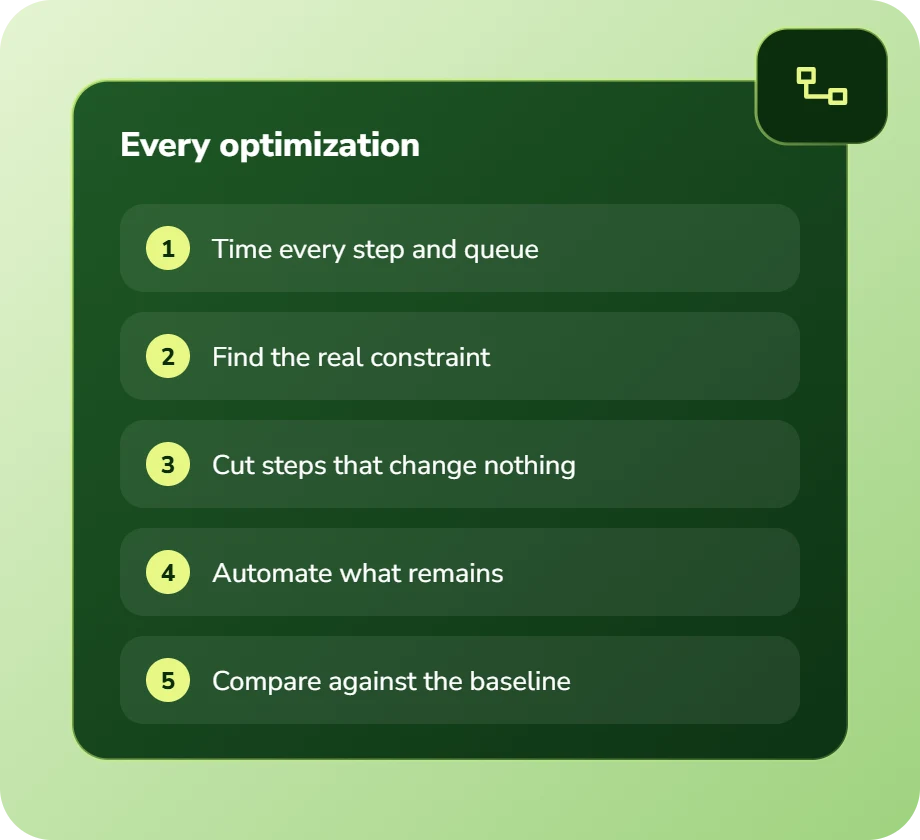
We instrument the workflow end to end: how long each step takes, how often each runs, how long items wait between steps, and what proportion require rework.

That produces a picture of where the cost actually is, which frequently contradicts what everyone assumed. Then optimization targets the real constraint rather than the loudest complaint.

Illustration of a roadmap with five numbered milestones
Service Overview

AI workflow optimization: scope and deliverables

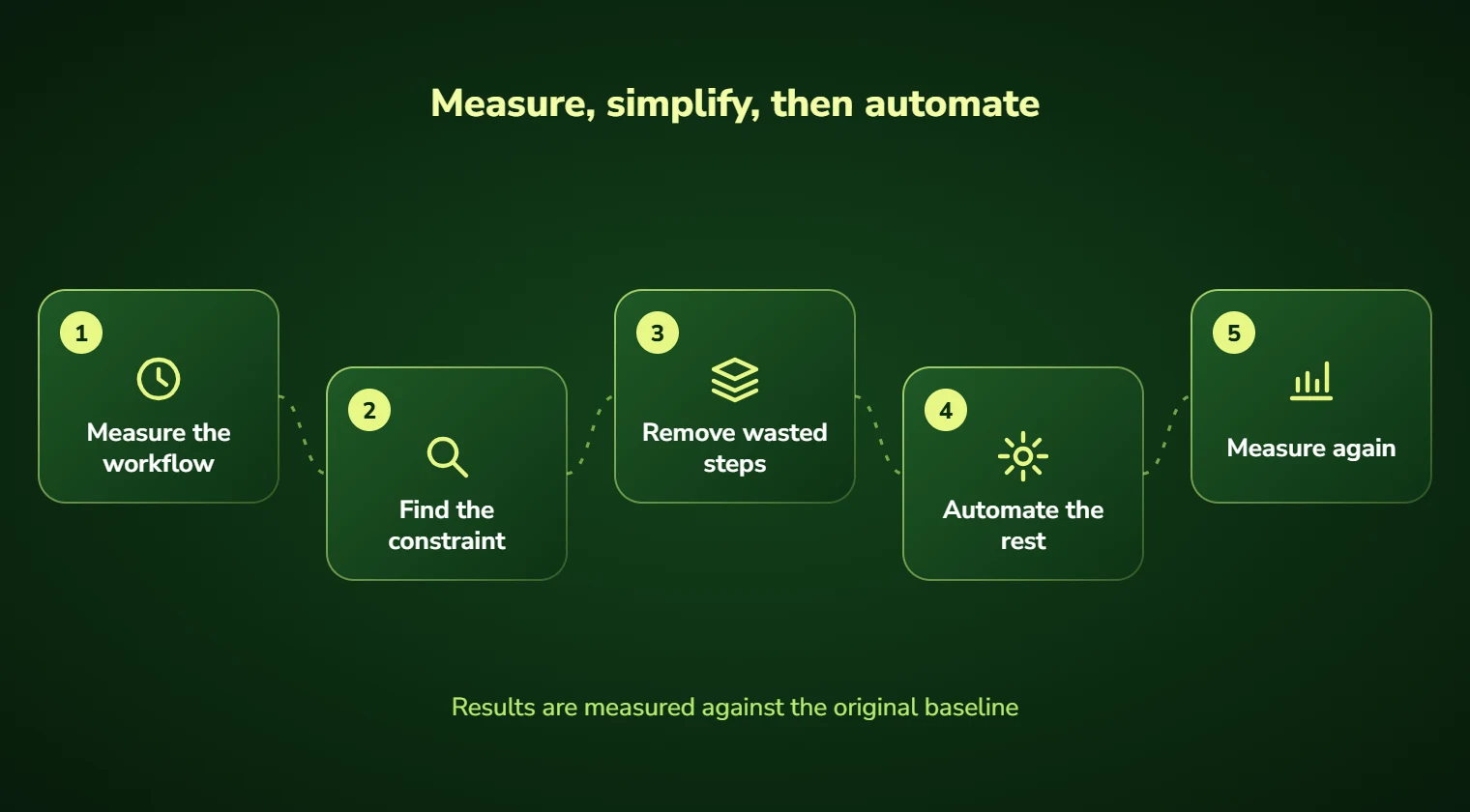
Measurement first: touch time, queue time, volume, rework rate and exception frequency per step. Most organizations have never had this and are surprised by it.

Then elimination. Steps that no longer change an outcome, approvals nobody reads, and forms whose fields are never used. This routinely recovers meaningful time before any technology is involved.

Then automation of what remains, which is a smaller and cheaper problem than automating the workflow as it stood.

And measurement afterwards against the same baseline, so the improvement is a number rather than an impression.

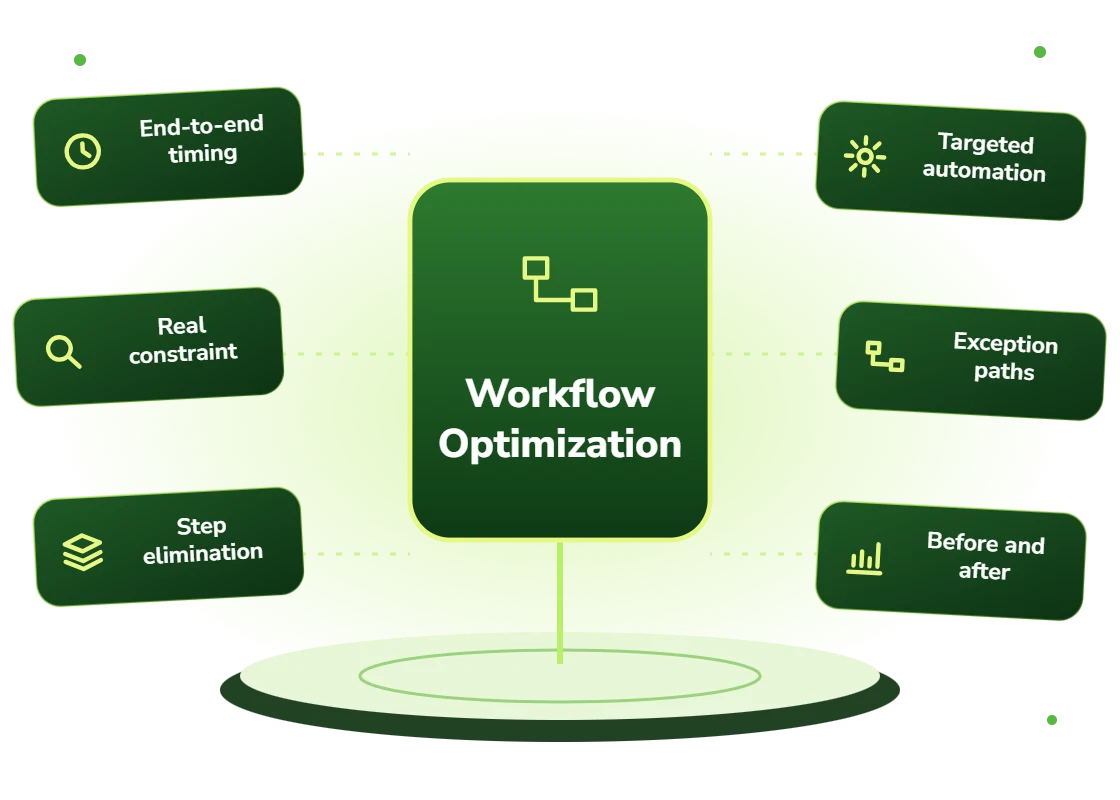
  • End-to-end measurement: touch time, queue time, volume, rework, exceptions
  • Constraint identification, which is frequently not where people assume
  • Elimination of steps that no longer change outcomes
  • Automation of what remains, scoped to the improved workflow
  • Exception path design, where disproportionate effort usually hides
  • Post-implementation measurement against the original baseline

For variation across an end-to-end business process, see AI process optimization. Workflow optimization focuses on a specific sequence of tasks and handoffs.

Right Fit

When to optimize rather than automate

When the workflow has grown organically over years and nobody has questioned its shape. That describes most workflows in most organizations.

And when a previous automation attempt delivered less than expected, which frequently means the automated workflow was the wrong one.

  • Workflows that have accumulated steps over years without review
  • Processes where nobody can state the end-to-end cycle time
  • Teams where a previous automation delivered less than expected
  • Operations with high rework rates and no diagnosis
  • Workflows where a small share of exceptions consume most of the effort
  • Processes about to be automated, where optimizing first reduces the build
Benefits

Benefits of AI workflow optimization

The real constraint identified

Measurement frequently contradicts assumption, and optimizing the wrong step is expensive.

Time recovered before any build

Eliminating steps that changed no outcome routinely recovers meaningful time at no technology cost.

Cheaper automation afterwards

Automating an optimized workflow is a smaller build than automating the accumulated version.

Exception paths designed

The small share of cases consuming most effort handled deliberately rather than ad hoc.

Improvement that is a number

Before-and-after measurement against the same baseline rather than an impression.

A documented workflow

The map itself is a deliverable, and for many teams it is the first accurate written record.

Problems We Solve

Business challenges this solves

01

Optimizing the wrong step

Effort going to the loudest complaint rather than the real constraint. Measurement resolves it.

02

Steps nobody can justify

Approvals and forms that exist from habit. Elimination recovers time before any build.

03

Rework with no diagnosis

Items looping back repeatedly. Root cause is usually incomplete information upstream.

04

Exceptions consuming everything

A small share of cases dominating effort. Explicit exception design contains it.

05

Automation that underdelivered

A bad workflow automated efficiently. Optimizing first would have cost less and delivered more.

06

No cycle time visibility

Nobody able to state how long the process takes. Instrumentation makes it measurable.

What's Included

Features and deliverables

Everything below is in scope on a standard engagement. Nothing here is an upsell discovered halfway through the build.

01

Workflow instrumentation

Measurement of touch time, queue time, volume, rework rate and exception frequency at every step.

02

Direct observation

Watching the work as performed rather than reading the procedure document, which describes something else.

03

Constraint analysis

Identification of where elapsed time and cost actually concentrate, with the data to support it.

04

Elimination workshop

A facilitated session with the people who own each step, removing those that no longer change outcomes.

05

Rework root cause

Analysis of why items loop back, which is almost always incomplete information from an upstream step.

06

Exception path design

Explicit handling for the cases that dominate effort rather than leaving them to individual improvisation.

07

Automation scoping

Automation designed for the optimized workflow, which is a materially smaller build.

08

Before-and-after measurement

The same measures taken after implementation so improvement is quantified honestly.

Technology Stack

Technologies we use for AI workflow optimization

We are not tied to one vendor. Model and infrastructure choices are made on accuracy, cost per task, latency, and where your data is allowed to live.

Language Models
C
Claude (Anthropic)
G
GPT (OpenAI)
G
Gemini (Google)
L
Llama
M
Mistral
A
Azure OpenAI Service
Agent & Orchestration
M
Model Context Protocol
L
LangGraph
L
LangChain
L
LlamaIndex
T
Temporal
C
Celery
Data & Backend
P
Python
T
TypeScript / Node.js
P
PostgreSQL
S
Snowflake
d
dbt
A
Apache Airflow
Business Systems
S
Salesforce
H
HubSpot
N
NetSuite
M
Microsoft 365
S
Slack
Z
Zapier / Make
How We Work

Our AI development process

The same five stages on every engagement, so you always know what happens next and what you get at the end of it.

01

Discovery

We interview the people doing the work, map the workflow end to end, and audit the systems and data behind it.

02

AI Strategy

Every opportunity gets scored on cost to build, time to value, and annual savings, then ranked.

03

Pilot Build

We ship the top-ranked automation as a fixed-scope pilot so you see real output before committing further budget.

04

Implementation

Integration with your live systems, staff training, human-in-the-loop review gates, and a documented rollback path.

05

Optimization

Monthly accuracy reviews, prompt and retrieval tuning, and a written report on hours and dollars saved.

Timeline

How long it takes

A typical first engagement, week by week. Complex integrations and regulated environments extend this, and we say so during discovery rather than after.

Weeks 1 to 2

Discovery and scoping

Process observation, systems audit, data review, and a written estimate of cost and expected saving before anything is built.

Week 3

Design sign-off

Architecture, data handling rules, review thresholds and success measures agreed in writing.

Weeks 4 to 7

Build and integration

Development against your real data, connected to your live systems, with weekly demos rather than a single reveal.

Week 8

Parallel run and testing

The system runs alongside the existing process so accuracy can be compared directly before anyone depends on it.

Weeks 9 to 10

Launch and handover

Cutover with a rollback path, staff training, full documentation, then 30 days of included tuning.

Who We Work With

Industries we deliver AI workflow optimization for

Professional Services

Proposal drafting, timesheet capture, research synthesis, and client reporting at scale.

Manufacturing

Quality inspection, maintenance prediction, supplier communication, and production scheduling.

Healthcare

Intake, prior authorization, clinical documentation, and revenue-cycle workflows built to respect HIPAA boundaries.

Logistics & Supply Chain

Document processing, carrier communication, exception handling, and inventory rebalancing.

Financial Services

Document extraction, reconciliation, KYC support, and audit-ready reporting with full traceability.

Insurance

First-notice-of-loss intake, claims triage, policy Q&A, and fraud signal detection.

Construction

Bid takeoffs, submittal review, RFI drafting, and field-report summarization.

Retail & E-commerce

Product data enrichment, demand forecasting, support deflection, and personalized merchandising.

Use Cases

Real-world use cases

01

Pre-automation optimization

Improving a workflow before automating it, which reduces both build cost and ongoing complexity.

02

Cycle time reduction

Cutting elapsed time by attacking queue time, which usually dominates touch time.

03

Rework elimination

Diagnosing and fixing the upstream causes of downstream rework loops.

04

Exception handling redesign

Containing the small share of cases that consume a disproportionate share of effort.

05

Post-automation diagnosis

Understanding why an automation delivered less than expected.

06

Capacity release

Recovering staff capacity without headcount change or technology investment.

Why DevSolutionsAI

Why choose DevSolutionsAI for AI workflow optimization

Business case before build

Every recommendation carries an estimated cost, timeline, and annual savings figure. If the math does not work, we say so before you spend.

Vendor-neutral by design

We resell nothing and take no platform commissions. Model and infrastructure choices are made on fit, cost, and your data-residency rules.

Fixed-scope pilots

The first engagement is a defined deliverable at a defined price, not an open-ended retainer that quietly grows each quarter.

Built for handover

You own the code, the prompts, the infrastructure, and the documentation. No lock-in to a proprietary wrapper you cannot leave.

Human-in-the-loop where it counts

Anything customer-facing, clinical, financial, or legal gets a review gate, a confidence threshold, and a logged audit trail.

Security reviewed early

Data flow diagrams, retention rules, and access boundaries are agreed in week one, not retrofitted after your security team objects.

Get Started

Find out what AI workflow optimization would cost you, before you commit to anything

Every engagement is quoted after a short discovery, so you get a fixed written price built around your actual volumes rather than a rate card that assumes someone else’s business.

The first call is thirty minutes and free. Bring one workflow. We will tell you what it is likely costing you each year, roughly what automating it would take, and whether we think it is worth doing at all.

  • A written savings estimate before any paid work
  • Fixed scope and fixed price, agreed up front
  • Full ownership of everything we build for you
  • An honest recommendation when the numbers do not work
What clients typically see
Across recent projects
Staff hours saved each week
31
Months to payback
4.8
Client retention
94%
Response to enquiries
4 hrs

Figures are internal measurements across recent engagements, reported to every client monthly in writing.

Illustrative project scenario

Illustrative project scenario

Professional services · client onboarding

Removing 40% of the cycle time before writing any code

Challenge. A firm wanted to automate client onboarding, which took an average of eighteen days. They had a quote from a vendor to automate the process as it stood. Nobody had measured where the eighteen days actually went.

What we built. Instrumentation found that touch time across the whole process was under four hours; the remaining seventeen-plus days were queue time waiting for approvals and documents. Three of eleven steps changed no outcome and were eliminated. Two approvals were consolidated. Only then was automation scoped, targeting the chasing and routing that caused the queue time.

Outcome. Cycle time fell to eleven days from the redesign alone, before any automation. The subsequent automation brought it to six. The automation build was materially smaller than the original vendor quote because it was automating a shorter, simpler process.

18 → 11 days
From redesign alone
11 → 6 days
After automation
3 of 11
Steps eliminated
<4 hrs
Actual touch time

Illustrative project scenario. The figures demonstrate how a project could be scoped and evaluated; they are not verified client results or an audited average.

Client Feedback

What clients say about working with us

31
Avg. staff hours saved weekly
4.8
Avg. months to payback
94%
Client retention
4
Hour response to enquiries
Common Questions

AI Workflow Optimization FAQs

Because you will pay to run unnecessary work efficiently. On a recent client onboarding engagement, eliminating three steps that changed no outcome cut cycle time by nearly 40% before any code was written, and the subsequent automation was materially cheaper because it was automating a shorter process. Automating first and optimizing later is the most expensive sequence.

Touch time, queue time, volume and rework rate per step, plus exception frequency and the effort exceptions consume. Queue time is usually the revelation, on that onboarding engagement, actual touch time across an eighteen-day process was under four hours. Everything else was waiting.
By asking of each step whether it changes an outcome, in a facilitated session with the people who own it. The people doing the work usually know exactly which steps are pointless and have wanted them removed for years. Resistance appears when a process is redesigned by people who have never performed it.

That is a legitimate and reasonably common outcome. For lower-volume workflows the elimination and redesign frequently delivers enough that automation would not justify its cost. We will tell you that rather than proceeding to a build you do not need.

Considerable overlap, and the difference is scope and emphasis. Workflow optimization typically targets one workflow with heavy measurement emphasis and may not result in automation at all. Business process automation covers end-to-end processes crossing departments and assumes a build. If you are unsure which fits, the analysis engagement will tell you.

A two to three week analysis with instrumentation and recommendations runs $9,000 to $18,000 and frequently identifies improvements you can implement yourselves. A combined optimize-and-automate engagement runs $42,000 to $85,000 depending on workflow complexity and integration requirements.

Service Areas

AI Workflow Optimization across the United States

We deliver AI workflow optimization remotely to clients nationwide, with on-site workshops available in major metros.

Ready to scope your AI workflow optimization project?

Book a free 30-minute consultation. Bring one workflow and leave with a realistic estimate of what it would cost to automate and what it would save.

Free 30-minute consultation
Fixed-scope pilots
U.S.-based team
Custom, not off-the-shelf
SOC 2-aligned practices
ROI tracked in writing
Free 30-minute AI consultation