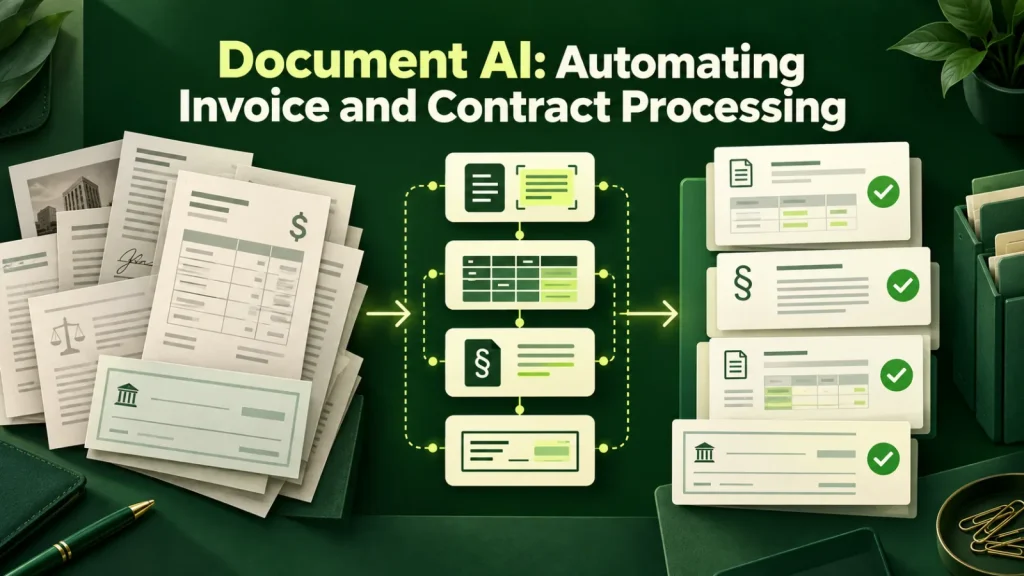
Document AI can extract and classify information from invoices, contracts and forms. This guide explains how it differs from OCR, where validation belongs and why you should test accuracy on your own documents. We also walk through the metric worth asking vendors for, a worked example and the rollout sequence we use with finance teams.
Why document AI is not just OCR
Optical character recognition converts images of text into machine-readable text, but accuracy still depends on document quality and layout. In other words, it turns an image of text into text. However, it does not tell you which number on an invoice is the total, which date is the due date, or whether the line items add up to what the supplier claims.
Document AI adds that understanding layer. It reads the extracted text with an awareness of what an invoice is, finds the fields you asked for regardless of where the supplier decided to put them, and returns structured data your accounting system can consume. It also flags when something looks wrong, which is where most of the value sits.
| Question | OCR alone | Document AI |
|---|---|---|
| Output | Raw text | Named fields, structured data |
| New supplier layout | Template breaks | Finds the fields anyway |
| Uncertain values | Not flagged | Flagged with a confidence score |
| Next step | Someone keys it in | Validation, then your system |
In practice, the two layers work together. Managed services such as Google Cloud’s Document AI and Amazon Textract package text extraction with field detection. Custom pipelines often add a language model on top for the harder fields, such as contract clauses.
Documents that automate well
The pattern is high volume, consistent purpose, variable layout:
- Supplier invoices. The classic case. Hundreds of formats, identical required fields, direct path into accounts payable.
- Purchase orders and delivery notes. Especially valuable when matched three-way against invoices automatically.
- Contracts and NDAs. Extracting parties, dates, renewal terms, liability caps and governing law into a searchable register.
- Claims and intake forms. Insurance first-notice-of-loss, patient intake, loan applications.
- Receipts and expenses. Low value per document, but the volume and the tedium make it one of the most appreciated automations internally.
On the other hand, a document type that shows up a few times a month rarely repays the setup and validation effort. By contrast, a type that arrives daily in dozens of layouts is where the technology earns its keep.
The document AI metric that matters
Vendors quote field-level extraction accuracy, typically 95% or higher, and the figure is usually honest. It is also close to useless on its own, because an invoice has perhaps twelve fields, and 95% per field means a meaningful share of documents contain at least one error.
The arithmetic also makes the point. If each of twelve fields were independently 95% accurate, only about 54% of invoices would come through with every field correct. Real errors are not fully independent, so treat that as an illustration, not a forecast.
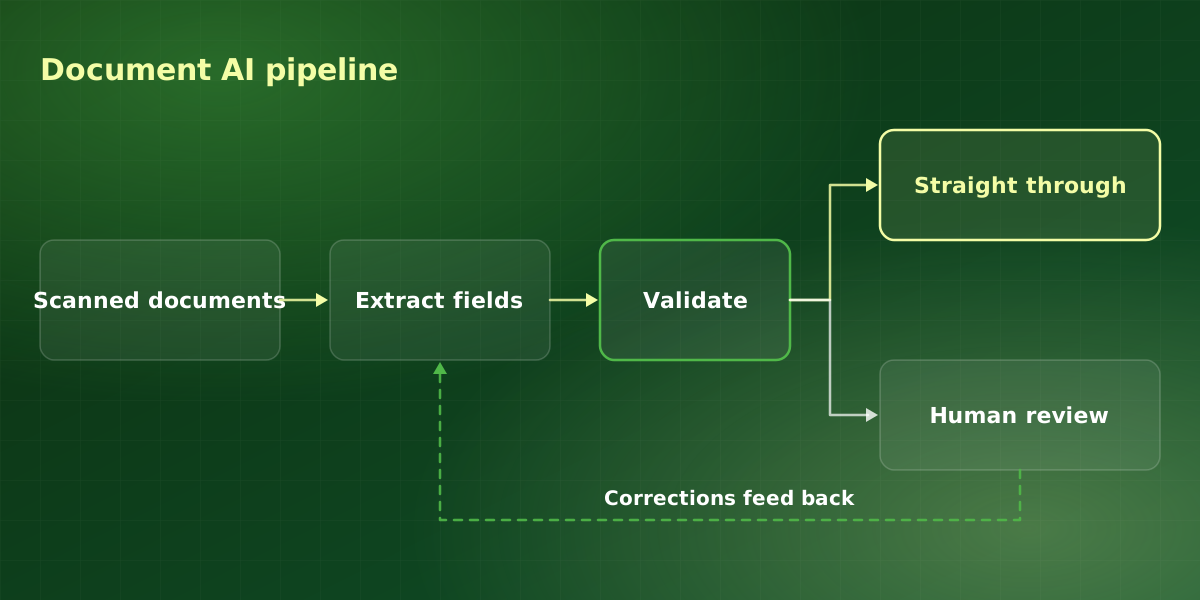
The number to ask for is the straight-through processing rate: what percentage of documents complete the entire workflow with no human touching them. Because it measures the whole workflow, it accounts for compounding errors, confidence thresholds and validation failures. A realistic target for invoices is 70% to 85% straight through, with the remainder surfacing for review.
However, this is not a disappointing result. Reviewing one invoice in five, with the uncertain field already highlighted, is dramatically faster than keying all of them.
Contracts need a different approach
Invoices are short and repetitive. Contracts, by contrast, are long, and the value you want is often a clause rather than a field. A renewal term might sit in a schedule, while an amendment signed later changes the liability cap. As a result, contract extraction works best when the system returns each value together with the exact passage it came from, so a reviewer can confirm it in seconds.
We also treat contract fields as review-by-default at the start. Then, once the correction rate for a given field stays low, that field can move to spot checks. Anything that feeds a legal decision should still go to the person who owns it; our guide to AI for legal teams and contract review covers that side in more depth.
Designing the workflow
The extraction is the easy part. Instead, the workflow around it decides whether finance trusts it.
-
Set confidence thresholds per field
A supplier name at 80% confidence is fine. A payment amount at 80%, however, is not. Thresholds should reflect the cost of that specific field being wrong, and they should be tunable without a redeploy.
-
Validate against what you already know
Does the supplier exist in your system? Does the total match the line items? Is there a matching purchase order? These checks catch more real errors than raising the extraction threshold does.
-
Route exceptions with the reason visible
A reviewer should see the document, the extracted values, the flagged field and why it was flagged, on one screen. Otherwise, reviewers will abandon any exception handling that requires opening three systems.
-
Feed corrections back into document AI
Every human correction is training data for the specific document types you actually receive. Systems that capture this improve month over month; systems that discard it plateau on day one.
How we roll out document AI
We follow the same sequence on every project, because it surfaces problems while they are still cheap to fix.
-
Collect a real sample
We start with a few hundred recent documents, including the ugly ones: faxed scans, phone photos, multi-page invoices and credit notes. Clean PDFs alone would overstate accuracy, so we avoid them.
-
List fields and the cost of error
Then, together with finance, we record each field, where it goes next and what happens if it is wrong. That list sets the confidence thresholds.
-
Measure document AI on the sample first
Before anything touches production, we run the pipeline on the sample and report the straight-through rate, the top exception reasons and the weakest fields.
-
Run document AI in parallel
For a few weeks, the system processes documents alongside the existing team. Staff compare results, and every disagreement becomes a correction or a new validation rule.
-
Go live with weekly monitoring
After the parallel run, the system takes the first pass. We track straight-through and correction rates weekly, since supplier layouts change without warning.
Pitfalls we see most often
When a document AI project disappoints, the cause is rarely the model itself. Instead, it is usually one of these:
- Testing on vendor samples. Demo documents are clean by design, so they flatter every vendor. Accuracy on your own documents is the only number that predicts your results.
- One threshold for every field. A single global setting either floods reviewers or lets costly errors through.
- Nobody owns the exception queue. Documents pile up, and the team quietly drifts back to manual entry.
- Skipping the integration conversation. Extraction that ends in a spreadsheet still needs someone to key it into the accounting system.
Frequently asked questions
How accurate is document AI on handwriting?
Do we need to train it on our documents?
Can it handle documents in multiple languages?
How does this integrate with our accounting system?
How long does a document AI project take?
For implementation support, explore our document AI services or discuss your workflow in a free consultation.