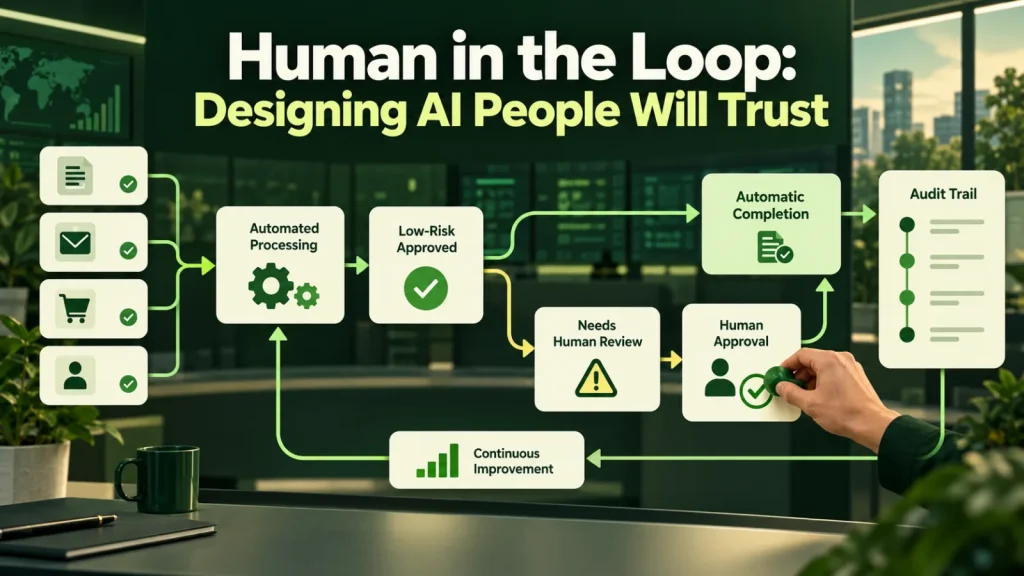
Human in the loop AI uses review at points where uncertainty or consequences require a person’s judgment. This guide explains how to place approval gates and design a review process that adds useful oversight. It also covers how to measure whether review is working and the staged rollout we use.
The human in the loop AI misconception worth killing first
There is a persistent idea that human review is a temporary crutch, something you remove once the model gets good enough. However, in regulated industries and in any workflow with real financial consequences, that is backwards. The review step is a permanent design feature, and the goal is not to remove it but to make it cheap.
The distinction that matters is between reviewing everything and reviewing what is uncertain or consequential. A system that surfaces the twelve documents it was unsure about, out of four hundred, has not failed to automate. Instead, it has automated 97% of the work and told you exactly where to look.
So the real design question for human in the loop AI is not whether people stay involved. Instead, it is how to make each review fast, focused and worth the reviewer’s time.
Where to put the gate
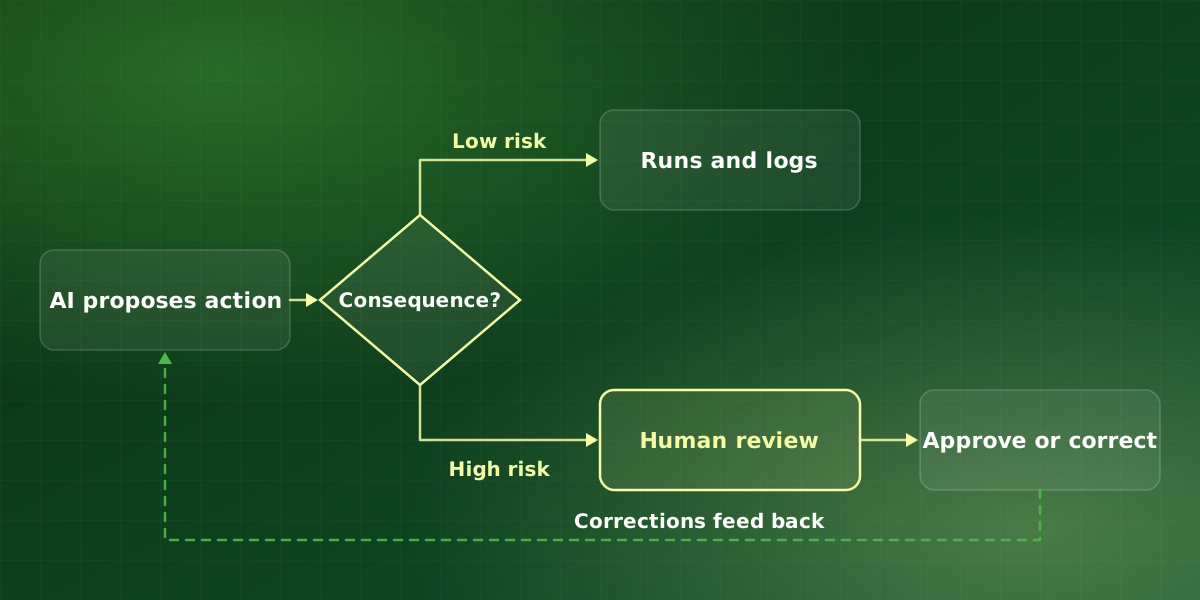
So decide by consequence and reversibility, not by how confident the model is. A useful rule of thumb for human in the loop AI: if you would be uncomfortable explaining an action to a customer after the fact, gate it before the fact.
| Action | Gate? | Why |
|---|---|---|
| Drafting an internal summary | No | Cheap to be wrong, obvious when it is |
| Classifying and routing a ticket | No | Easily corrected downstream |
| Updating a CRM field | No | Reversible, logged |
| Sending an external email | Yes | Irreversible, reputational |
| Issuing a refund or payment | Yes | Financial, hard to unwind |
| Changing a contract or policy record | Yes | Legal exposure |
| Deleting anything | Yes | Irreversible by definition |
Confidence still matters, but it decides which items inside a gated category reach a person first, not whether the gate exists. For example, every outbound refund waits for approval regardless of its score, while the least certain refunds sit at the top of the queue.
Between the two columns, there is also a useful middle ground: the soft gate. Here the action goes ahead, but a person sees it within a set window and can reverse it. That works well for reversible actions with a customer-visible side, such as a CRM status that triggers a follow-up task.
How review becomes rubber-stamping
The failure mode of human-in-the-loop is a reviewer who approves everything without reading it. It happens for predictable reasons, so it is also preventable:
- Volume too high. If a person must review two hundred items a day, they will stop reading by item thirty. Instead, gate on uncertainty and consequence, not on everything.
- No visible reasoning. If the reviewer cannot see why the system proposed this, they have nothing to evaluate and will default to approving.
- Approval is one click, rejection is a form. Whatever is easier will happen, so make correcting as fast as accepting.
- No feedback loop. If corrections change nothing, reviewers learn the work is theater, and behave accordingly.
- The reviewer is not the expert. Routing legal approvals to an operations coordinator produces signatures, not scrutiny.
Each of these is a design problem rather than a people problem. Therefore, the fix sits in the workflow itself: smaller queues, visible reasoning, one-gesture corrections and the right reviewer. Well-built human in the loop AI treats reviewer attention as the scarcest resource in the system.
Designing a human in the loop AI review step people use
-
Show the evidence next to the decision
The proposed action, the inputs it came from, and the specific passage or field that drove it, on one screen. Anything requiring the reviewer to open another system will be skipped under load.
-
Rank by uncertainty
Put the least confident items first. Reviewer attention is highest at the start of a queue, so spend it where it is most likely to catch something.
-
Make correction one gesture
Editing the proposed value should be as fast as accepting it. Every extra step increases the rubber-stamp rate measurably, so keep it to one.
-
Capture the correction as signal
Corrections are the highest-quality training data you will ever get, because they are specific to your real inputs. Store them with the reason and use them.
-
Monitor the approval rate
A reviewer approving 100% of items is not a sign of a perfect model. Instead, it is a sign that nobody is reading. Track it and investigate when it saturates.
Measuring whether review works
Approval rate is the headline number, but on its own it can mislead. Instead, track these five signals together:
- Approval rate. Shows whether reviewers are reading. However, a rate near 100% for weeks usually means they are not.
- Correction rate by category. Shows where the model is weak. If it stays flat despite feedback, the corrections are not reaching the system.
- Time per review. Shows whether the review screen helps. When it rises over time, the screen or the queue order needs work.
- Queue age. Shows whether volume fits capacity. Items waiting for days mean the gate is too wide or the team too small.
- Escaped errors. Shows what review missed. Any escaped error in a gated action deserves a short root-cause review.
We also review these monthly with the reviewers themselves. They usually know which screens slow them down before the numbers show it. In addition, involving them keeps the process from feeling like surveillance.
How we roll out human in the loop AI
We introduce human in the loop AI in stages, so that trust grows from evidence rather than from a launch date.
- Shadow mode. The system proposes actions but changes nothing. Meanwhile, reviewers compare its proposals with their own decisions, and we log every disagreement.
- Assisted, fully gated. Proposals now go live, but every one passes through review. This stage is also where we tune the review screen and the queue order.
- Selective gating. Categories with a consistently low correction rate move to spot checks. However, irreversible actions stay gated.
- Ongoing sampling. A reviewer still checks a sample of auto-approved items each week. That way drift shows up early, rather than in a customer complaint.
If you are building multi-step agents rather than single actions, the same staging applies, with gates on each tool that can act externally. Anthropic’s article on building effective agents is a practical read on keeping agent designs simple, and our comparison of AI agents and chatbots explains where each fits.
Frequently asked questions
Does human review cancel out the time saving?
Who should be the reviewer?
Can we remove the gates later?
How does this affect compliance approval?
Is human in the loop AI only for regulated industries?
For implementation support, explore our AI agent development services or discuss your workflow in a free consultation.
For a structured approach to AI risks and evaluation, consult the NIST AI Risk Management Framework.