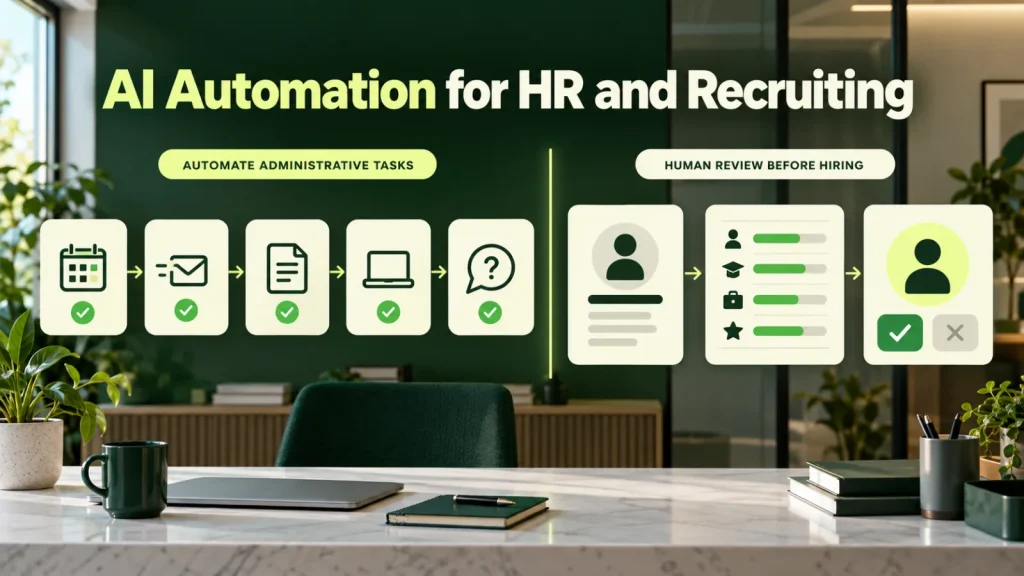
AI automation for HR can support scheduling, onboarding and policy administration. This guide separates those tasks from systems that evaluate people, where privacy, bias and employment requirements need closer review. It also includes a comparison table, a worked example and the way we scope HR projects.
AI automation for HR has two very different halves
One half is administrative: scheduling interviews, chasing documents, answering the same policy questions, onboarding paperwork, benefits enrollment support. Because this work follows clear rules, it automates cleanly, carries little regulatory risk, and is where most of the recoverable time sits.
By contrast, the other half involves evaluating people: screening resumes, ranking candidates, scoring interviews, predicting performance. This is legally constrained in the United States, increasingly so at state and city level, and the compliance cost frequently exceeds the efficiency benefit.
So treating these as one category is how HR teams end up with a tool that legal will not approve. The first design decision, then, is not which tool to buy. Instead, it is where you draw the line between the two halves.
The administrative half
Low risk, high volume, immediate return:
- Interview scheduling. Coordinating candidate and panel availability across calendars, including rescheduling. Consistently the single largest time drain in a recruiting function.
- Candidate communication. Acknowledgements, status updates and timely rejections. Automating rejections is also a kindness, since they are so often simply never sent.
- Employee questions. Policy, benefits, leave entitlement and process questions answered from your actual handbook, with citations, so employees can check the source.
- Onboarding coordination. Document collection, equipment requests, account provisioning and first-week scheduling, so nothing waits on a forgotten email.
- Job description drafting. First drafts from a role brief, with inclusive language checks applied before a recruiter edits them.
- Interview note structuring. Turning rough notes into a consistent structured record, which incidentally improves defensibility.
Unlike the evaluative half, each of these tasks has a clear right answer and a person who can check it. For that reason, AI automation for HR teams usually starts here, and many teams never need to go further.
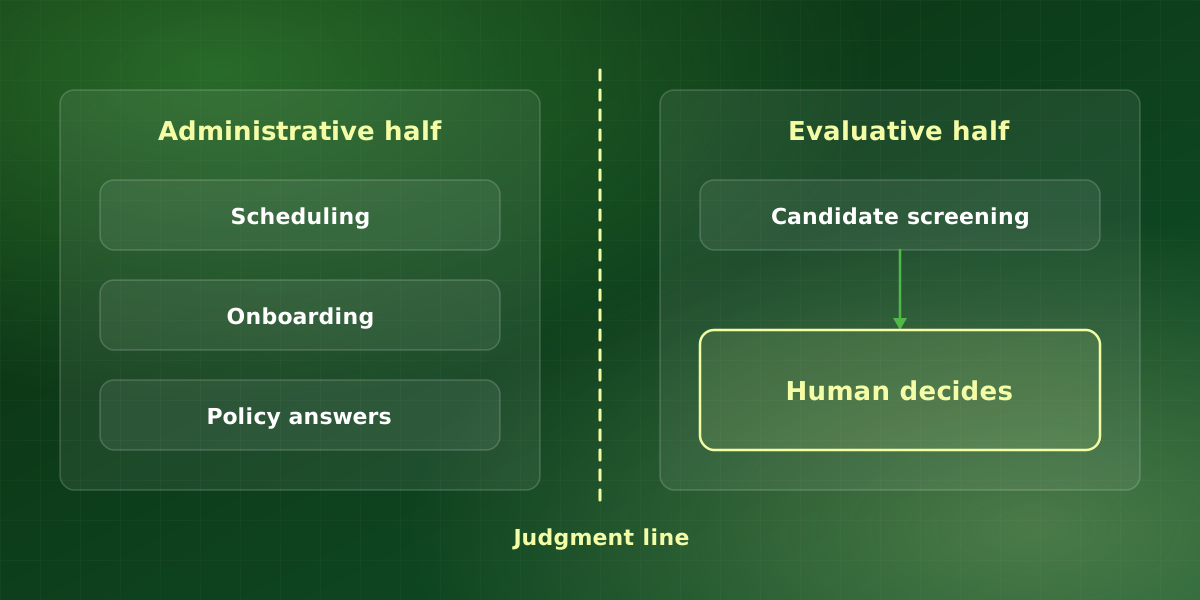
The evaluative half, and what the law requires
If you automate any part of candidate assessment in the U.S., these apply. So before you extend AI automation for HR into assessment, check each point below.
-
Bias auditing may be mandatory
New York City Local Law 144 requires an annual independent bias audit for automated employment decision tools, with published results and candidate notice. Other jurisdictions have followed with variations, so check your specific locations. For the New York rules, start with the city’s page on automated employment decision tools, then confirm the rules in each other location where you hire.
-
Candidate notice and alternatives
In addition, several jurisdictions require disclosing that an automated tool is used and offering an alternative process. So build this into the flow rather than bolting it on.
-
Disparate impact remains your liability
Title VII applies to outcomes regardless of mechanism. Therefore, a vendor’s assurance is not a defense; if the tool produces disparate impact, the employer is exposed. The EEOC has also launched an initiative on AI and algorithmic fairness, so expect scrutiny of outcomes, not just process.
-
Accommodation obligations persist
Automated assessment must accommodate disability under the ADA. Timed or video-based assessments raise this most acutely, so review them first.
-
Keep a human decision maker
Instead, use automation to organize information for a person, not to reject candidates automatically. In practice, this single design choice removes most of the exposure.
Where each HR task sits
| Task | Half | Risk | Our approach |
|---|---|---|---|
| Interview scheduling | Administrative | Low | Automate end to end |
| Policy questions | Administrative | Low | Answer with citations |
| Onboarding paperwork | Administrative | Low | Automate with HR sign-off |
| Interview notes | Administrative | Low | Structure; people conclude |
| Resume screening | Evaluative | High | Organize for a reviewer |
| Candidate ranking | Evaluative | High | Avoid, or audit first |
Overall, the pattern behind good AI automation for HR is simple. Where the output is a booking, a document or an answer from a handbook, automate it. When the output is an opinion about a person, however, keep a person in charge.
A worked example: interview scheduling
Take a hypothetical recruiting team of three that schedules 40 interviews a week. If each interview takes about 20 minutes of back-and-forth to book, then scheduling consumes over 13 hours a week before anyone has met a candidate. Reschedules then add more on top.
Instead, a calendar automation assistant reads panel calendars, offers candidates valid slots, books the video link and handles reschedules. Recruiters step in only when constraints conflict, for example when a panel member is away all week. As a result, most of those hours return to sourcing and candidate conversations, and candidates also get faster replies.
Above all, nothing in that workflow judges a candidate. That is why it tends to clear legal review quickly, and it is why we usually recommend it as the first build. So for teams that recruit at volume, AI automation for HR usually pays off fastest in scheduling.
How we scope AI automation for HR
We scope every AI automation for HR project the same way, so the judgment line is clear before anything is built.
- Map the workflow end to end. First, we list every step from requisition to first day and note who does it today.
- Draw the judgment line. Second, we mark each step as administrative or evaluative. Specifically, anything that rates, ranks or rejects a person goes on the evaluative side.
- Agree data handling up front. HR data is sensitive, so we confirm retention, access and vendor terms with your legal and IT teams before we build anything. For example, we check what each vendor stores, for how long, and whether it trains on your data.
- Launch narrow, then widen. Finally, we start with one workflow and one team, and we widen only once errors and escalations are stable. During the first month, we also review the logs with HR every week.
Pitfalls to avoid in HR projects
- Buying a suite for one task. A broad HR platform with an AI screening module can pull you into the evaluative half without anyone deciding to go there. Instead, switch off the modules you have not reviewed.
- Answering from stale documents. However, an assistant is only as accurate as the handbook behind it. Therefore, name an owner for every policy it cites, and update the source before the answer.
- Hiding the human. Candidates and employees should always be able to reach a person. Otherwise, a minor scheduling glitch turns into a poor candidate experience.
- Skipping the logs. Sooner or later, someone will ask why a message went out, and then you need the record. So keep inputs, outputs and approvals for as long as your policy requires.
In fact, most of these come down to one habit. Before you switch on any new feature, ask which half it belongs to, and then treat it accordingly.
How to measure AI automation for HR
First, keep the measures simple and tie them to the work you automated. For scheduling, track the time from application to first interview and the hours recruiters spend booking. For employee questions, track how many the assistant answers with a citation and how many it hands to HR. In addition, watch the escalation rate over time, because a rising rate usually means a policy has changed while the source has not.
Finally, ask the people affected. A short monthly check with recruiters and hiring managers often surfaces problems that a dashboard alone will miss, because people notice friction first. It also keeps the project grounded in how AI automation for HR actually feels to use.
Frequently asked questions
Can AI screen resumes legally in the U.S.?
What is a bias audit and who performs it?
Does this apply if our vendor built the tool?
What is the fastest HR automation win?
Can an HR assistant answer pay and benefits questions?
For implementation support, explore our HR automation services or discuss your workflow in a free consultation.