Preparing your data for AI starts with the use case. This guide explains how access, quality, freshness and permissions affect document workflows, knowledge retrieval and predictive models. It also walks through a worked example, a practical checklist and the order we recommend for the work.
Where the received wisdom goes wrong
The standard advice is that data readiness precedes AI, and organizations act on it by commissioning a data program that runs for two years and delivers a warehouse before anything useful reaches a user. Sometimes that is correct, especially for predictive work. Often, however, it postpones all value for the sake of use cases that were never the priority.
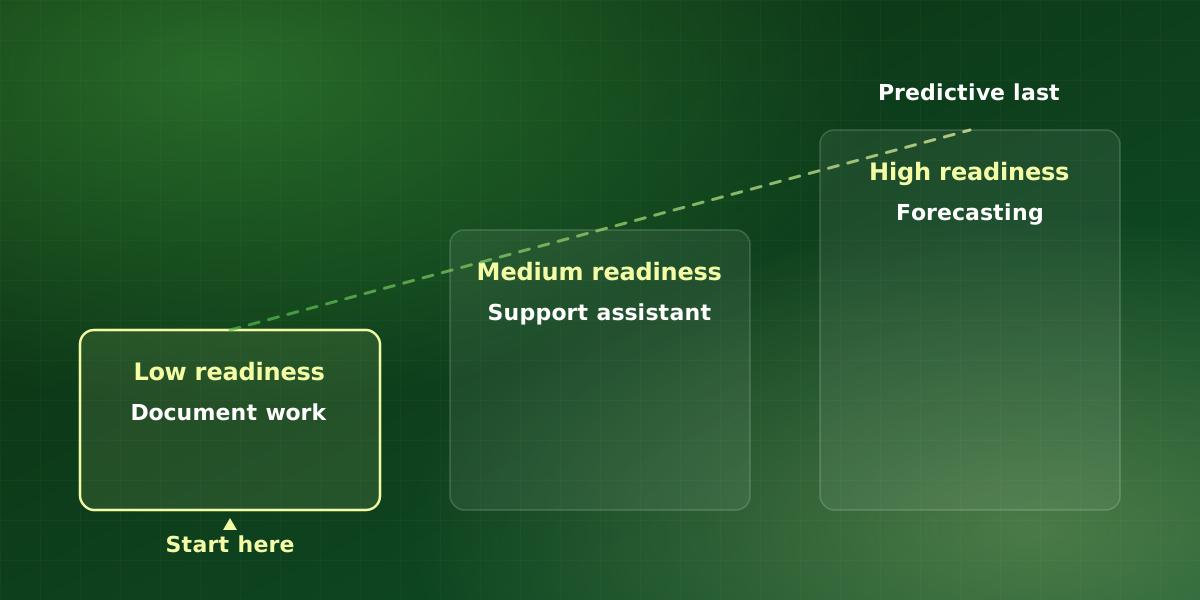
The distinction is straightforward. Predictive work, forecasting, scoring, analytics, genuinely requires clean historical data, because it learns patterns from that history. Language-driven work, reading documents, drafting, classifying, answering questions, mostly does not, because the model reads the same messy input a person would.
So the first question is not “is our data ready?” but “ready for what?” In other words, preparing your data for AI looks very different for a document workflow than for a forecasting model.
Readiness by use case
| Use case | Data needed | Readiness required |
|---|---|---|
| Document processing | The documents themselves | Low |
| Support assistant (RAG) | Accurate current documentation | Medium |
| Drafting and summarizing | Context from existing systems | Low |
| Classification and routing | Historical examples with labels | Medium |
| Demand forecasting | Clean history, 2+ years | High |
| Lead or churn scoring | Labeled outcomes at volume | High |
| Recommendations | Behavioral data at volume | High |
In practice, the top of that table is where most operational value sits for mid-market businesses, and it is reachable without a data warehouse program.
So read the table from the use case outward. First, pick the workflow you want to improve. Then prepare only the data that workflow needs, and leave the rest for later. Because of that, preparing your data for AI becomes a series of small, funded tasks rather than one large program.
What preparing your data for AI actually requires
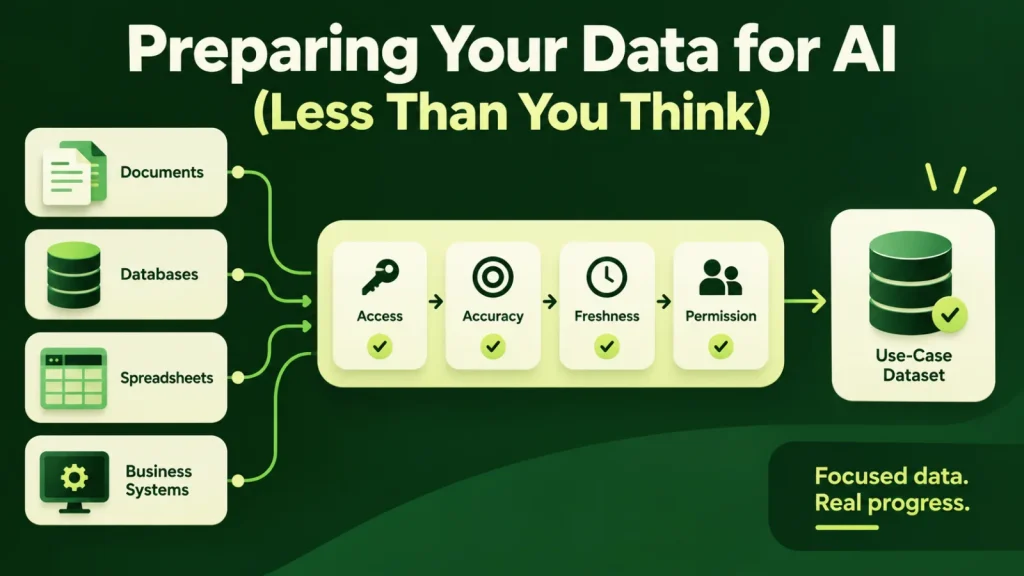
Even for low-readiness use cases, four things matter:
- Accessible. Reachable by API, database connection or an automated export. Manual spreadsheet exports may be a starting point, but a repeatable production workflow needs an appropriate ingestion process.
- Current. A knowledge base with a documented owner and update process. Otherwise, stale content produces confidently wrong answers, which is worse than no system.
- Non-contradictory. Three versions of the same policy means the system picks one, effectively at random. So deduplication matters far more than schema perfection.
- Permissioned. You need to know who is allowed to see what, expressed in a way the system can enforce at retrieval time.
Notice, however, that none of these require a warehouse, a lake, or a modeling exercise. Instead, they require ownership and hygiene.
A worked example: a support assistant
Imagine a hypothetical software company with 600 help-center articles, a shared drive of internal how-to notes and a ticket history. It wants an assistant that drafts answers for support agents using retrieval-augmented generation. However, preparing the data for this AI assistant does not start with a warehouse. Instead, the team names an owner for the help center, merges duplicate articles and marks the internal notes that agents may see but customers may not.
Then the assistant goes live for drafting only, and agents review every reply. Within the first weeks, the logs show which questions fail and why. For example, they might reveal an outdated pricing page, two conflicting refund policies and a missing article on account transfers. In other words, those three fixes are the data project, and each one has an obvious payoff. As a result, the help center improves for customers as well as for the assistant.
Notice what did not happen. In particular, nobody modeled the ticket history or designed a schema for every field. That work only becomes worthwhile if the team later wants to predict ticket volume, so it can wait until then.
A checklist for preparing your data for AI
- Name the use case. Write one sentence describing the workflow and who uses the output.
- List the sources. For each system, note how you can reach it: API, database connection or scheduled export.
- Assign owners. Every source that feeds answers needs a person responsible for keeping it current.
- Remove contradictions. Merge or retire duplicate policies before the system can pick the wrong one.
- Map permissions. Record who may see what, in a form the system can enforce at retrieval time.
- Document each source. Note where the data came from, what it covers and its known gaps.
That last item borrows from Gebru et al.’s paper “Datasheets for Datasets”, which argues for documenting how a dataset was created and what it is meant for. In practice, a one-page note per source is usually enough for operational work. Even so, it saves the next team from guessing, and it makes preparing your data for AI repeatable rather than heroic.
A sequence that delivers value while you improve
-
Start with a use case that tolerates mess
For example, document processing or a drafting assistant. It delivers value in weeks and also reveals exactly which data problems actually matter to you.
-
Fix the specific problems it surfaces
Soon you will learn that three fields matter and forty do not. As a result, you have a far better basis for a data project than a general quality initiative.
-
Build the shared foundation second
Once two or three automations want the same data, consolidate that data specifically. So the requirement is now evidenced rather than theoretical.
-
Take on predictive work last
By this point you have clean, structured, current data for the domains that matter, and forecasting becomes feasible without a dedicated multi-year program.
Overall, this order means preparing your data for AI happens alongside delivery rather than before it. In addition, each step funds and informs the next.
Common mistakes when preparing your data for AI
- Cleaning everything first. At first, a broad cleanup feels responsible. However, it spends effort on fields no workflow uses, so scope the cleanup to the use case.
- Ignoring permissions until launch. If access rules live only in people’s heads, then the system cannot enforce them. Therefore, map them before any sensitive source goes in.
- Loading every version. Indexing old drafts alongside current policies invites contradictions, because the system cannot tell which one is current. Instead, retire or archive superseded documents first.
- Treating ownership as an IT task. IT can connect systems, but only the business owner knows whether the content is right. So give each source a business owner as well as a technical one.
In each case, the fix is cheaper than it looks, because it applies to the data your first workflow touches rather than to everything you hold.
Frequently asked questions
Do we need a data warehouse before starting with AI?
How much historical data do predictive models need?
Our data is spread across ten systems. Is that a blocker?
What about unstructured data like emails and PDFs?
Who should own data preparation?
For implementation support, explore our AI data engineering services or discuss your workflow in a free consultation.