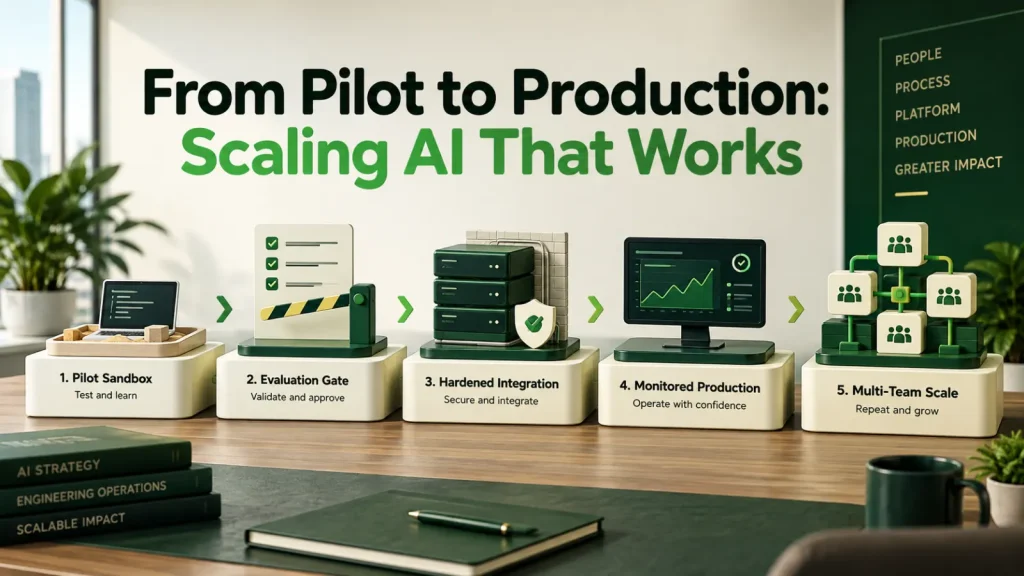
Scaling AI to production means preparing for real inputs, concurrent users, permissions and integration failures. This guide covers the operational work between a successful pilot and a maintained business system, with a readiness check, a worked budget example and the path we follow.
Why the last mile is most of the road
A pilot succeeds under conditions it selected for itself: representative inputs, a patient audience, a developer nearby, and no consequence for failure. Production, however, has none of those. The same system now meets malformed inputs, concurrent load, integration timeouts, permission edge cases and users who will not report problems, they will simply stop using it.
Nothing about this is specific to AI, but AI projects are hit harder because the pilot is so cheap to produce. For example, three weeks to a convincing demo sets an expectation that production is a fortnight away. But it is not, and the gap is where most AI projects quietly stall, as we explain in why AI projects fail.
For that reason, scaling AI to production deserves its own plan and budget. In practice, treat it as a separate phase with its own success criteria, rather than as the last task on the pilot’s list.
What scaling AI to production adds
The work that was invisible in the pilot:
- Error handling. What happens when the model API times out, returns malformed output, or hits a rate limit mid-workflow. So plan retries, backoff and partial-failure recovery.
- Evaluation. An automated test set that catches quality regressions when a prompt or model changes. Without it, every change is a gamble.
- Monitoring. Latency, cost per request, error rate, escalation rate, and output quality sampling. Cost monitoring especially, because usage-based pricing turns a loop bug into an invoice.
- Access control. Real permissions, per user, enforced at retrieval and action time rather than assumed.
- Audit logging. Inputs, retrieved context, decisions and actions, retained per your policy.
- Versioning and rollback. Prompts and configurations under version control with a tested path back to the previous working state.
- Cost controls. Rate limits and budget alerts, so an unexpected volume spike is capped rather than discovered on a bill.
Security review also belongs on this list. Before a system takes real user input and real actions, we walk through the OWASP Top 10 for LLM Applications with the team, because a pilot rarely tests for hostile input.
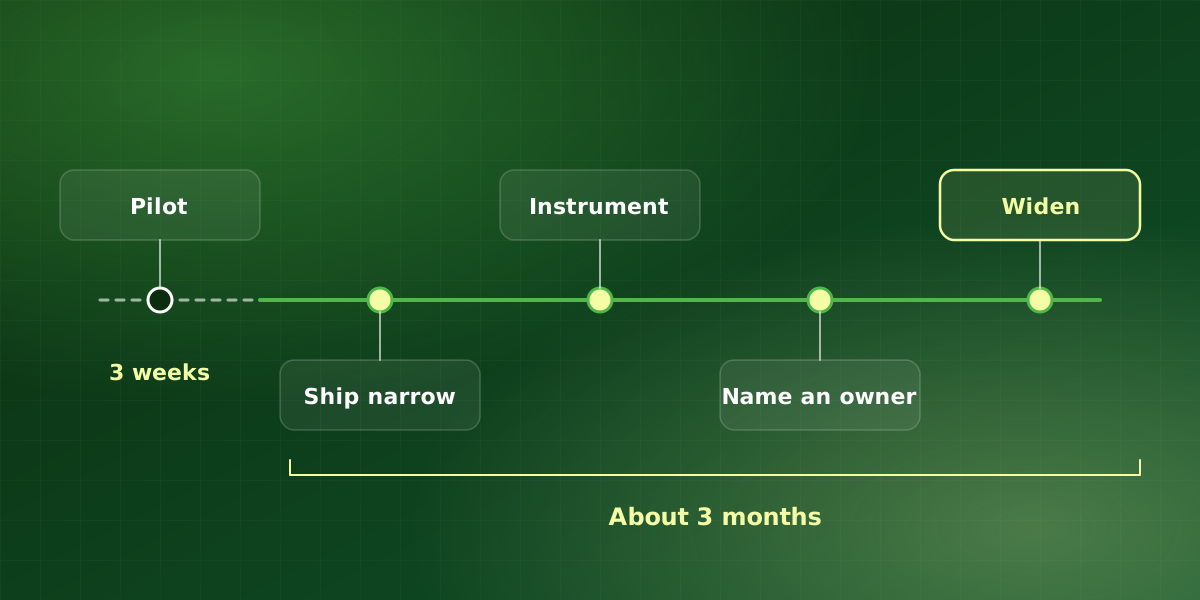
A path that does not stall
-
Build the evaluation set during the pilot
First, collect real inputs and correct outputs while you are prototyping. This then becomes the regression suite, and building it later means reconstructing examples you no longer have.
-
Ship narrow before you ship wide
One team, one workflow, real usage, real consequences. In practice, a narrow production deployment surfaces more useful problems in a fortnight than months of extended piloting.
-
Instrument before scaling AI to production
Monitoring, logging and cost tracking go in before the user count rises, not after. Otherwise, diagnosing a quality complaint without logs is guesswork.
-
Design the maintenance arrangement
Name who owns it, how issues are raised, and what the response time is. Also, model deprecations arrive on the provider’s schedule, not yours.
-
Then widen deliberately
Add teams once the error rate and escalation rate are stable and understood. That is because each new group brings edge cases the previous one did not have.
A readiness check for scaling AI to production
| Area | In the pilot | In production |
|---|---|---|
| Inputs | Hand-picked examples | Whatever users send |
| Failures | A developer fixes them live | Retries, fallbacks, alerts |
| Quality | Spot checks | Scheduled evaluation runs |
| Cost | Rarely tracked | Per-request tracking, budget caps |
| Access | One shared login | Per-user permissions |
| Ownership | Whoever built it | A named owner and response time |
If any production cell is still empty for your system, that is your next piece of work before scaling AI to production. Beyond the engineering, NIST’s AI Risk Management Framework is a good reference for organizing the governance side, especially when several teams share one system.
A worked example: budgeting the move
Suppose a document-routing pilot took three weeks and cost $20,000. So by the heuristic above, we would plan roughly three months and about $60,000 to put it into production properly. These figures are hypothetical. Even so, the shape is familiar: most of the extra effort goes into integration, permission modeling, error handling, evaluation and monitoring, rather than model work.
Then the maintenance line follows. At 15% to 25% of a $60,000 build each year, that system needs roughly $9,000 to $15,000 annually for evaluation runs, tuning and provider deprecations. In our experience, budgeting this up front is far easier than asking for it after the first incident.
Who needs to be involved in scaling AI to production
Pilots usually run with a developer and one enthusiastic sponsor. Production, however, needs more people at the table. First, the process owner decides what correct output looks like and signs off the evaluation set. Second, IT or security reviews access, logging and vendor terms. Third, the people who will use the system every day test it on real work before launch.
Finally, someone has to own it afterwards. However, that owner does not need to be an engineer. Instead, they need the authority to prioritize fixes, time to review monitoring each week, and a clear route to whoever maintains the code. Without that role, scaling AI to production tends to stall at the handover rather than the build.
Signs you are ready to widen
- Stable error rate. Errors have stayed flat for several weeks, and you know the cause of each recurring one.
- Understood escalations. When the system hands work to a person, the reasons are known and expected.
- Predictable cost. Cost per request is steady, so you can project the bill before the next team joins.
- A tested rollback. You have rolled back a prompt or configuration at least once, so you know the path works.
If any of these is missing, fix it before scaling AI to production any further. Otherwise, each new team multiplies the problem instead of the value.
It is never finished
Model providers deprecate versions. Your processes also change. Meanwhile, the documents underneath a retrieval system go stale. An AI system left untouched for a year does not hold steady, it degrades, and it does so quietly enough that trust erodes before anyone raises a ticket.
So plan for 15% to 25% of build cost annually in maintenance, and name an owner. This is the single most reliable difference we see between AI systems still delivering value in year three and those quietly switched off in month fourteen.
In short, scaling AI to production is the start of operating a system, not the end of a project. So budget, staff and measure it that way.
Frequently asked questions
How long does pilot to production usually take?
Can we skip the pilot and build production directly?
What ongoing engineering does a production AI system need?
How do we know it is still working six months later?
What should we monitor first after launch?
For implementation support, explore our AI maintenance and support or discuss your workflow in a free consultation.